
🧠 AI Quiz
Think you really understand Artificial Intelligence?
Test yourself and see how well you know the world of AI.
Answer AI-related questions, compete with other users, and prove that
you’re among the best when it comes to AI knowledge.
Reach the top of our leaderboard.

















GPT Image 2

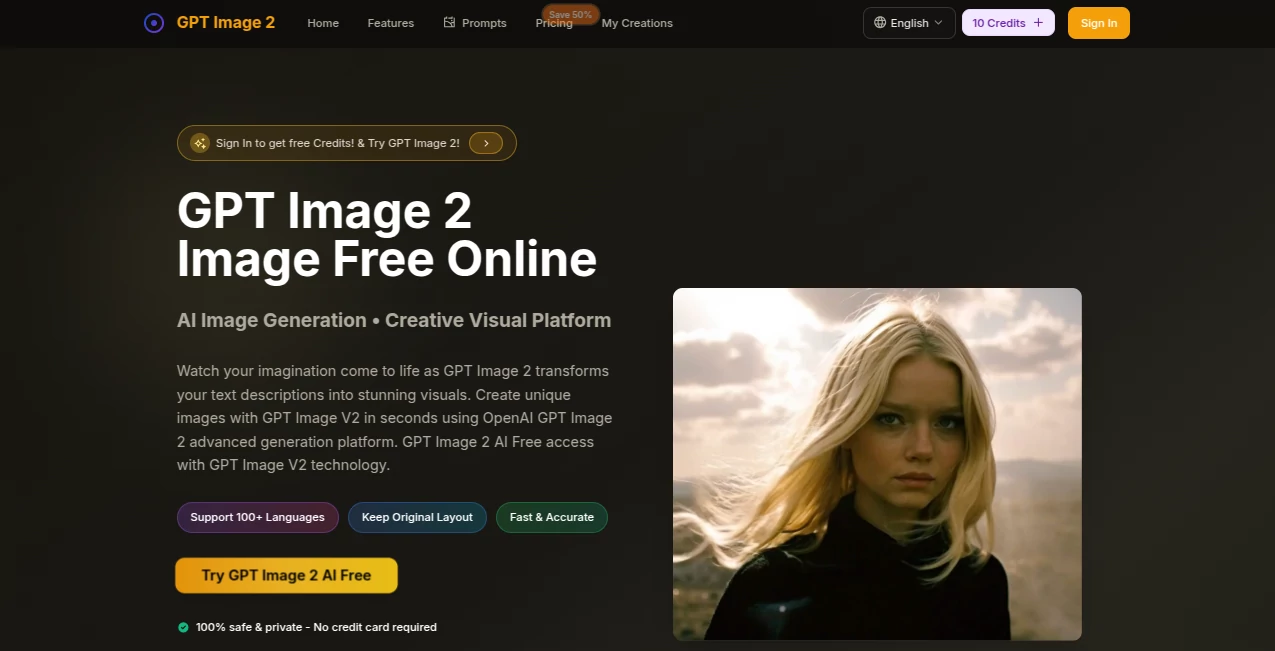
What is GPT Image 2?
There's something downright satisfying about typing a wild idea into a box and watching it materialize as a crisp, detailed picture just seconds later. This platform nails that thrill, blending powerful text-to-visual magic with handy editing tricks that make tweaking photos feel effortless. I've tinkered with plenty of these over the years, but this one stands out for how reliably it captures the nuance in your words—whether you're dreaming up fantasy scenes or sprucing up real shots. No fuss, no watermarks on the good stuff, and it all happens fast enough to keep your creative streak alive.
Introduction
A couple of years back, when AI visuals were still a bit hit-or-miss, this spot carved out its niche by focusing on clean, high-res outputs that don't demand pro skills to achieve. It leans on cutting-edge tech to turn plain descriptions into 4K stunners or breathe new life into uploaded pics, from fixing faded family snaps to swapping backgrounds for that perfect product shot. What keeps folks hooked—and I've heard this from designer pals—is the private vibe and multilingual support, letting ideas flow in over a hundred languages without losing steam. It's the kind of tool that quietly empowers everyday creators, turning "I wish" into "done" without the usual barriers or hidden catches.
Key Features
User Interface
Everything sits right there on one welcoming page: a generous text box that counts your characters, easy upload for references, and straightforward picks for ratios or styles. Hit generate, and previews pop up ready to inspect or grab—no endless loading or buried options to hunt down. My first spin felt like second nature; dragged in an old photo, added a quick note about brightening the colors, and there it was, revived and vibrant. It's thoughtfully laid out for quick sessions or deeper dives, adapting nicely whether you're on a laptop or sneaking a create during downtime.
Accuracy & Performance
Prompts land with impressive fidelity, pulling out specifics like lighting moods or intricate details that lesser setups gloss over, often nailing it on the first go. Generations zip along in seconds, churning out 4K clarity that holds up for prints or screens, and the editing holds context tight across tweaks. A buddy restoring vintage portraits couldn't believe how it smoothed scratches while keeping the authentic feel intact—sharp, reliable, and rarely needing do-overs.
Capabilities
Beyond fresh creations from words alone, it excels at refinements: restore faded tones, swap scenes behind subjects, overlay text that blends seamlessly, or even preview outfits virtually. Multiple styles from photoreal to artistic strokes, plus aspect tweaks for any platform, make it versatile for avatars, ads, or personal projects. The no-watermark policy on solid outputs means you're free to use them straight away, commercial or otherwise, with that pro polish baked in.
Security & Privacy
Creations stay private by design, with secure handling and no unnecessary lingering data—ideal for sensitive uploads like client mocks or personal memories. Encrypted paths and straightforward policies give that reassuring backdrop, so you can experiment boldly without a worry in sight. It's a breath of relief in a crowded field, prioritizing your control from upload to download.
Use Cases
E-shop owners craft catalog heroes that pop, staging items in ideal settings to lift conversions without studio costs. Photographers revive archived gems, fixing wear while enhancing vibes for client delights. Social posters design custom avatars or themed graphics that match their voice perfectly. Marketers mock campaign banners with spot-on text overlays, testing ideas before launch. Even hobbyists play with virtual try-ons for fun wardrobe what-ifs or background dreams that turn ordinary selfies extraordinary.
Pros and Cons
Pros:
- Lightning-quick turns that keep inspiration flowing uninterrupted.
- Stunning 4K detail with natural language ease—no steep skills needed.
- Versatile editing that feels intuitive and powerful in equal measure.
- Generous free start and private outputs ready for real use.
Cons:
- Credit bites add up for heavy daily use, though fair for the quality.
- Best with clear prompts—vague ones might need a refine or two.
Pricing Plans
Dive in free with starter credits to feel the potential—no card asked, just pure play. Plans scale simply from there, around the twenties to nineties monthly for bundles that unlock unlimited runs and priority speed, with yearly deals slashing half off for committed creators. Cancel anytime, secure Stripe handling—it's straightforward pricing that grows with you, rewarding loyalty without locking you down.
How to Use GPT Image 2
Land on the main spot, spill your description into the box (up to 500 characters for focus), or drag a photo for edits. Choose a ratio if it matters, then tap generate—watch the preview fill with options you can enlarge or snag. Refine by adding details in a new prompt, building on what worked. Download clean files in your format of choice, and you're set for posting, printing, or further tweaks elsewhere.
Comparison with Similar Tools
Plenty of generators out there promise speed, but few match this one's blend of sharp 4K fidelity and smart editing without the gimmicks or marks. Where others stumble on text placement or context, this holds steady with cleaner integration and multilingual finesse. It's the balanced pick for reliable, pro-grade results that don't demand endless rerolls, edging ahead for creators who value precision over flash.
Conclusion
This platform quietly redefines what's possible with a few words and a click, handing over visuals that spark joy and get jobs done beautifully. It's the companion that turns fleeting thoughts into lasting assets, whether reviving memories or fueling fresh campaigns. Give it a whirl with those free credits—you'll likely find yourself coming back for the way it just gets your vision right, time after time.
Frequently Asked Questions (FAQ)
What formats can I work with?
JPG, PNG, or WebP uploads up to 10MB—outputs come crisp and ready.
How fast are results?
Seconds most times, keeping your momentum without the wait.
Any limits on free use?
Starter credits give a solid taste; upgrades open the floodgates.
Commercial okay?
Absolutely—clean downloads for business or personal wins.
Tips for best outputs?
Detail the mood, colors, and style—specifics yield the sharpest magic.
AI Photo & Image Generator , Photo & Image Editor , AI Art Generator , AI Text to Image .
These classifications represent its core capabilities and areas of application. For related tools, explore the linked categories above.
GPT Image 2 details
This tool is no longer available on submitaitools.org; find alternatives on Alternative to GPT Image 2.
Pricing
- Free
Apps
- Web Tools
Categories

GPT Image 2 Alternatives Product
Kirkified AI

VIGGLE
Uni-1

SparkIconAI
z image

Pic 2 Meme

MidJourney
Nano Banana 2
Genmi AI
