
🧠 AI Quiz
Think you really understand Artificial Intelligence?
Test yourself and see how well you know the world of AI.
Answer AI-related questions, compete with other users, and prove that
you’re among the best when it comes to AI knowledge.
Reach the top of our leaderboard.


















GPT Image 1.5
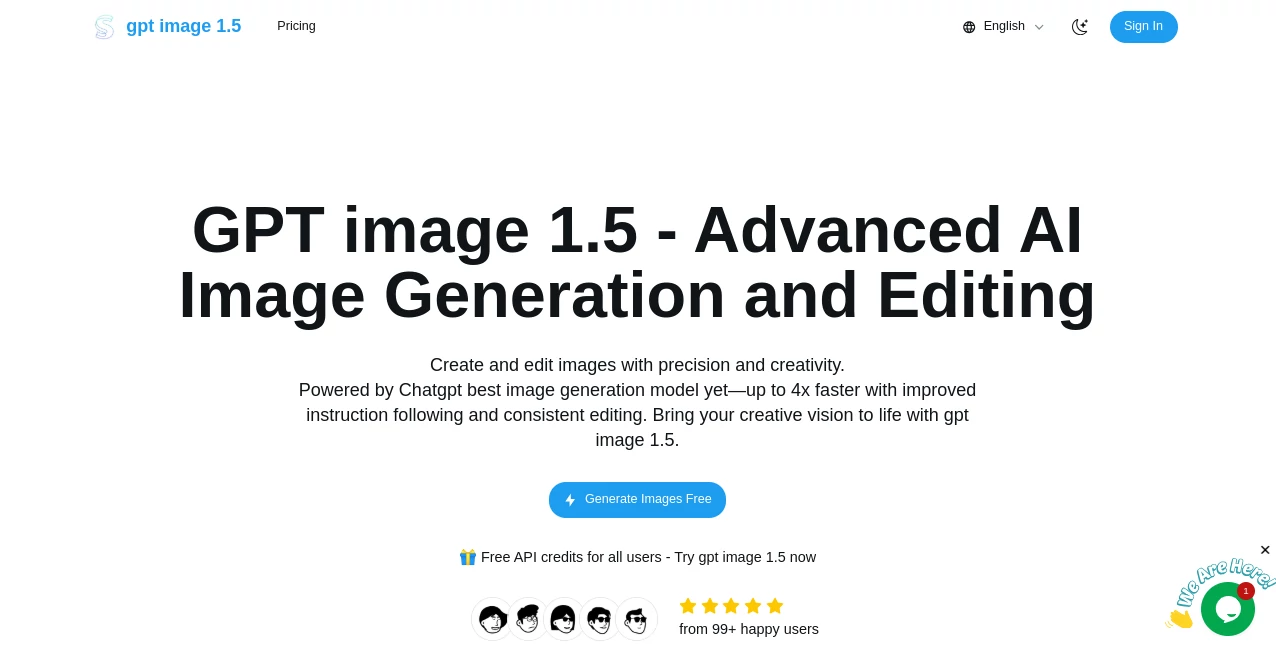
What is GPT Image 1.5?
There's something downright satisfying about typing a wild idea or tweaking an old photo and watching it transform into something crisp and captivating in moments. This platform nails that thrill, blending top-shelf AI smarts with a straightforward setup that lets you generate or edit visuals that punch way above their weight. I've lost track of how many times it's pulled me out of a creative rut—turning a vague concept for a poster into a ready-to-print stunner, or fixing a product shot that looked flat into one that pops on the page.
Introduction
Built on the latest leaps in AI vision, this tool stands out for its knack at precise tweaks and creative spins, handling everything from subtle photo fixes to bold compositions with multi-elements that stay coherent. It shines in keeping faces consistent, rendering text that actually reads right, and applying filters that feel artistic rather than forced. Free credits to kick things off make it welcoming for casual explorers, while the depth draws in pros who need reliable outputs for real work. What keeps folks hooked is that rare balance: powerful enough for demanding tasks, yet simple enough that you don't need a manual to get stunning results on the first try.
Key Features
User Interface
Drag your image into the spot or paste a link, jot your instructions in the guidance box, and you're off—clean, uncluttered, with a preview that updates as you go. Supports common formats up to a reasonable size, and the editor feels responsive, like sketching ideas that come alive instantly. My go-to for quick sessions: upload a rough mockup, describe the changes, and iterate without the usual back-and-forth frustration.
Accuracy & Performance
It follows instructions with a sharpness that's hard to beat, preserving key details like faces or logos while weaving in new elements seamlessly—up to four times quicker than older setups, often nailing complex scenes on the first pass. Text pops clear in posters, compositions balance naturally, and edits hold the original essence without weird artifacts. From experience, it's a lifesaver for tight deadlines, churning out variants that save rounds of revisions.
Capabilities
Dive into text-to-image for fresh creations, or upload for targeted edits—add/remove objects, shift styles, try clothing or hairstyles, all while maintaining lighting and likeness across shots. Handles intricate layouts for marketing materials or infographics, with strong multi-subject scenes that don't fall apart. The API hook opens doors for workflows in design apps or e-commerce, making it versatile beyond solo plays.
Security & Privacy
Sign-in keeps things personal, with processing that focuses on your task without unnecessary lingering—solid compliance backing ensures data handles responsibly, especially handy for commercial or sensitive projects. It's that quiet reliability that lets you focus on creating, not worrying.
Use Cases
Designers refine client headshots or mockups, swapping outfits for virtual try-ons that wow without photoshoots. Marketers craft campaign visuals with branded text that reads perfect, or composite products into lifestyles seamlessly. Gamers visualize concepts with consistent characters across poses, while educators build clear diagrams from descriptions. Even small shops update listings with polished edits that boost clicks, all without hiring out.
Pros and Cons
Pros:
- Lightning-fast generations that fit busy schedules perfectly.
- Spot-on detail preservation, especially faces and text.
- Free credits to start strong, no barriers to testing.
- Creative flexibility that sparks real inspiration.
Cons:
- File size caps mean prepping larger shots sometimes.
- Sign-in gate for full access, though quick to set up.
Pricing Plans
Free API credits welcome everyone aboard, letting you generate without upfront costs—ideal for trying the waters or lighter needs. As you dive deeper, options scale with usage, keeping it accessible while rewarding frequent creators with efficient flows. It's the generous entry that stands out, turning skeptics into regulars.
How to Use GPT Image 1.5
Hop into the editor, drag your base image or start blank, fill the guidance with clear directions—like "add a vintage filter and overlay text"—and generate. Preview pops up for tweaks, regenerate variants if needed, then download the keeper. For edits, upload and specify changes precisely; a friend of mine turned a bland product photo into a lifestyle hero this way in under five minutes.
Comparison with Similar Tools
It edges ahead with tighter instruction following and consistent edits that retain originals better, quicker too for iterative work where others lag. While some excel in pure artistry, this one's practical precision for real-world tasks—like readable text or believable try-ons—makes it the everyday champion for pros who need reliability over flash.
Conclusion
This tool quietly redefines what's possible with a prompt and a picture, delivering visuals that feel thoughtfully crafted every time. It's the bridge from rough idea to refined output, empowering creators to experiment boldly and finish strongly. If you're chasing images that truly match your mind's eye, give it a spin—you'll wonder how you managed without it.
Frequently Asked Questions (FAQ)
What formats does it support?
JPG, PNG, WebP uploads, with flexible outputs for your needs.
How fast are generations?
Often seconds to minutes, way quicker than predecessors.
Great for text in images?
Absolutely—renders clear and natural, perfect for designs.
Free to try?
Yes, credits on sign-up let you jump right in.
API available?
Built-in for integrating into your own tools or apps.
AI Text to Image , AI Photo & Image Generator , Photo & Image Editor , AI Art Generator .
These classifications represent its core capabilities and areas of application. For related tools, explore the linked categories above.
GPT Image 1.5 details
Pricing
- Free
Apps
- Web Tools
Categories

GPT Image 1.5 Alternatives Product
SeeDream 4.5

Transform An…

Z-Image Gene…

Nano Banana …

AI Ease AI P…

insMind

GPT Image 1.5

ImageKontext…

Mage
