
🧠 AI Quiz
Think you really understand Artificial Intelligence?
Test yourself and see how well you know the world of AI.
Answer AI-related questions, compete with other users, and prove that
you’re among the best when it comes to AI knowledge.
Reach the top of our leaderboard.


















GrokImagineAI
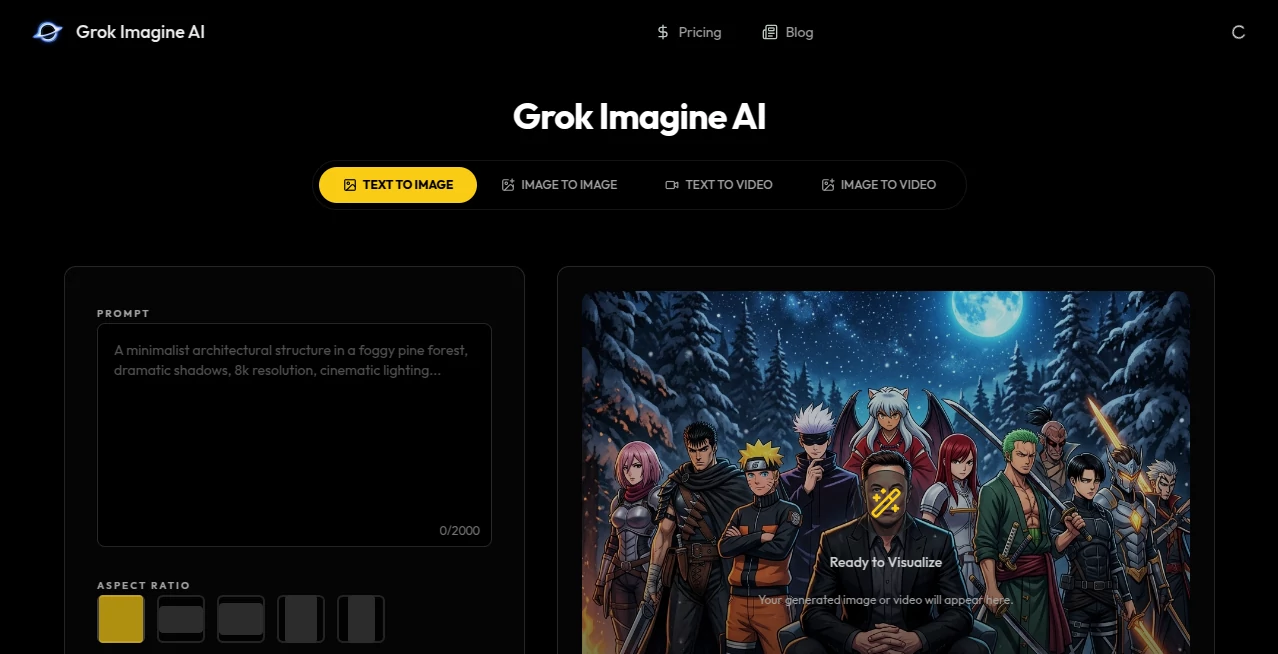
What is GrokImagineAI?
There’s something special about typing a few words and watching a vivid scene or character come to life in seconds—sometimes so good it stops you mid-scroll. This tool delivers that spark consistently. Whether you describe a serene mountain lake at dawn or a futuristic cyberpunk street at night, it turns your ideas into high-quality images and short cinematic videos that feel thoughtful and alive. I’ve used it to brainstorm thumbnails, visualize storyboards, and even create fun social content, and the results often exceed what I pictured in my head. It’s fast, flexible, and surprisingly good at capturing mood and detail without the usual AI weirdness.
Introduction
Creative work often starts with a vague idea that’s hard to visualize. Traditional tools take time, skill, or budget. This platform removes those barriers by letting you go from prompt to polished visual in moments. Built with a focus on quality and speed, it handles both still images and short motion clips, making it ideal for creators who need to iterate quickly. The outputs have a cinematic quality—good lighting, natural composition, and coherent style—that makes them feel ready for real projects rather than just experiments. For marketers testing concepts, writers visualizing scenes, or hobbyists exploring ideas, it has become a daily creative companion that keeps the fun in the process.
Key Features
User Interface
The workspace is clean and inviting. A prominent prompt box sits front and center, with quick aspect ratio choices (square, landscape, portrait) and options to add reference images if you want more control. Generate buttons are obvious, and previews load fast so you can refine without frustration. It never feels cluttered or intimidating—even first-time users get beautiful results on their initial try. The flow encourages experimentation: tweak one word, regenerate, and instantly see the difference.
Accuracy & Performance
It excels at understanding nuance—capturing specific moods, lighting conditions, artistic styles, and complex scenes without falling apart. Motion in videos feels natural rather than jerky, with good temporal consistency. Generation is impressively quick, letting you explore multiple variations in the time it used to take for one. The quality holds up across photorealistic, stylized, and artistic prompts, making it reliable for both serious work and playful ideas.
Capabilities
You can generate detailed still images or short cinematic videos from text prompts alone. Adding reference images gives even more precise control over style, characters, or composition. It supports different aspect ratios for social media, thumbnails, or widescreen concepts. The model handles everything from realistic photography to painterly art, product visuals to fantastical scenes. Outputs are high-resolution and ready to use in presentations, social posts, storyboards, or further editing.
Security & Privacy
Your prompts and generated content are handled responsibly with no unnecessary storage. The platform prioritizes user control, so you can create privately and share only what you choose. For creators working on client projects or personal ideas, that respectful approach builds confidence to experiment freely.
Use Cases
A social media manager quickly generates eye-catching thumbnails and short video concepts for upcoming posts. A writer visualizes key scenes from their novel to better describe them or share with beta readers. A product designer mocks up variations of packaging and lifestyle shots before shooting real photos. A teacher creates custom illustrations for lesson materials that engage students. The common thread is speed and inspiration—turning vague ideas into concrete visuals that move projects forward.
Pros and Cons
Pros:
- High-quality outputs that often feel professionally directed.
- Fast generation that supports rapid iteration and experimentation.
- Strong understanding of both realistic and creative/artistic prompts.
- Simple yet powerful interface that gets out of your way.
- Versatile enough for images and short videos in one place.
Cons:
- Video length is best for short clips rather than long-form content.
- Very complex or highly specific scenes sometimes benefit from clearer prompting.
- Advanced or high-volume use requires a paid plan.
Pricing Plans
The free tier offers generous daily generations so you can explore and create without commitment. Paid plans unlock higher limits, faster processing, priority access during busy times, and additional features for heavier users. Pricing feels fair for the creative freedom and time it saves—many creators find the value shows up after just a few productive sessions.
How to Use Grok Imagine
Start by typing a clear, descriptive prompt—include details about mood, lighting, style, or composition if you have them in mind. Choose your aspect ratio for the intended use (vertical for stories, horizontal for thumbnails, etc.). Optionally upload a reference image for stronger style or character consistency. Hit generate and review the results. Like a variation? Download it or use it as a starting point for further prompts. The process is fast enough that you can explore several directions in one creative session.
Comparison with Similar Tools
Many AI image and video generators produce decent results but often struggle with consistency, unnatural motion, or generic styling. This one stands out for its cinematic quality and reliable coherence across both images and short videos. The balance of speed, ease, and output polish makes it especially appealing for creators who need professional-looking visuals without complicated workflows or long wait times.
Conclusion
Creativity thrives when ideas can flow freely without technical hurdles. This tool removes many of those barriers, letting you move from thought to visual almost instantly. Whether you’re brainstorming, prototyping, storytelling, or just having fun exploring concepts, it delivers results that inspire rather than frustrate. In a world full of content demands, having a reliable creative partner that turns words into compelling images and videos is a genuine advantage. If you’ve been waiting for AI visuals that feel exciting to use, this is worth trying today.
Frequently Asked Questions (FAQ)
How detailed should my prompt be?
The more specific you are about mood, lighting, style, or composition, the better the results—though it also handles shorter prompts surprisingly well.
Can I upload reference images?
Yes—reference images help guide style, characters, or composition for more consistent outputs.
Are the videos suitable for social media?
Absolutely—short, high-quality clips with good motion work great for Reels, TikTok, and other platforms.
Do I need an account to start?
You can try it without signing up, though an account unlocks saving and more features.
What kind of styles can it create?
It handles photorealistic, artistic, cinematic, cartoon, and many other styles depending on your prompt.
AI Image to Video , AI Video Generator , AI Art Generator , AI Text to Image .
These classifications represent its core capabilities and areas of application. For related tools, explore the linked categories above.
GrokImagineAI details
Pricing
- Free
Apps
- Web Tools
Categories

GrokImagineAI Alternatives Product

Aura AI

grok images

seedance 3.0

Ltx 2.3

Picsart

Berrioo

Gualele

Seedance 2.0…

kling 3 AI
