🧠 AI Quiz
Think you really understand Artificial Intelligence?
Test yourself and see how well you know the world of AI.
Answer AI-related questions, compete with other users, and prove that
you’re among the best when it comes to AI knowledge.
Reach the top of our leaderboard.


















HappyHorse AI
What is HappyHorse AI?
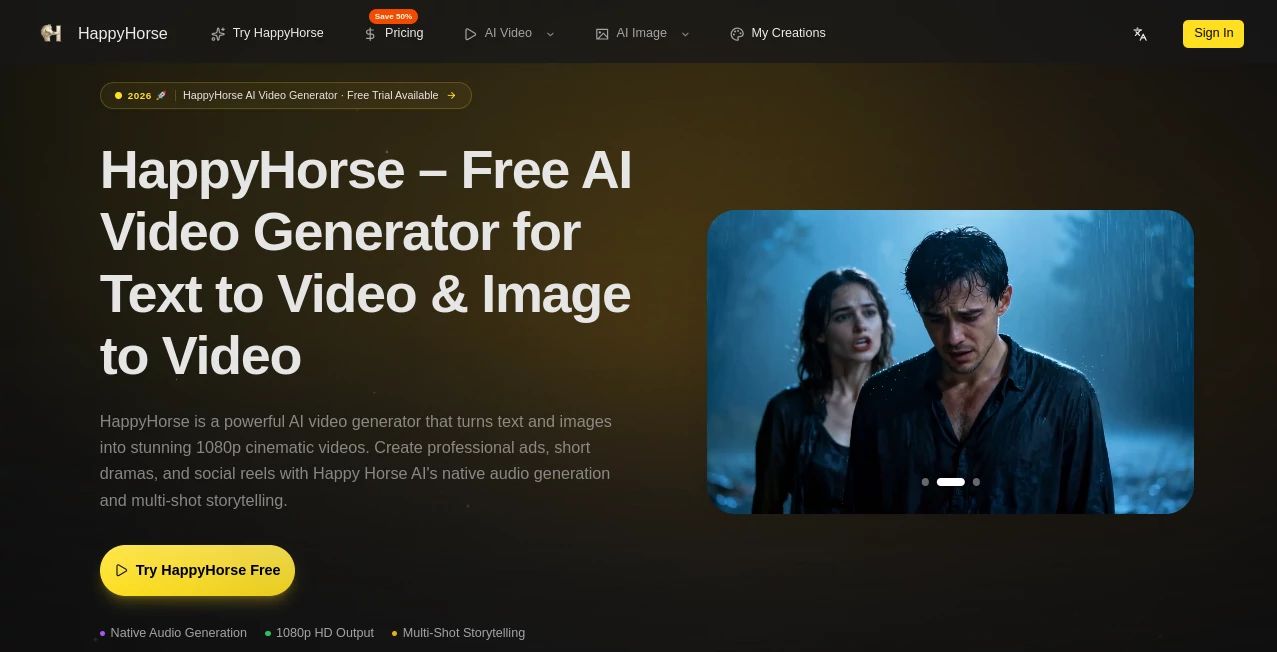
There’s a special excitement when you type a simple scene idea and a few seconds later a polished little film appears — characters move naturally, lighting feels right, and the whole thing carries real mood. This tool delivers that experience consistently. Whether you start with words alone or drop in a reference image, it turns your vision into short cinematic clips that look far more directed than most AI video I’ve tried. I’ve watched friends create product ads, short stories, and social Reels that actually feel professional, all without spending hours in editing software. It’s the kind of tool that makes you want to keep creating because the results are genuinely satisfying.
Introduction
Creating video has always been one of the most time-consuming parts of content making. Between shooting, editing, syncing audio, and getting the tone right, many good ideas never see the light of day. HappyHorse changes that equation. It combines strong text-to-video and image-to-video capabilities with a focus on cinematic quality and natural motion. The platform is built for creators who need fast, usable footage — marketers testing ads, filmmakers mocking up scenes, social creators building daily content, or anyone who simply wants to bring an idea to life quickly. What stands out is how coherent the outputs feel: characters stay consistent, motion has weight, and the overall result often needs very little cleanup.
Key Features
User Interface
The workspace is clean and inviting. A large prompt area sits front and center, with easy options to upload reference images or video clips. You can choose aspect ratio, duration, and style preferences without digging through complicated menus. Previews load reasonably fast, so you can iterate quickly. It’s designed for flow — you spend more time shaping your story and less time fighting the interface. Even first-time users tend to get decent results on their initial try.
Accuracy & Performance
The model handles character consistency remarkably well across shots, keeping faces, clothing, and style intact even with camera movement. Motion feels natural rather than floaty or robotic, and lighting adapts convincingly to the scene. Generation times are practical for real workflows, and the outputs hold up at 1080p quality. It rarely produces the common AI artifacts that break immersion, which makes the clips much more usable right away.
Capabilities
You get strong text-to-video and image-to-video modes, hybrid workflows where you combine prompts with reference images, multi-shot storytelling, native audio support, and flexible aspect ratios for different platforms. It excels at both realistic and stylized looks, making it suitable for ads, short dramas, music visuals, educational content, and creative experiments. The ability to guide with images gives you significantly more control over the final look than pure text generators.
Security & Privacy
Your prompts and reference files are handled responsibly during generation. The platform focuses on delivering the output without unnecessary long-term storage or sharing of your creative work. For creators working with original ideas or client material, this respectful approach provides welcome peace of mind.
Use Cases
Small brands quickly generate product demo videos or lifestyle ads from a single hero image. Indie filmmakers prototype key scenes to test tone and pacing before full production. Social media creators produce daily Reels with consistent characters and synced audio. Musicians create official visualizers that match the emotion of their tracks. Educators turn lesson concepts into short animated explanations. The common thread is speed paired with quality — getting something shareable without weeks of work.
Pros and Cons
Pros:
- Cinematic quality with natural motion and strong consistency.
- Effective hybrid control using both text and reference images.
- Fast enough generation for real creative iteration.
- Versatile across realistic and stylized visual styles.
- Approachable interface that doesn’t overwhelm beginners.
Cons:
- Clip lengths are best for short-form content (multi-shot helps build longer stories).
- Very complex or highly specific scenes may need prompt refinement.
- Unlimited or high-volume use requires a paid plan.
Pricing Plans
A generous free tier lets you test the quality and workflow without any commitment. Paid plans unlock higher resolutions, longer clips, faster generation, priority access, and unlimited creations. Pricing feels reasonable for the jump in creative capability — many users find the paid tier pays for itself quickly when replacing stock footage or freelance editing costs.
How to Use HappyHorse
Start by writing a clear scene description in the prompt box. Add a reference image if you want stronger visual control over characters or style. Choose your aspect ratio (vertical for social, horizontal for other uses) and desired length. Hit generate and review the preview. Like the direction? Download it. Want adjustments? Tweak the prompt or reference strength and generate again. For multi-shot stories, build scenes individually and combine them in your editor. The process rewards clear direction while remaining approachable for quick ideas.
Comparison with Similar Tools
Many AI video tools still struggle with character drift, unnatural motion, or generic results. HappyHorse stands out by focusing on cinematic coherence and practical control through reference images and prompts. It often delivers more usable footage with less post-production cleanup compared to pure text generators or less consistent image-to-video options. For creators who need reliable short-form video, it frequently feels like a step ahead.
Conclusion
Video creation no longer needs to be slow or expensive to look good. This tool brings cinematic quality within reach for everyday creators, turning text and images into polished clips that feel intentional and alive. It respects your time and vision while delivering results you can actually use. Whether you’re building a brand, telling stories, or experimenting with ideas, it opens up new possibilities without the usual headaches. If you’ve been waiting for AI video that feels ready for real work, this is worth trying.
Frequently Asked Questions (FAQ)
How long are the generated videos?
Typically short cinematic clips (5–15 seconds), ideal for social media, ads, and prototyping. Multi-shot workflows allow longer storytelling.
Do I need reference images?
Not required — text-only works well — but adding images dramatically improves character and style consistency.
Is audio included?
Yes, many generations include native audio or support for synced soundtracks.
Can I use the videos commercially?
Check the terms for your plan, but paid usage generally allows commercial applications.
What if the first result isn’t perfect?
Small prompt adjustments or stronger references usually improve the output quickly.
AI Animated Video , AI Image to Video , AI Video Generator , AI Text to Video .
These classifications represent its core capabilities and areas of application. For related tools, explore the linked categories above.
HappyHorse AI details
Pricing
- Free
Apps
- Web Tools
Categories

HappyHorse AI Alternatives Product

seedream 5

Seedance 2.0

kling 5.0

Sora AI Vide…

Nano Banana …

Seedance 2.0…

Motion Contr…

Fiddl.art

Veo 3.2