
🧠 AI Quiz
Think you really understand Artificial Intelligence?
Test yourself and see how well you know the world of AI.
Answer AI-related questions, compete with other users, and prove that
you’re among the best when it comes to AI knowledge.
Reach the top of our leaderboard.


















Happy Horse AI
What is Happy Horse AI?
There’s a special kind of excitement when you type a simple scene description and a few seconds later a smooth, cinematic clip plays that actually feels directed. Not jerky motion or random artifacts — just natural movement, consistent characters, and a mood that matches what you imagined. HappyHorse delivers that experience reliably. I’ve watched creators go from rough text prompts to shareable video in under a minute, and the results often look polished enough to use straight away. It’s the kind of tool that makes you want to create more because the barrier between idea and finished clip has become so small.
Introduction
AI video tools have been getting better, but many still feel experimental — faces shift, motion looks floaty, or the story falls apart after the first second. HappyHorse stands out by focusing on usable, cinematic results. You can start with text, add reference images, or combine both, and it produces short clips with strong temporal consistency and visual appeal. It’s built for real creators: marketers needing quick ads, filmmakers prototyping scenes, social media creators building Reels, or anyone who wants to see their ideas move without a full production setup. The output has that polished feel that makes people stop scrolling and watch.
Key Features
User Interface
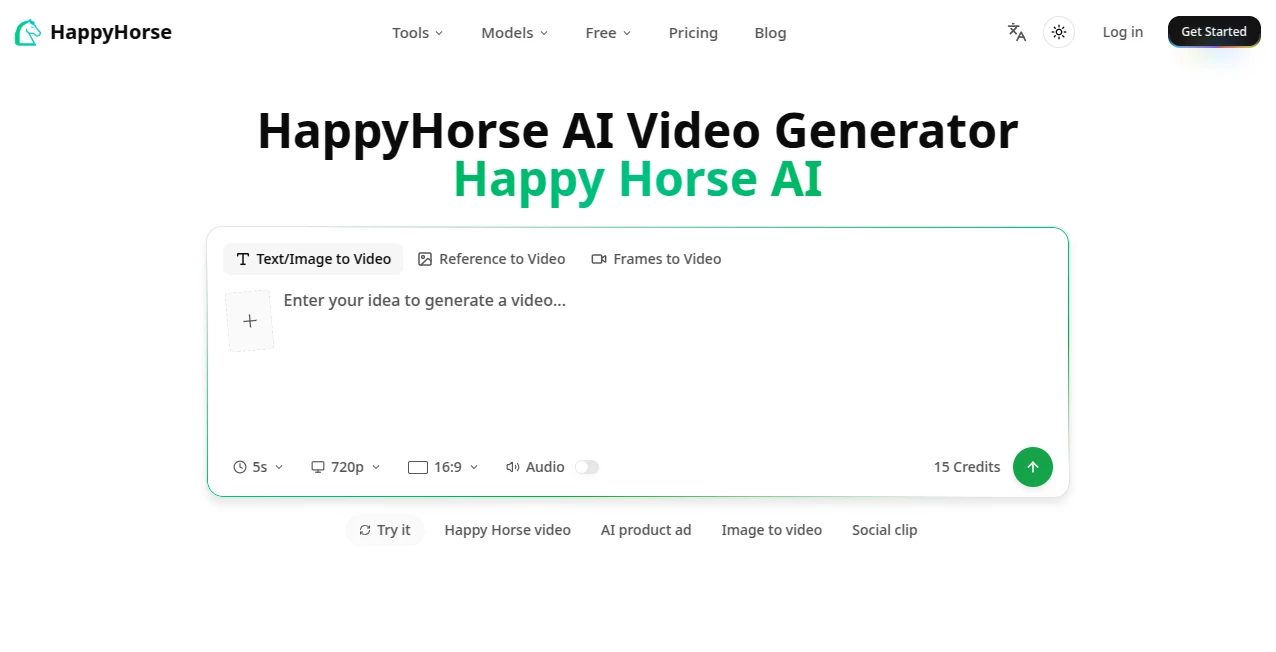
The workspace is clean and intuitive. A prominent prompt box, easy upload area for reference images or video, simple toggles for aspect ratio and length, and one clear generate button. Previews appear fast, so you can iterate without losing your flow. It avoids the clutter and confusion common in many AI tools — everything you need is visible, nothing unnecessary gets in the way. Beginners feel comfortable right away, while experienced users appreciate how quickly they can refine ideas.
Accuracy & Performance
Character consistency is excellent — faces, clothing, and style hold across shots much better than most current tools. Motion feels natural with believable physics, and the model handles complex prompts with multiple subjects surprisingly well. Generation times are practical for creative work, and the results require far less post-editing than expected. It’s reliable enough that you can plan around it instead of hoping for the best.
Capabilities
Strong text-to-video and image-to-video modes, hybrid guidance with references, multi-shot storytelling, natural camera movement, and good handling of lighting and emotion. You can guide specific elements, maintain consistency across a sequence, and create clips suitable for social media, marketing, or story prototyping. The outputs have a cinematic quality that makes them feel intentional rather than purely algorithmic.
Security & Privacy
Your prompts and reference files are handled responsibly during generation. The platform focuses on delivering the video without unnecessary long-term storage or sharing of your creative work. For creators working with original ideas or client material, this respectful approach provides welcome peace of mind.
Use Cases
A small brand turns a single product photo into an engaging lifestyle clip for social ads. An indie filmmaker prototypes key emotional beats to test pacing before full production. A musician creates a visualizer that matches the song’s mood instead of using generic footage. A content creator builds consistent character-driven Reels without daily shooting. Educators make short explanatory videos with natural motion that holds student attention. Wherever you need video that tells a story quickly and looks good, it becomes a valuable part of the process.
Pros and Cons
Pros:
- Strong character and style consistency across shots.
- Cinematic motion and lighting that feel directed.
- Fast enough to support real creative iteration.
- Hybrid text + image guidance gives precise control.
- Results often need minimal editing to be usable.
Cons:
- Clip lengths are best for short-form content (multi-shot helps for longer stories).
- Very abstract or highly complex scenes may need prompt refinement.
- Heavy daily use benefits from paid plans.
Pricing Plans
A generous free tier lets you test the quality and workflow without commitment. Paid plans unlock higher limits, faster generation, priority access, and more advanced features for regular creators. Pricing feels balanced for the quality and time it saves — many users find the paid tier pays for itself after just a few productive sessions.
How to Use HappyHorse
Start with a clear, descriptive prompt that includes subject, action, mood, and camera direction. Add reference images if you want stronger consistency for characters or style. Choose your aspect ratio (vertical for Reels, horizontal for other platforms) and desired length. Hit generate, review the preview, and refine the prompt or references as needed. For multi-shot stories, build sequences step by step. Download when ready or iterate until it feels right. The process rewards thoughtful prompts while remaining approachable for quick ideas.
Comparison with Similar Tools
Many AI video generators produce interesting clips but struggle with consistency and natural motion. HappyHorse stands out by focusing on usable, cinematic results with better character continuity and directed feel. It gives creators more practical control than pure text-to-video tools while remaining simpler than complex professional platforms. For people who need video that looks intentional and shares well, it often delivers stronger real-world results.
Conclusion
Creating video that feels alive and intentional no longer requires a big team or endless hours. HappyHorse brings cinematic quality into a fast, approachable workflow that actual creators can use every day. It respects your ideas while handling the technical heavy lifting, resulting in clips you’re proud to share. Whether you’re building a brand, telling stories, or just experimenting with motion, it opens up new possibilities without the usual AI frustrations. If you’ve been waiting for AI video that feels ready to use, this is worth trying.
Frequently Asked Questions (FAQ)
How long are the generated clips?
Typically 4–10 seconds per generation, with multi-shot workflows for longer narratives.
Do I need reference images?
Not required, but they significantly improve character and style consistency.
Can I use the videos commercially?
Yes — paid plans include commercial rights for most use cases.
What if the first result isn’t perfect?
Refine your prompt or add references — small changes often yield big improvements.
Is there a free way to try it?
Yes, a generous free tier lets you test the quality without any payment.
AI Animated Video , AI Image to Video , AI Video Generator , AI Text to Video .
These classifications represent its core capabilities and areas of application. For related tools, explore the linked categories above.
Happy Horse AI details
Pricing
- Free
Apps
- Web Tools
Categories

Happy Horse AI Alternatives Product

Shoorts AI

AnividAI

Seedream 4.0…

Aura AI

Veo3 AI

HappyHorse AI

seedream 5

Grok Imagine…

Seedance2 Vi…
