
🧠 AI Quiz
Think you really understand Artificial Intelligence?
Test yourself and see how well you know the world of AI.
Answer AI-related questions, compete with other users, and prove that
you’re among the best when it comes to AI knowledge.
Reach the top of our leaderboard.


















Free HD Photo Converter
What is Free HD Photo Converter?
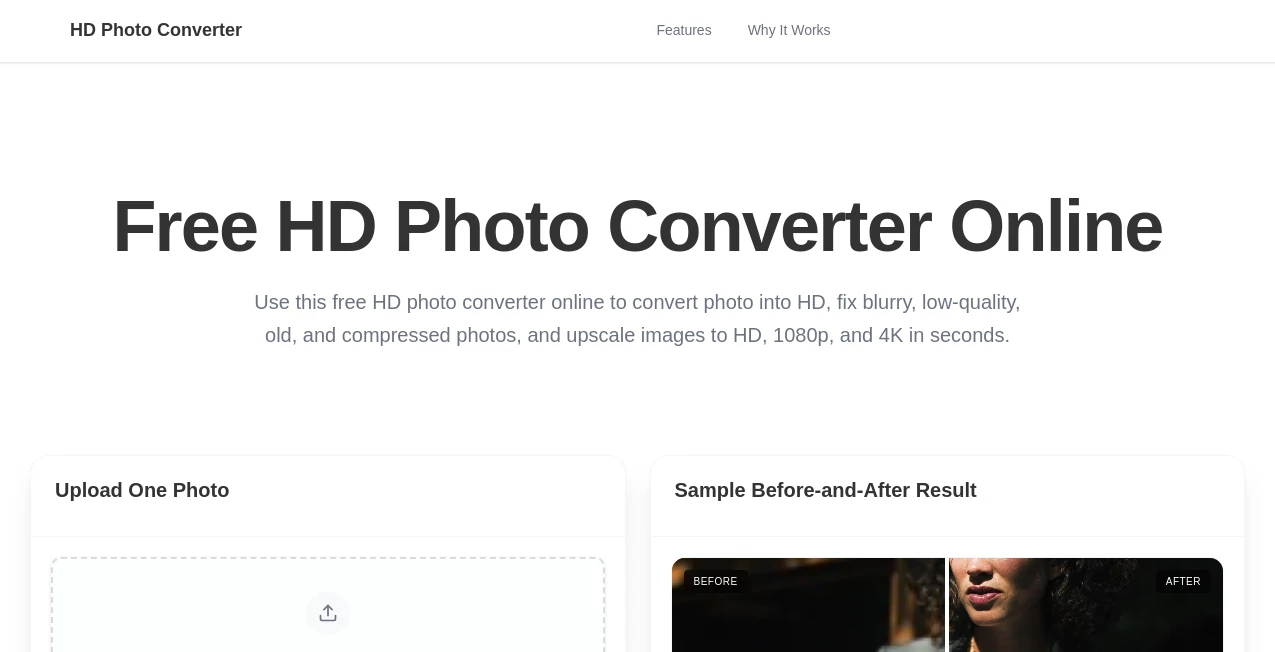
There's a special frustration when you have a great photo but it's stuck in the wrong format, too small, or just looks dull on a big screen. This tool takes that frustration away. You upload your image—whether it's an old JPEG, a PNG from your phone, or even a low-res screenshot—and it converts it to crisp HD quality while preserving the original look and feel. I’ve used it to rescue family photos that looked muddy on my TV and to prepare product shots for an online store. The difference is striking: colors pop, details emerge, and the image finally feels like it belongs in high definition. It’s the kind of simple upgrade that makes you wonder why you ever struggled with bulky editing software before.
Introduction
Most of us have folders full of photos that are “good enough” but not quite there—blurry edges, wrong aspect ratios, or formats that don’t play nicely with modern devices. HD Photo Converter steps in as a no-fuss helper that handles conversion, upscaling, and basic enhancement in one clean process. It doesn’t pretend to be a full Photoshop replacement; instead, it focuses on doing one job exceptionally well: turning ordinary images into sharp, ready-to-use HD versions. Whether you’re a casual photographer, small business owner, or just someone who wants their memories to look their best, it delivers results that feel noticeably better without requiring any technical know-how.
Key Features
User Interface
The design is wonderfully straightforward. A large, inviting upload area sits front and center, supported by clear format options and a simple “Convert” button. You don’t have to hunt through menus or learn new terminology. After upload, you see a quick preview of the enhanced version, with side-by-side comparison if you want it. Everything loads fast and feels responsive, even on mobile. It’s the kind of interface that makes you feel capable rather than confused.
Accuracy & Performance
The upscaling is intelligent—it adds detail without creating weird artifacts or plastic-looking skin. Colors stay true to the original, and sharpness improves without introducing noise. Processing is quick; most images finish in under 10 seconds. Whether you’re converting a tiny thumbnail to full HD or turning an old vacation photo into something frame-worthy, the results consistently impress. It handles common formats (JPG, PNG, WebP) smoothly and rarely needs a second try.
Capabilities
It converts between popular image formats, upscales to HD and beyond while preserving aspect ratio, applies smart enhancement for clarity and color, and offers batch processing for multiple files. You can adjust quality settings to balance file size and sharpness, and the output is ready for web, print, or social media. It’s particularly useful for old family scans, product photography, social media content, and any situation where resolution and clarity matter.
Security & Privacy
Your photos are processed securely and deleted shortly after conversion. No account is required for basic use, so there’s no lingering profile or data trail. For personal memories or client work, that simple, respectful approach provides real peace of mind.
Use Cases
A small online shop owner uploads low-res product photos and gets crisp HD versions that make listings look professional and boost sales. A family archivist rescues decades-old scanned photos, turning them into clear digital keepsakes for grandchildren. A content creator prepares images for Instagram and YouTube thumbnails, ensuring they look sharp on every device. Even casual users quickly enhance vacation shots before printing or sharing. Wherever image quality holds you back, this tool quietly removes the obstacle.
Pros and Cons
Pros:
- Fast, high-quality upscaling that actually looks natural.
- Simple workflow—no steep learning curve or complex settings.
- Supports batch processing for larger jobs.
- Free tier is generous enough for regular personal use.
- Output files are clean and ready for immediate use.
Cons:
- Extremely low-quality or heavily compressed originals may still show limitations.
- Advanced creative editing (filters, retouching) is outside its scope.
- Heavy daily use benefits from a paid plan.
Pricing Plans
The free version gives you several high-quality conversions per day—more than enough for most personal needs. Paid plans remove limits, unlock batch processing, higher resolutions, and priority speed. Pricing is reasonable and scales with usage, making it accessible for both casual users and small businesses that rely on clean images daily.
How to Use HD Photo Converter
Drag your image into the upload area or click to select a file. Choose your target format and quality level if you want to customize. Hit convert and watch the preview appear. Use the before-and-after view to check the improvement, then download the enhanced HD version. For multiple photos, paid users can upload a batch and process them together. The entire process usually takes less than a minute per image.
Comparison with Similar Tools
Many free converters either add unwanted artifacts or barely improve quality. This one focuses on clean, natural-looking enhancement without over-processing. Where some tools require accounts or watermarks, this stays simple and private. The balance of speed, quality, and ease makes it stand out from both basic online converters and heavier desktop software.
Conclusion
Great photos deserve to look their best. This tool makes that possible without complicated software, expensive subscriptions, or hours of editing. It quietly upgrades your images from “okay” to “impressive” with minimal effort, freeing you to focus on what matters—sharing memories, selling products, or simply enjoying clearer visuals. In a world full of blurry, low-res images, having a fast, reliable way to bring them up to HD quality feels like a small but meaningful win.
Frequently Asked Questions (FAQ)
How many free conversions do I get?
Several high-quality ones per day—enough for regular personal use.
Will it work on very old or damaged photos?
It improves clarity and color significantly, though extremely damaged images may still need light manual touch-up first.
Can I process multiple images at once?
Yes—batch processing is available on paid plans for larger jobs.
Is my data stored?
No—images are processed temporarily and deleted after download.
What formats does it support?
Common formats like JPG, PNG, and WebP; converts to HD versions of the same or different formats.
Photo & Image Editor , AI Photo Enhancer , AI Image to Image .
These classifications represent its core capabilities and areas of application. For related tools, explore the linked categories above.
Free HD Photo Converter details
Pricing
- Free
Apps
- Web Tools
Categories

Free HD Photo Converter Alternatives Product

Sketchready

Edit Stamp

deck cleaner

Image Unblur

VIGGLE

Picsart
DLSS 5 Meme …

Niji V7

ImgUnblur
