🧠 AI Quiz
Think you really understand Artificial Intelligence?
Test yourself and see how well you know the world of AI.
Answer AI-related questions, compete with other users, and prove that
you’re among the best when it comes to AI knowledge.
Reach the top of our leaderboard.


















HD Photo Converter
What is HD Photo Converter?
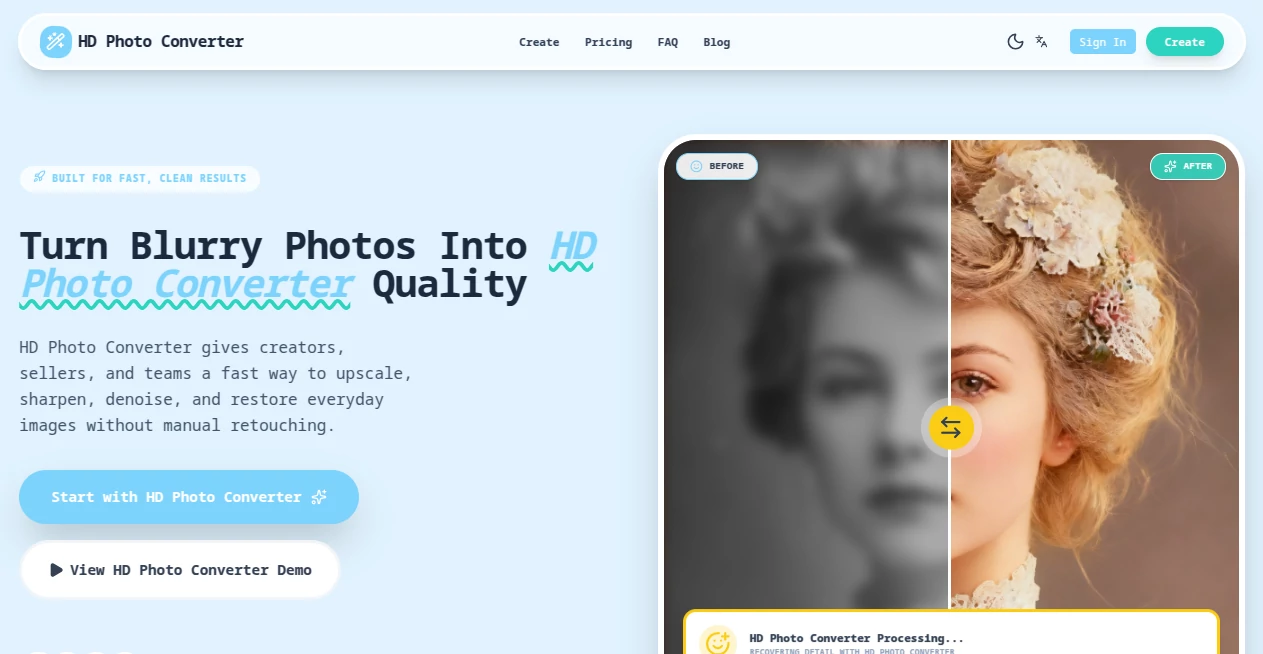
We've all been there — you find an old photo that means the world to you, but it's blurry, low-resolution, or stuck in an awkward format. Or you're trying to use a picture for a presentation or print, and it just looks disappointing on screen. This tool quietly solves that frustration. You upload almost any image, and it transforms it into crisp, high-definition quality while keeping the soul of the original intact. No complicated software, no steep learning curve — just better-looking photos in seconds. I’ve used it to rescue family pictures from the early 2000s and to polish product shots for online stores, and the difference is always striking.
Introduction
Low-resolution or poorly formatted photos are one of those everyday annoyances that steal joy from memories and professionalism from work. Traditional editing tools can help, but they often require technical know-how and time you don’t have. HD Photo Converter steps in as the simple, effective solution that bridges that gap. It takes blurry, compressed, or outdated images and brings them up to modern HD standards without over-processing or creating unnatural artifacts. What makes it especially appealing is how accessible it feels — whether you’re a complete beginner or someone who just wants fast, reliable results without fuss. It’s become a go-to for people who want their photos to look their best without turning the process into a project.
Key Features
User Interface
The design is refreshingly straightforward. A large, inviting upload area welcomes your photo, with clear options for output format and quality level right below. There’s no clutter, no hidden menus, and the preview appears quickly so you can see the improvement before committing. It feels like the tool was built by someone who understands that most people just want their photo to look better, not to learn a new program. The whole experience is smooth, fast, and respectful of your time.
Accuracy & Performance
It handles the technical side remarkably well — upscaling resolution while preserving natural details, reducing noise without turning skin into plastic, and maintaining colors that feel true to life. Processing is quick, even on larger files, and the results consistently look sharp and clean rather than artificially sharpened. In my experience, it performs especially well on portraits and landscapes, where it manages to recover lost detail without inventing things that weren’t there.
Capabilities
The tool supports a wide range of input formats and converts them to high-quality HD output (JPG, PNG, WebP, and more). It can upscale low-resolution images significantly while keeping them looking natural, enhances clarity and sharpness, reduces compression artifacts, and offers different quality presets depending on your needs. Whether you’re preparing photos for printing, social media, presentations, or archiving old memories, it delivers results that feel professional without requiring professional skills.
Security & Privacy
Your photos are processed securely and not stored longer than necessary. There’s no forced account creation for basic use, so you can enhance images privately without handing over personal data. For family photos, client work, or any sensitive images, that respectful approach to privacy is genuinely reassuring.
Use Cases
A grandmother scans decades-old family photos and turns them into crisp prints she can frame and share. An online seller takes smartphone product shots and converts them into clean, high-resolution images that make listings look more professional. A student enhances scanned textbook diagrams for better visibility in reports. A traveler rescues blurry vacation memories from old phones and brings them back to life for albums or social posts. Wherever a photo matters but its current quality doesn’t, this tool quietly makes a meaningful difference.
Pros and Cons
Pros:
- Simple, fast workflow that delivers noticeable improvements in seconds.
- Natural-looking results that avoid the over-sharpened or artificial feel of many enhancers.
- Supports common formats and works well on both old and newer photos.
- No steep learning curve — perfect for non-technical users.
- Generous free tier lets you test and use it without immediate commitment.
Cons:
- Extremely damaged or very low-quality source images may still need some manual touch-up.
- Heavy batch processing and unlimited use require a paid plan.
- Advanced creative editing features are kept minimal to maintain simplicity.
Pricing Plans
The free version gives you several high-quality conversions per day — enough for occasional personal use or testing on important photos. Paid plans remove daily limits, unlock batch processing, higher resolution options, and priority speed. The pricing feels fair for the time and quality it saves, especially when you consider how often blurry photos pop up in daily life.
How to Use HD Photo Converter
Start by dragging your photo into the upload area or clicking to select a file. Choose your desired output format and quality level if you want to fine-tune. Click convert and wait a few seconds while it works its magic. Use the before-and-after view to check the improvement, then download the enhanced version. For multiple photos, paid users can process them in batches. The entire process usually takes less than a minute per image, making it easy to clean up several photos in one short sitting.
Comparison with Similar Tools
Many free online enhancers either produce overly sharpened results or add unwanted artifacts. This one stands out for its natural-looking improvements and clean output. While some tools require accounts or push subscriptions aggressively, this one keeps things simple and private. It’s particularly strong for everyday users who want reliable quality without complexity or hidden costs.
Conclusion
Photos are more than pixels — they hold memories, stories, and moments worth preserving. HD Photo Converter makes it easier to give those moments the clarity and life they deserve without turning the task into a chore. It’s simple, effective, and respectful of both your time and your images. Whether you’re rescuing old family pictures, polishing work photos, or just wanting your shots to look their best, it delivers consistent, natural results that make you glad you tried it. Sometimes the best tools are the ones that quietly make ordinary things look better — and this one does exactly that.
Frequently Asked Questions (FAQ)
How many free conversions do I get?
Several per day — enough for regular personal use or testing on key photos.
Will it make my photo look artificial?
No — it focuses on natural enhancement rather than heavy filters or plastic effects.
Can I use it for professional work?
Yes — many users rely on it for e-commerce, presentations, and marketing materials.
What file formats does it support?
It works with common formats including JPG, PNG, and others, converting to high-quality HD output.
Are my photos stored on the site?
Files are processed temporarily and not stored long-term, keeping your images private.
Photo & Image Editor , AI Photo Enhancer , AI Image to Image , AI Design Generator .
These classifications represent its core capabilities and areas of application. For related tools, explore the linked categories above.
HD Photo Converter details
Pricing
- Free
Apps
- Web Tools
Categories

HD Photo Converter Alternatives Product

Remove Handw…

Caricature G…
Kirkified AI

insMind

Mage

grok imagine…

ShinePhoto

Nano Banana 2

SeeDream 4.5