🧠 AI Quiz
Think you really understand Artificial Intelligence?
Test yourself and see how well you know the world of AI.
Answer AI-related questions, compete with other users, and prove that
you’re among the best when it comes to AI knowledge.
Reach the top of our leaderboard.

















Image To Image AI
What is Image To Image AI?
There’s something magical about typing a rough idea or uploading a basic photo and watching it transform into a polished, professional-looking image within seconds. This tool makes that magic feel effortless. Whether you’re starting from a simple text prompt or an existing picture that needs a fresh look, it delivers results that often surprise you with their quality and creativity. I’ve used it to turn quick product shots into eye-catching social media visuals and to bring vague creative concepts to life when my own imagination felt stuck. The best part? It doesn’t feel robotic — the outputs carry real character and polish that make them genuinely usable.
Introduction
Most of us have ideas faster than we can create them. A product photo that needs better lighting, a social post concept that’s still just words, or a wild creative vision that’s hard to visualize. This platform bridges that gap beautifully. It combines strong text-to-image generation with powerful image-to-image editing, letting you restyle, enhance, or completely reimagine visuals without starting from scratch. What makes it stand out is the balance it strikes — high-resolution outputs, smart controls, and a workflow that feels intuitive rather than technical. For marketers, designers, content creators, and everyday idea people, it’s become one of those tools you didn’t know you needed until you try it once and suddenly can’t imagine working without it.
Key Features
User Interface
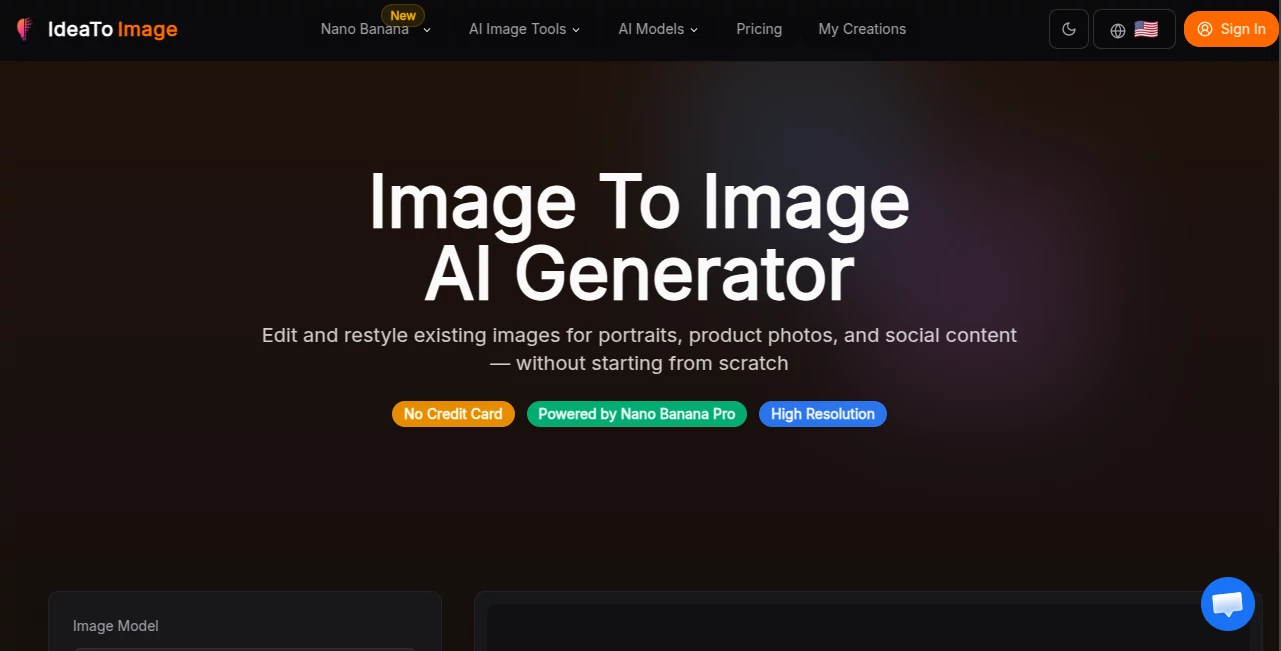
The experience is refreshingly clean. A prominent prompt box for text ideas, a clear upload area for reference images, and straightforward options for style, resolution, and intensity. You can see previews quickly, make small adjustments, and generate variations without getting lost in menus. It’s the kind of interface that respects your time — you focus on your vision instead of fighting the tool. Even first-time users usually get good results within a couple of tries.
Accuracy & Performance
It excels at understanding both your words and your reference images. Details like product textures, facial expressions, lighting mood, and artistic style stay remarkably consistent. Generation is fast enough to keep the creative flow going, and the high-resolution outputs (especially with the Pro models) hold up for professional use. The results feel thoughtful rather than random — it seems to “get” what you’re aiming for more often than not.
Capabilities
You can generate images from text prompts, restyle existing photos, replace backgrounds, enhance details, or create variations while keeping core elements intact. It supports multiple artistic styles, high-resolution outputs, and strong image-to-image control that lets you guide the AI precisely. Whether you’re creating social media content, product visuals, concept art, or just having fun with creative experiments, it gives you the flexibility to iterate quickly and effectively.
Security & Privacy
Your uploads and generations are handled responsibly. No unnecessary data retention, and you can use it without creating an account for basic tasks. For anyone working with client images or personal photos, that respectful approach adds a layer of comfort that many tools overlook.
Use Cases
A small business owner uploads plain product photos and turns them into lifestyle shots that better represent the brand. A content creator generates eye-catching thumbnails and visuals from quick text ideas. A designer explores multiple style variations for a client project without spending hours in Photoshop. A hobbyist brings childhood story ideas to life as beautiful illustrations. It fits naturally into daily creative work wherever visuals need to be better, faster, or more engaging.
Pros and Cons
Pros:
- Strong image-to-image control that keeps your original vision intact while improving it.
- Fast, high-quality results suitable for both casual and professional use.
- Intuitive workflow that doesn’t require technical expertise.
- Generous free access lets you explore before committing.
- Versatile enough for product shots, social content, concept art, and more.
Cons:
- Very complex or highly specific artistic directions may need a few attempts to perfect.
- Advanced features and unlimited generations are behind paid plans.
- Extremely low-quality source images can limit the best possible results.
Pricing Plans
You can start completely free with no credit card required — enough generations to test the quality and workflow. Paid plans unlock higher resolution, faster processing, more daily generations, and access to premium models. The pricing feels fair for the time and creative freedom it provides, especially for regular users who save hours compared to traditional editing methods.
How to Use IdeaToImg
Start by typing a description of what you want or uploading a reference photo. Add details about style, mood, or specific changes you’d like. Choose your preferred resolution and hit generate. Review the results, then either download your favorite or generate variations with small prompt tweaks. For product photos or existing images, the image-to-image mode gives especially strong control. The whole process is quick enough that you can explore several creative directions in one short session.
Comparison with Similar Tools
While many AI image tools focus only on text-to-image or basic filters, this one shines at intelligent image-to-image work — understanding your reference while applying meaningful improvements. It offers better balance between creative freedom and control than purely prompt-based generators, and cleaner, more usable results than many basic editors. For people who work with existing visuals as much as new ideas, it feels like the more practical and versatile choice.
Conclusion
Good visuals shouldn’t require expensive software or endless hours of editing. This tool makes creating and improving images feel approachable and enjoyable again. Whether you’re building a brand, telling a story, or just bringing an idea to life, it gives you results you can actually use — and often love. In a world full of content, having a fast, reliable way to make your visuals stand out is a real advantage. If you’ve been putting off improving your images because it felt like too much work, this might be the nudge you’ve been waiting for.
Frequently Asked Questions (FAQ)
Do I need to create an account to start?
No — you can try it right away without signing up.
Can I upload my own photos to edit?
Yes — the image-to-image features are one of its strongest points.
Are the results high resolution?
Yes, especially on paid plans — suitable for professional and print use.
How fast are generations?
Usually just a few seconds to under a minute, depending on complexity.
Is it good for product photography?
Extremely — many users rely on it to quickly create better-looking product visuals.
AI Photo & Image Generator , Photo & Image Editor , AI Design Generator , AI Image to Image .
These classifications represent its core capabilities and areas of application. For related tools, explore the linked categories above.
Image To Image AI details
Pricing
- Free
Apps
- Web Tools
Categories

Image To Image AI Alternatives Product
Color-Analys…

Image Descri…
Face Swag

grok bikini
Kirkified AI
KissPixel
CircleCrop
Gualele

Nano banana …