
🧠 AI Quiz
Think you really understand Artificial Intelligence?
Test yourself and see how well you know the world of AI.
Answer AI-related questions, compete with other users, and prove that
you’re among the best when it comes to AI knowledge.
Reach the top of our leaderboard.


















ImageCombiner AI

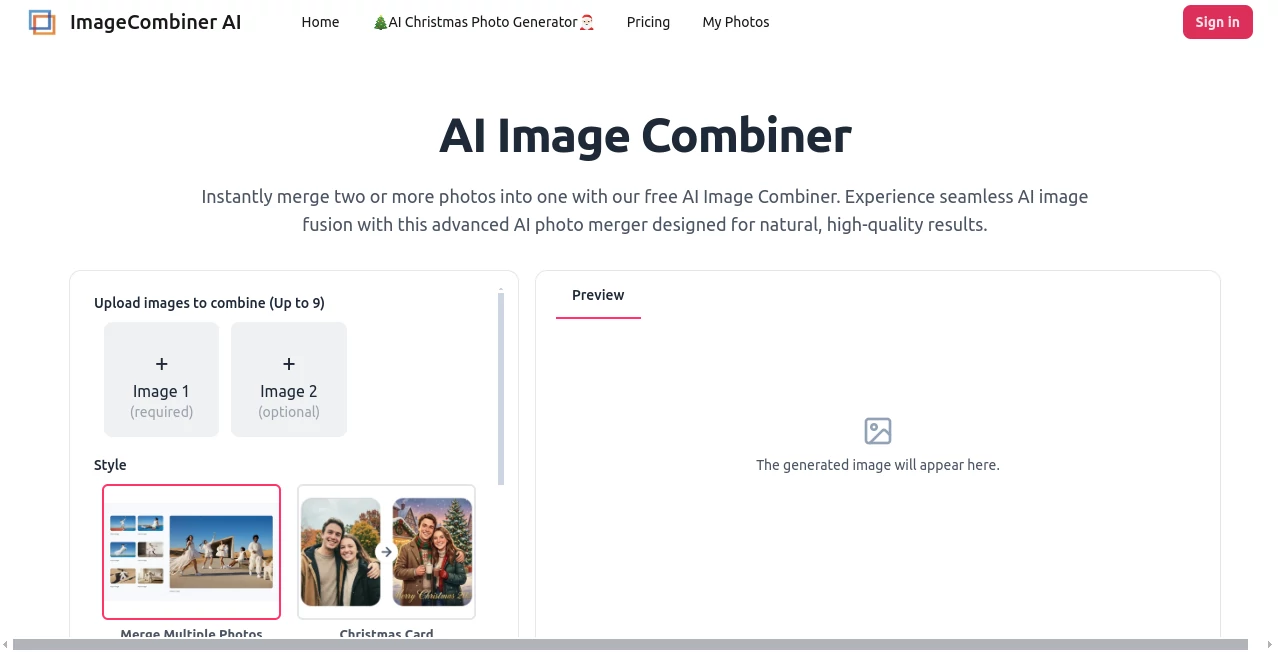
What is ImageCombiner AI?
Ever stared at two photos and wished you could just blend them together without spending hours in Photoshop? This little gem makes it happen in seconds, pulling two (or more) images into one seamless frame that looks like it was always meant to be. I remember messing around with it on a rainy afternoon, tossing in a portrait and a dreamy landscape—the result was this gorgeous composite that felt oddly personal and professional at the same time. No fuss, no skills required, and suddenly your ideas are staring back at you in a way that feels almost too good to be free.
Introduction
In a world where everyone’s trying to create standout visuals fast, this tool quietly stands out by doing exactly what it promises: merging photos naturally so they don’t look slapped together. It uses clever AI to match lighting, adjust depth, and blend elements in ways that save you from manual tweaking. I’ve seen friends use it for everything from fun couple shots (putting people who couldn’t be in the same room together) to quick product mocks that pop on socials. What I love most is how it keeps the magic accessible—no steep learning curve, just upload and let it work its charm. It’s one of those rare finds that makes you think, “Why didn’t someone do this sooner?”
Key Features
User Interface
The whole experience is refreshingly straightforward: a big upload area for your photos, a few style options that pop up like suggestions from a helpful friend, and a clear “Merge Images” button that does the heavy lifting. You can preview the result instantly, and if something feels off, a quick prompt tweak gets you back on track. It’s built for speed—drag, drop, generate, download—and never leaves you hunting through menus. Honestly, it feels like the tool is on your side, not fighting you.
Accuracy & Performance
What really impresses is how well it handles the tricky stuff: lighting matches up naturally, shadows fall where they should, and the blend doesn’t feel forced. Whether you’re combining two portraits or a product with a lifestyle scene, the AI figures out the depth and perspective without obvious seams. Generations are quick—usually under a minute—and the results hold up even when you zoom in. I’ve thrown some challenging pairs at it (different lighting conditions, odd angles) and it still pulls off results that look thoughtfully composed.
Capabilities
You can merge up to nine photos at once, pick from ready-made styles like Christmas cards or e-commerce staging, or just type a custom prompt to guide the blend. It excels at realistic fusions—putting two people together convincingly, swapping backgrounds while keeping shadows right, or blending textures for artistic effects. For pros, it’s a fast way to create high-converting product shots or mood boards; for everyone else, it’s pure creative fun with no learning curve.
Security & Privacy
Your uploads get processed privately and aren’t stored longer than necessary—everything stays between you and the tool. No sign-up required for basic use, and the focus is clearly on keeping things simple and secure. It’s reassuring to know your personal photos or client work aren’t floating around somewhere indefinitely.
Use Cases
Couples who couldn’t be in the same place snap individual portraits and merge them into a heartfelt frame—perfect for announcements or keepsakes. E-commerce sellers stage products in lifestyle scenes without reshooting everything. Designers mock up branding on packaging or apparel in seconds. Even casual users have fun blending selfies with fantasy backdrops or creating surreal art by mixing animals or styles. It’s versatile enough to spark joy for personal projects and save real time on professional ones.
Pros and Cons
Pros:
- Blends images so naturally it’s hard to spot where one ends and the other begins.
- Free to use with watermark-free downloads on paid plans—great value.
- Handles multiple photos and custom prompts for endless creativity.
- Fast results that look pro without any editing skills.
Cons:
- Free tier might have limits on generations or resolution.
- Complex prompts sometimes need a few tries to get perfect.
Pricing Plans
You can jump in completely free with no sign-up needed for basic merges—ideal for testing or light use. When you need more power (higher resolution, no watermarks, unlimited generations), paid plans kick in at a reasonable price. They’re straightforward and scale with how much you create, so you’re never locked into more than you need.
How to Use AI Image Combiner
Start by uploading your photos—one required, up to nine total. Pick a style like “Put Two People Together” or “E-commerce Fashion,” or just type a prompt describing what you want. Hit merge, wait a moment for the AI to blend lighting and depth, then preview and download. If the first try isn’t spot-on, tweak the prompt and try again—it’s forgiving and fast. I usually get a keeper on the second go, and the whole process feels more like playing than working.
Comparison with Similar Tools
Unlike basic collage makers that just slap images side-by-side, this one actually understands lighting, depth, and composition—creating blends that look like one cohesive shot. It outshines many competitors with its prompt flexibility and style options, and the free access makes it way more approachable than tools that demand subscriptions upfront. For realistic, thoughtful merges, it’s tough to beat.
Conclusion
This tool quietly takes the frustration out of combining photos, delivering results that surprise and delight every time. It’s one of those rare finds that feels both powerful and effortless, opening up creative possibilities for anyone with a phone and a few minutes. Whether you’re crafting memories, boosting products, or just experimenting, it’s ready to help you see your ideas in a whole new light.
Frequently Asked Questions (FAQ)
How many photos can I merge?
Up to nine at once—plenty for creative combos or group shots.
Do I need to sign up?
No sign-up for basic use—just upload and go.
Are the results watermark-free?
Free tier might include one, but paid plans deliver clean downloads.
Can I use it for commercial work?
Yes, especially on paid plans—perfect for products, ads, or branding.
What if the blend doesn’t look right?
Tweak the prompt or try a different style—small changes often nail it.
AI Photo & Image Generator , Photo & Image Editor , AI Design Generator , AI Image to Image .
These classifications represent its core capabilities and areas of application. For related tools, explore the linked categories above.
ImageCombiner AI details
This tool is no longer available on submitaitools.org; find alternatives on Alternative to ImageCombiner AI.
Pricing
- Free
Apps
- Web Tools
Categories

ImageCombiner AI Alternatives Product

AI Polaroid …

Image Text E…
Z-Image Free

Try FLux2

AI Image Edi…

Normal Map G…

seedream 6

Artguru

Free HD Phot…
