
🧠 AI Quiz
Think you really understand Artificial Intelligence?
Test yourself and see how well you know the world of AI.
Answer AI-related questions, compete with other users, and prove that
you’re among the best when it comes to AI knowledge.
Reach the top of our leaderboard.


















Image Describer
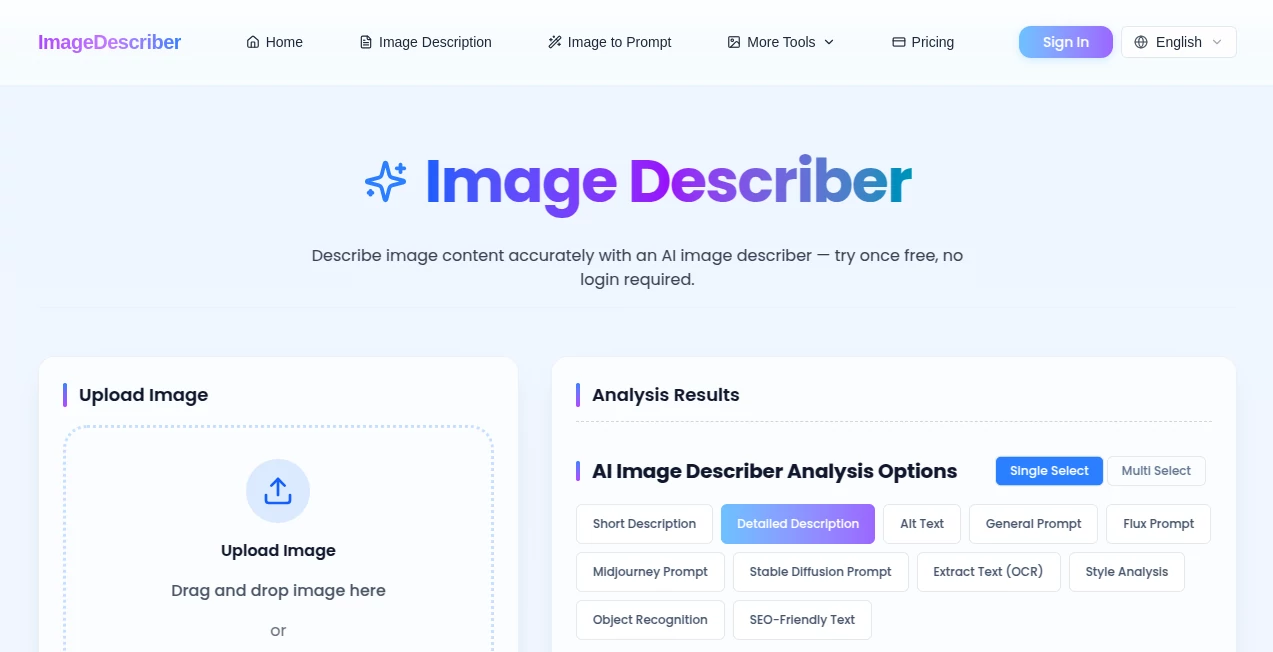
What is Image Describer?
Some photos tell stories you can’t quite put into words. A bustling street scene, an intricate product shot, an old family picture with faded details — you know there’s meaning there, but describing it accurately takes time. This tool bridges that gap beautifully. Upload any image and it delivers clear, thoughtful descriptions that capture not just what’s there, but the mood, lighting, composition, and small details most people miss. I’ve used it to create better alt text for websites, generate strong prompts for other AI tools, and even write social media captions that actually connect with people. The results feel smart and human, not robotic.
Introduction
In a world full of images, being able to understand and articulate what’s inside them quickly is becoming essential. Whether you’re a content creator needing captions, a developer building accessibility features, a marketer crafting product descriptions, or just someone who wants to understand a complex photo better, this platform makes it effortless. It doesn’t just spit out generic labels — it analyzes context, style, lighting, and emotion, then gives you useful outputs like detailed descriptions, AI image prompts, alt text, or even structured data. The best part? It’s fast, accurate, and genuinely helpful for real-world tasks.
Key Features
User Interface
The experience is delightfully simple. A clean upload area welcomes your image — whether from your computer, a URL, or even clipboard paste. Once uploaded, you choose what kind of output you need (detailed description, prompt for Midjourney/Flux, alt text, etc.) and it delivers results in seconds. Side-by-side previews and easy copy buttons make it practical. No complicated menus or steep learning curve — just straightforward usefulness that respects your time.
Accuracy & Performance
It consistently picks up on subtle details: the texture of fabric, the emotion on someone’s face, the way light falls across a scene. Descriptions feel thoughtful rather than mechanical, and the generated prompts for other AI tools are often surprisingly effective. Processing is quick even with higher-resolution images, and the accuracy holds up across photos, screenshots, artwork, and product shots. It’s reliable enough that you can trust the output for professional work.
Capabilities
Beyond basic descriptions, it excels at creating ready-to-use prompts for image generators, SEO-friendly alt text, social media captions, and even OCR-style text extraction when needed. You can request different levels of detail — short and punchy or rich and narrative. Batch processing lets you handle multiple images at once, making it perfect for larger projects. The outputs are practical and versatile, saving hours of manual writing and guessing.
Security & Privacy
Your images are processed securely and not stored long-term. There’s no unnecessary data collection or forced accounts for basic use. For professionals handling client photos or sensitive content, that respectful approach to privacy is a big plus — you get powerful analysis without handing over permanent control of your files.
Use Cases
A web developer uses it to generate accurate alt text for hundreds of product images, improving both SEO and accessibility scores. A social media manager turns product photos into engaging captions that actually convert. An artist uploads reference images and gets detailed prompts to feed into Midjourney for variations. A teacher describes complex diagrams for visually impaired students. Content creators quickly understand stock photos before using them. Wherever you need to understand, explain, or repurpose an image, it becomes an indispensable helper.
Pros and Cons
Pros:
- Descriptions feel natural and detailed, not robotic or generic.
- Excellent at creating strong prompts for other AI image tools.
- Fast processing even with complex or high-resolution images.
- Practical outputs like alt text and captions save real time.
- Simple, no-nonsense interface that anyone can use immediately.
Cons:
- Very abstract or artistic images can sometimes need clearer prompting for best results.
- Advanced batch features and unlimited use require a paid plan.
- Extremely low-quality or blurry images may produce less accurate descriptions.
Pricing Plans
The free tier offers generous daily usage — enough to test thoroughly or handle light workloads. Paid plans remove limits, unlock batch processing, priority speed, and more advanced output options. Pricing feels fair for the time and quality it delivers, especially for professionals who use image descriptions regularly.
How to Use Image Describer
Go to the main page and upload your image by dragging it in or clicking the upload area. Choose the type of description you need (general, detailed, prompt, alt text, etc.). Click generate and review the result. Copy what you need or regenerate with different settings. For multiple images, use the batch option on paid plans. The whole process is intuitive enough that you’ll be productive from your very first try.
Comparison with Similar Tools
Many basic image describers give short, generic labels that aren’t very useful. Others focus only on prompts but lack depth or accuracy. This one stands out by offering multiple useful output types with consistently high quality and natural language. The balance of speed, accuracy, and practical features makes it more versatile than most free alternatives and more approachable than overly technical paid tools.
Conclusion
In a visual world, being able to quickly and accurately understand images is becoming a core skill. This tool makes that skill accessible to everyone without requiring technical expertise. It turns “I don’t know how to describe this” into “here’s exactly what I need” in seconds. Whether you’re improving accessibility, creating content, generating new art, or simply understanding images better, it delivers reliable, thoughtful results that save time and spark creativity. Once you start using it, you’ll wonder how you ever managed without it.
Frequently Asked Questions (FAQ)
How accurate are the descriptions?
Very accurate for most everyday and professional images. It understands context, style, and subtle details well.
Can it generate prompts for Midjourney or Flux?
Yes — it creates strong, detailed prompts optimized for popular AI image generators.
Is it good for alt text and accessibility?
Excellent. It produces clear, descriptive alt text that meets WCAG guidelines.
Do I need an account to use it?
No account is required for basic use. Sign up is optional for saving history and higher limits.
Does it support batch processing?
Yes — available on paid plans for handling multiple images at once.
AI Image Recognition , AI Content Generator , AI Documents Assistant , Photo & Image Editor .
These classifications represent its core capabilities and areas of application. For related tools, explore the linked categories above.
Image Describer details
Pricing
- Free
Apps
- Web Tools
Categories

Image Describer Alternatives Product
Kirkified AI

AI Polaroid …
genie 4
Slogan Gener…

FaceShapeDet…

PNG to 3D

Image Unblur

CozAIPhoto

Gemini AI Ph…
