🧠 AI Quiz
Think you really understand Artificial Intelligence?
Test yourself and see how well you know the world of AI.
Answer AI-related questions, compete with other users, and prove that
you’re among the best when it comes to AI knowledge.
Reach the top of our leaderboard.


















Imagen3D

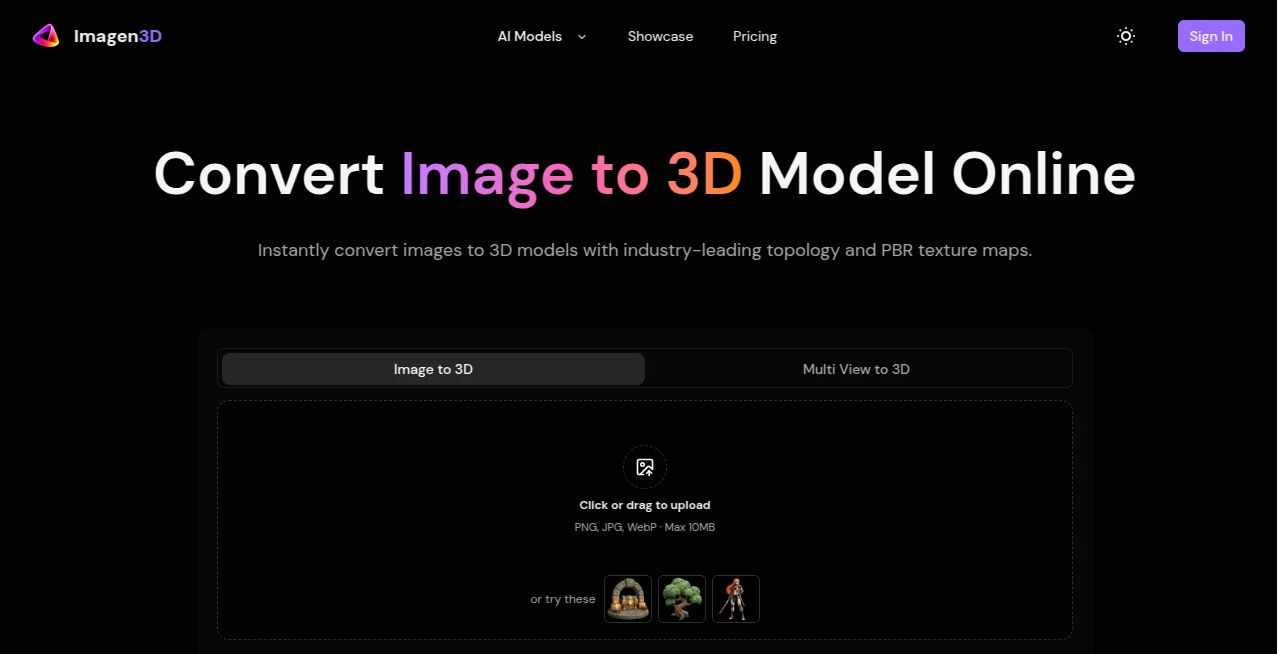
What is Imagen3D?
Turning a simple photo into a fully realized 3D model used to feel like a distant dream reserved for pros with hours to spare, but this tool flips that script entirely. Upload a clear shot of pretty much anything—a gadget on your desk, a favorite sneaker, even a quick sketch—and watch it morph into a detailed, usable model ready for whatever you throw at it next. The thrill hits when you spin that fresh creation around in the preview; it's satisfying in a way that makes you want to dig through old photos for more ideas.
Introduction
At a time when everyone’s chasing faster ways to prototype or visualize, this platform stands out by stripping away the complexity of traditional 3D work. It leans on clever AI to rebuild your images with proper structure and textures, often nailing the details that matter most without needing multiple angles—though tossing in a few extras bumps the quality even higher. I've turned a casual product snap into a textured asset for a mockup in under five minutes, and the clean geometry meant no frustrating fixes later. It's that blend of speed and solidity that keeps creators coming back, whether they're building game worlds or prepping prints.
Key Features
User Interface
The whole thing unfolds on one welcoming page: a big upload zone that accepts drags or clicks, sample images to kickstart ideas, and clear buttons for quality choices that explain themselves. Once done, previews load right there with export options at your fingertips—no jumping between tabs or confusing menus. It's refreshingly direct, the kind of setup that lets you focus on the fun part rather than figuring out the tool.
Accuracy & Performance
Results come back watertight and well-structured, preserving those fine edges and surfaces that make models feel real, all in anywhere from 20 seconds to a couple minutes depending on your pick. Higher modes bake in realistic materials that catch light just right, and the speed never dips into waiting-game territory. From experience, a well-lit object photo yields something impressively faithful, ready to drop into scenes without much fuss.
Capabilities
It handles single shots for quick wins or multiple views for refined accuracy, outputting everything from basic shapes to PBR-textured beauties complete with maps for albedo, normals, and more. Exports cover all the bases—GLB for easy sharing, STL for printers, USDZ for AR peeks—plus video turntables to show off the spin. The manifold meshes mean they're production-friendly straight away, cutting down on cleanup that plagues other quick converters.
Security & Privacy
You keep full rights to whatever you make, commercial or otherwise, with the responsibility on input images squarely yours. The process feels contained and respectful—no lingering data worries when experimenting with personal or client stuff.
Use Cases
Game builders grab concept art and spin assets that slot into engines for rapid prototyping. Product folks stage virtual previews from catalog shots, testing angles without physical mocks. Printer enthusiasts turn everyday objects into custom files for home setups, while AR fans deploy quick models for immersive tries on phones. It's those everyday leaps—from a furniture photo to a room planner insert—that highlight how it bridges ideas to reality.
Pros and Cons
Pros:
- Incredibly quick generations that fit into tight schedules without compromise.
- Clean, ready-to-use geometry that skips hours of manual tweaks.
- Versatile exports and material options for diverse projects.
- Free start that delivers real value right away.
Cons:
- Thrives on simple, clear inputs—busy or reflective scenes might need prep.
- Top-tier details lean toward higher modes, which take a bit longer.
Pricing Plans
Dive in free with no barriers to basic generations, letting you test and play before committing. As needs grow, tiers unlock faster queues, multi-view boosts, and premium materials—flexible enough to match casual curiosity or steady workflows without overkill.
How to Use Imagen3D
Grab a good photo—plain background helps—drag it onto the page (or try samples for a feel), pick your quality from fast to ultra, and let it run for a short spell. Preview the result, spin it to check angles, then export in whatever format suits—GLB for general use or STL if printing's the goal. Add extra views for trickier subjects, and you're iterating ideas faster than ever.
Comparison with Similar Tools
Plenty of converters promise quick turns, but few match this one's focus on clean topology and baked realism that works straight out of the box. It's less about endless options and more about dependable outputs that save real time, edging ahead for folks who value efficiency over experimentation.
Conclusion
This tool quietly changes the game for anyone dipping into 3D, making the leap from photo to model feel natural and exciting rather than daunting. It's a spark for creativity that fits modern paces, turning snapshots into stories you can hold or explore. Give it a whirl with something around you—the results might just surprise you in the best way.
Frequently Asked Questions (FAQ)
What images work best?
Clear, well-lit singles on plain backgrounds—products or objects shine, higher resolution always helps.
How fast is it really?
Under three minutes across the board, often much quicker for basics.
Export options?
GLB, OBJ, STL, GLTF, USDZ, even video previews—all on demand.
Multi-view necessary?
Not for starters, but 3-4 angles boost detail in pro modes.
Commercial use okay?
Full rights to your models, just mind the source image permissions.
AI 3D Model Generator , Photo & Image Editor , AI Image to 3D Model , AI Design Generator .
These classifications represent its core capabilities and areas of application. For related tools, explore the linked categories above.
Imagen3D details
This tool is no longer available on submitaitools.org; find alternatives on Alternative to Imagen3D.
Pricing
- Free
Apps
- Web Tools
Categories

Imagen3D Alternatives Product
Color-Analys…

Brave Pink H…

Nano Image AI

ds image

EaseMaker

Sento AI
Wplace Live

Flux2 Klein

Z Image Turbo