🧠 AI Quiz
Think you really understand Artificial Intelligence?
Test yourself and see how well you know the world of AI.
Answer AI-related questions, compete with other users, and prove that
you’re among the best when it comes to AI knowledge.
Reach the top of our leaderboard.


















Image to Image AI
What is Image to Image AI?
There’s something quietly thrilling about taking a photo you already love and watching it shift into something entirely new—same composition, same heart, but wrapped in a completely different mood or style. This tool does exactly that with a kind of effortless grace that keeps surprising me every time I use it. You drop in your picture, tell it what you’d like to see changed or added, and it returns variations that feel thoughtful and cohesive. I once turned a plain street shot into a cyberpunk evening scene in under a minute; the neon glow felt like it belonged there from the start. It’s the kind of creative nudge that makes you want to keep experimenting.
Introduction
Most image tools either generate from nothing or slap on heavy filters that lose the original soul. This one strikes a different balance: it respects what you bring to the table and builds on it. Upload any photo, describe the transformation in plain words, and it reimagines the scene while holding onto the core layout and key details. That preservation of structure is what sets it apart—no more unrecognizable messes after the AI gets involved. It’s become my quiet go-to for refreshing product shots, experimenting with artistic directions, or just playing with “what if” ideas on lazy afternoons. The fact that it’s free to start with solid results right away only makes the whole thing more inviting.
Key Features
User Interface
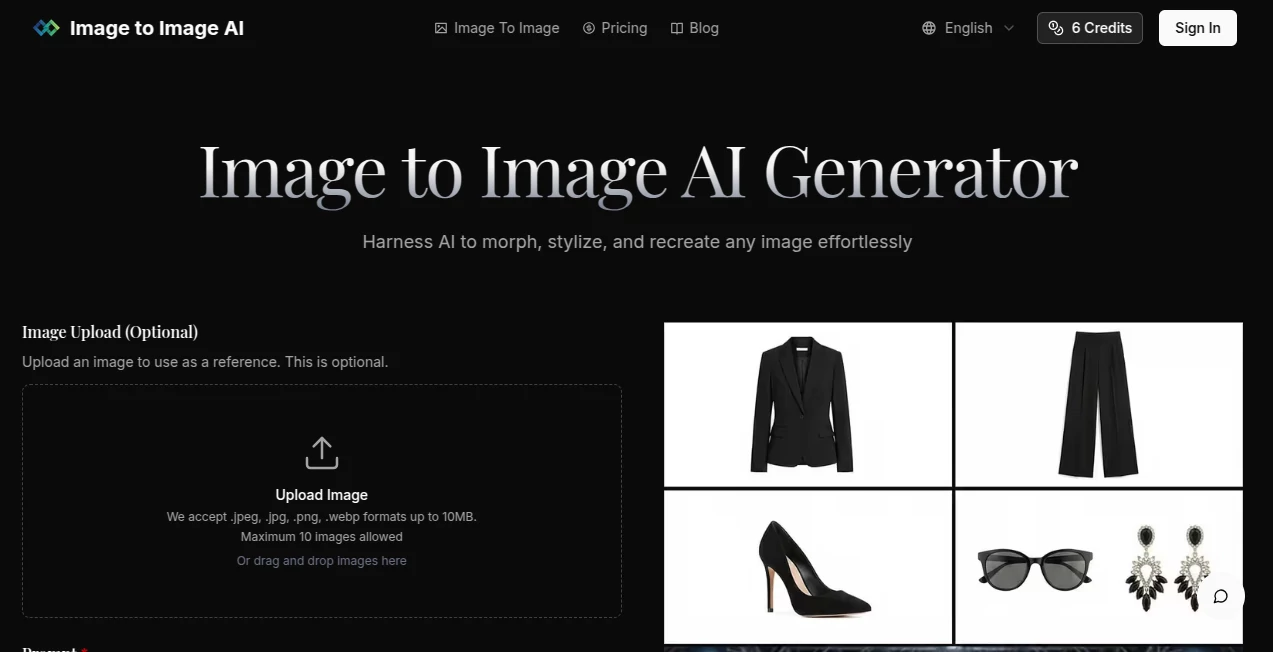
The layout is refreshingly uncluttered. You get a generous upload area, a spacious prompt box with a live character count, dropdowns for aspect ratio and output format, and a clear “Generate” button that doesn’t hide behind extra clicks. Everything is front and center, no overwhelming side panels or buried settings. I appreciate how quickly you can go from upload to result—there’s no friction, just flow. Even when I’m half-asleep with coffee in hand, I can still make sense of it instantly.
Accuracy & Performance
It listens closely to both the image and your words. The composition stays intact—people don’t suddenly vanish, backgrounds don’t warp into nonsense—and the changes feel deliberate rather than random. Generations are swift, often finishing in seconds, and the quality holds up even when you push for dramatic shifts. I’ve thrown in low-light portraits and busy scenes, and it still manages to keep faces recognizable and lighting believable. That reliability turns what could be a gamble into something you can count on.
Capabilities
You can nudge it toward almost any aesthetic—oil painting, neon cyberpunk, vintage film, minimalist line art—and it adapts while keeping your subject front and center. Aspect ratios cover everything from square Instagram posts to cinematic widescreen, and you can generate multiple variations at once to compare ideas. It handles complex prompts well, so asking for “same woman but now in a rainy Tokyo street at night, cinematic lighting” actually delivers something coherent and striking. For quick edits or full creative overhauls, it gives you room to breathe and explore.
Security & Privacy
Your uploads are processed and then gone—no lingering copies or sneaky data grabs. There’s no account required for basic use, which keeps things light and private by default. When you do sign in for more features, it’s clear that the focus is on letting you create without worrying about where your images end up. That simplicity and respect for your content make the whole experience feel safe and straightforward.
Use Cases
A small jewelry shop owner uploads product photos and reimagines them in elegant lifestyle settings, turning plain white-background shots into aspirational scenes that sell better. A graphic designer tests color palettes and moods on the same base illustration, quickly narrowing down directions for a client. Someone creating social content refreshes old selfies into seasonal versions—summer beach vibes one day, cozy winter portraits the next—without reshooting. It’s versatile enough for fast professional tweaks and playful personal experiments alike.
Pros and Cons
Pros:
- Keeps the original composition intact, so results stay recognizable and useful.
- Fast generations that don’t leave you waiting around.
- Flexible aspect ratios and multiple outputs help you explore quickly.
- Free entry point with genuinely good quality right away.
Cons:
- Heavily relies on clear, well-lit input images for the best outcomes.
- Complex prompts sometimes need a couple of tries to dial in perfectly.
Pricing Plans
You can jump in completely free and still get strong results—plenty for casual use or testing ideas. When you’re ready for more volume or higher priority, affordable credit packs unlock unlimited potential without locking you into subscriptions. It’s designed so you only pay for the extra speed and quantity you actually need, keeping the barrier low while scaling smoothly as your projects grow.
How to Use Image to Image AI
Start by uploading a photo that has the core elements you want to keep—good lighting and resolution help a lot. Write a clear prompt describing the changes or style you’re after (the more specific, the better). Choose your aspect ratio and how many variations you’d like, then hit generate. Browse the results, download your favorites, and tweak the prompt for another round if needed. It’s a fast loop—upload, describe, generate, refine—that lets you iterate without losing momentum.
Comparison with Similar Tools
Some image editors lean too heavily on generic filters or lose the original structure entirely. This one stands out by holding onto the bones of your photo while still giving you real creative freedom. Where others feel heavy-handed or slow, the speed and coherence here make it easier to stay in flow. It’s less about overwhelming you with options and more about delivering usable, high-quality transformations that actually fit what you had in mind.
Conclusion
This tool quietly unlocks a kind of creative freedom that used to take hours or expensive software. It respects the images you start with and lets you play with possibility without losing what made the original special. Whether you’re refreshing content, exploring new styles, or just having fun with “what if” ideas, it delivers results that feel personal and polished. It’s one of those rare finds that makes you excited to create again.
Frequently Asked Questions (FAQ)
Do I need a high-quality photo to start?
Clear, well-lit images give the best results, but it still works surprisingly well with everyday shots.
How specific should my prompt be?
The more detailed, the better—mention style, mood, lighting, or exact changes for sharper outcomes.
Can I generate multiple versions at once?
Yes, select how many variations you want and compare them side by side.
Is it really free?
You can start and get solid results without paying; credits unlock more speed and volume when you need it.
What aspect ratios are available?
A wide range including square, portrait, landscape, and cinematic options to match any platform.
AI Photo & Image Generator , Photo & Image Editor , AI Image to Image , AI Design Generator .
These classifications represent its core capabilities and areas of application. For related tools, explore the linked categories above.
Image to Image AI details
Pricing
- Free
Apps
- Web Tools
Categories

Image to Image AI Alternatives Product

Z-Image Gene…

Nano Banana …

Flux2 Klein

Touchpoint

Text Remover…

NanoAI

Editaimg

SlideStorm AI

bratgenerator