
🧠 AI Quiz
Think you really understand Artificial Intelligence?
Test yourself and see how well you know the world of AI.
Answer AI-related questions, compete with other users, and prove that
you’re among the best when it comes to AI knowledge.
Reach the top of our leaderboard.


















Transform Any Image with AI Magic
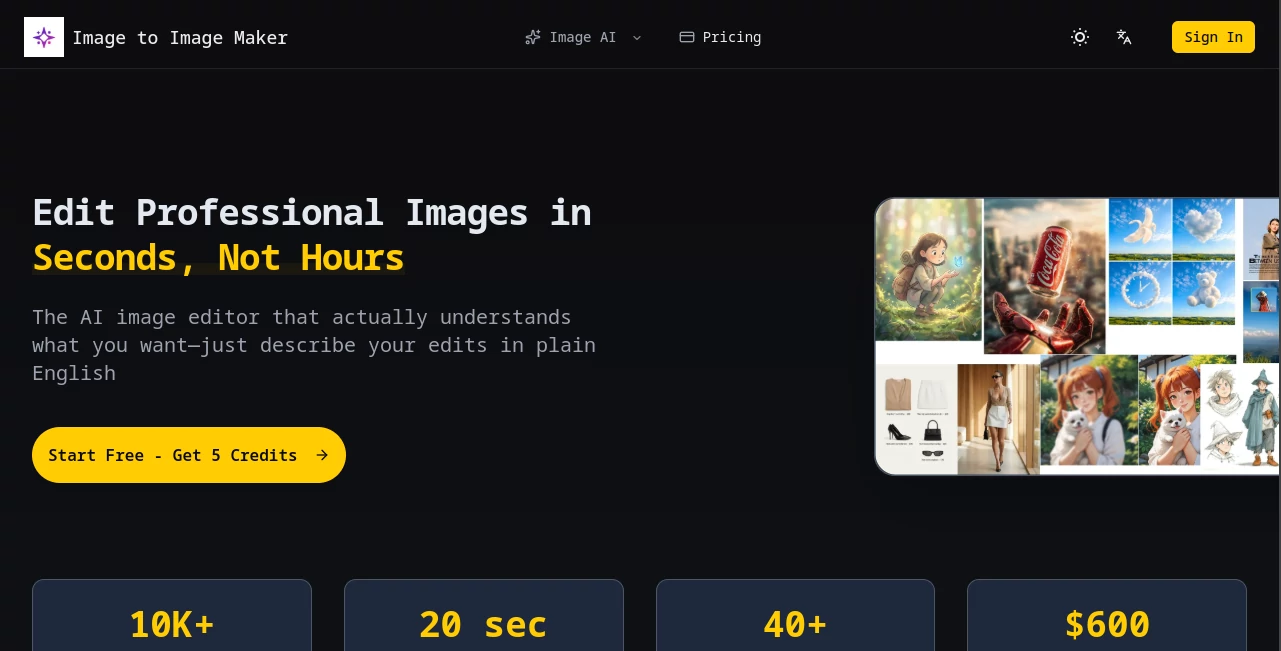
What is Transform Any Image with AI Magic?
There’s something quietly thrilling about taking a photo you already love and watching it transform into something entirely fresh—same soul, different skin. This little gem does exactly that: feeds your image a creative nudge through words, and returns versions that feel like they were painted or shot by someone who really gets your vibe. I’ve lost hours just playing with old travel snaps, turning a rainy street into a neon cyber scene or a plain portrait into a vintage oil painting. It’s the kind of tool that makes you feel like you’ve unlocked a secret level of creativity without needing to learn Photoshop.
Introduction
Most people have a folder full of photos they like but never quite know what to do with. This platform changes that in seconds. Upload any image, describe the mood or style you’re chasing, and it reimagines the whole thing while keeping the core composition intact. What sets it apart is how faithfully it holds onto faces, poses, and objects—even when you push the prompt toward wild styles like cyberpunk, watercolor, or 90s anime. I’ve seen friends go from “this is just a selfie” to “this could be an album cover” in under a minute. It’s fast, forgiving, and surprisingly addictive.
Key Features
User Interface
The whole experience is refreshingly uncluttered. Big upload area, clear prompt box, a few sliders for strength and creativity, and that’s it. No overwhelming menus or sidebars trying to sell you things. You can see your original next to the new version instantly, and switching between outputs is just a click. It feels like a conversation with a very talented artist who never gets tired.
Accuracy & Performance
It remembers faces better than most tools I’ve tried—important when you’re working with people. The structure of the image (where things are placed) stays surprisingly solid even with dramatic style changes. Generations are quick—usually 10–30 seconds—and the quality holds up even at higher resolutions. I’ve used it on everything from phone snaps to scanned sketches, and it rarely feels like it’s guessing.
Capabilities
You can go subtle (enhance lighting, add depth) or go full fantasy (turn your dog into a cybernetic warrior). Supports realistic portraits, painterly styles, anime, cinematic looks, vintage photography, and more. Strength sliders let you decide how much of the original stays vs how much new interpretation comes in. Negative prompts help avoid weird artifacts. It’s flexible enough for professional mood boards or just weekend fun.
Security & Privacy
Your images aren’t stored long-term unless you explicitly save them. Processing happens securely and privately. No creepy data harvesting or model training on your personal photos. That matters more than people usually realize when you’re uploading faces or private moments.
Use Cases
Photographers use it to create stylized portfolio pieces without reshooting. Social media creators turn everyday selfies into eye-catching posts that stand out in crowded feeds. Artists experiment with new directions by feeding their sketches into different aesthetics. Small businesses mock up product photos in seasonal or branded styles without hiring a photographer again. It’s one of those tools that quietly becomes part of the daily creative rhythm.
Pros and Cons
Pros:
- Excellent subject and face consistency—rare in image-to-image tools.
- Very fast generations, even at higher quality settings.
- Intuitive controls that reward experimentation without punishing mistakes.
- Strong style range from photoreal to wildly artistic.
Cons:
- Free tier includes a small watermark (removable with paid plans).
- Occasionally over-applies dramatic lighting on subtle prompts.
- Best results still come from well-lit, clear source images.
Pricing Plans
You can start completely free with a generous daily allowance—enough to play seriously and decide if it fits your flow. Paid plans begin at a very approachable monthly rate that removes watermarks, unlocks faster queue times, higher resolutions, and more daily generations. There are no sneaky hidden fees; it’s straightforward: more credits, more freedom, better priority. Annual billing knocks the price down noticeably if you know you’ll be using it regularly.
How to Use ImageToImageMaker
Drag or upload your starting image. Write a clear description of the style, mood, lighting, or artistic direction you want (“cinematic golden hour portrait, dramatic shadows, film grain”). Adjust the strength slider—lower keeps more of the original, higher gives more creative freedom. Optionally add negative prompts (“blurry, deformed, extra limbs”). Hit generate. Review the variations, upscale your favorite, and download. That’s it. Most people get usable results on the first or second try.
Comparison with Similar Tools
Compared to other image-to-image generators, this one punches above its weight in keeping the original subject intact while still allowing bold stylistic shifts. Some competitors are faster but lose faces or composition too easily; others are more artistic but slower and more expensive. This strikes a very usable middle ground—fast enough for iteration, consistent enough for real work, and priced so you don’t feel guilty playing.
Conclusion
This tool quietly redefines what you can do with photos you already have. It’s not just about making things “prettier”—it’s about unlocking new stories, moods, and possibilities inside images you thought you already knew. Whether you’re creating content, experimenting artistically, or just having fun, it delivers that rare combination of speed, quality, and creative control that makes you want to come back tomorrow and try something else. Once you start, it’s hard to stop.
Frequently Asked Questions (FAQ)
Do I need a high-resolution source image?
Not necessarily, but sharper inputs give sharper outputs. Phone photos work surprisingly well.
Can I remove the watermark for free?
No, but the paid plans are affordable and remove it completely.
Does it work with portraits of people?
Yes—face consistency is one of its strongest points.
How many images can I generate per day for free?
A solid daily quota—enough to seriously test and explore.
Can I use the results commercially?
Yes, especially on paid plans. Always double-check licensing for your specific use.
AI Photo & Image Generator , Photo & Image Editor , AI Image to Image , AI Design Generator .
These classifications represent its core capabilities and areas of application. For related tools, explore the linked categories above.
Transform Any Image with AI Magic details
Pricing
- Free
Apps
- Web Tools
Categories

Transform Any Image with AI Magic Alternatives Product
Ghibli Image…
Z-Image Free

img2img.net

City Boy Meme
Action Figur…

insMind

Photo Locati…

MuseCraft.AI

BananaFrame
