
🧠 AI Quiz
Think you really understand Artificial Intelligence?
Test yourself and see how well you know the world of AI.
Answer AI-related questions, compete with other users, and prove that
you’re among the best when it comes to AI knowledge.
Reach the top of our leaderboard.

















Image to Prompt
What is Image to Prompt?
Ever looked at a beautiful image and wondered exactly how to recreate it in Midjourney or Stable Diffusion? Or wished you could understand what makes one photo work so well as AI art? This tool solves that puzzle with surprising ease. You upload any picture—your own photo, a piece of art, a product shot—and it quickly returns a rich, detailed prompt you can copy and paste straight into your favorite generator. I’ve used it on everything from vacation snapshots to old paintings, and the results consistently help me create variations that feel intentional rather than random. It’s like having a smart translator that speaks fluent “AI art language,” turning visuals back into words that actually work.
Introduction
Creating good prompts for AI image generators is part art, part science, and often a lot of trial and error. This platform makes that process much smoother by reversing the usual flow: instead of starting with words, you start with an image. The AI carefully analyzes every detail—subject, composition, lighting, style, colors—and crafts a comprehensive text prompt you can use right away. It’s completely free, supports multiple languages, and works with all the major models like Stable Diffusion, Midjourney, DALL-E, and Flux. For artists, designers, and curious creators, it’s become a daily companion that saves time and sparks new ideas by showing exactly how the AI “sees” an image.
Key Features
User Interface
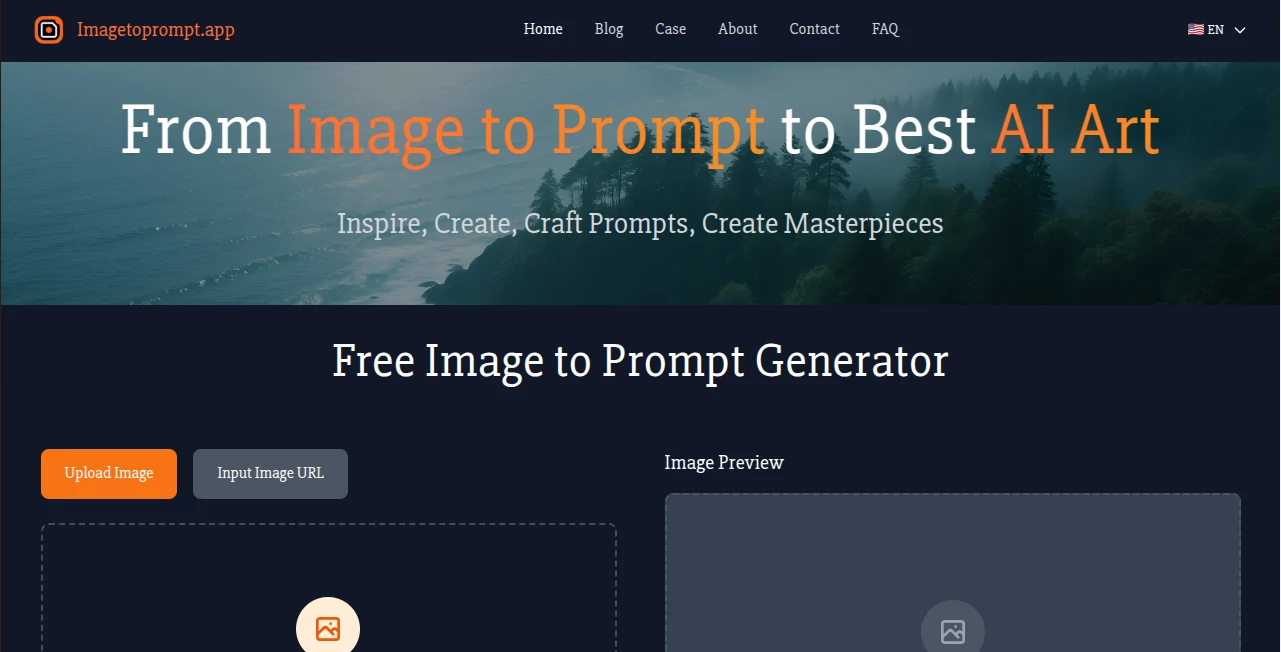
The page is refreshingly straightforward. A large upload area welcomes you with “drag and drop” or the option to paste an image URL. Choose your preferred output language from a clean dropdown, then hit the prominent generate button. The image preview appears immediately, and the generated prompt shows up below in a simple, copy-friendly box. No accounts, no clutter, no unnecessary steps—just upload, select, generate, copy. It feels designed by someone who actually uses these tools daily and hates wasting clicks.
Accuracy & Performance
The prompts are impressively detailed, capturing not just the obvious subject but also background elements, lighting direction, color palette, composition, and artistic style. It takes a few extra seconds for the thorough analysis, but that patience pays off in prompts that actually produce strong, consistent results. I’ve tested it on tricky images with complex backgrounds and been pleasantly surprised at how well it breaks everything down without missing key details or adding random fluff.
Capabilities
It handles a wide variety of images—photographs, digital art, product shots, paintings—and turns them into high-quality prompts ready for Stable Diffusion, Midjourney, DALL-E, Flux, and others. Multi-language support means you can generate prompts in English, Chinese, Spanish, and more. The output includes rich descriptions of subject, action, environment, mood, and technical details, making it perfect for recreating similar images, creating variations, or simply learning better prompt-crafting techniques. You can even use it to reverse-engineer what makes certain AI artworks so effective.
Security & Privacy
Your uploaded images are used only for the immediate generation process and are deleted right afterward. No long-term storage, no training on your data, no sharing with third parties. The tool respects your privacy completely, which is especially comforting when working with personal photos or client work. You don’t even need to create an account to start using it.
Use Cases
A digital artist uploads their latest illustration to understand how the AI interprets their style, then uses the generated prompt to create consistent variations. A product photographer turns real photos into detailed prompts to generate lifestyle mockups quickly. A hobbyist finds an inspiring image online and uses the tool to recreate it in different artistic styles. A content creator analyzes trending AI art to improve their own prompting skills. It’s equally useful for learning, inspiration, and practical production work.
Pros and Cons
Pros:
- Generates surprisingly detailed and effective prompts that save hours of trial and error.
- Completely free with no usage limits or hidden paywalls.
- Works with all major AI image generators and supports multiple languages.
- Extremely simple and fast workflow—no account or complicated setup needed.
- Helps users understand and improve their own prompting skills over time.
Cons:
- Analysis can take a few extra seconds for very complex or high-resolution images.
- Extremely abstract or low-quality source images may produce less accurate prompts.
- No built-in image editing features—purely focused on prompt generation.
Pricing Plans
It’s completely free to use with no usage limits or paid tiers. You can upload images and generate prompts as often as you like without any restrictions. That open approach makes it accessible for students, hobbyists, and professionals alike who just want a reliable way to turn images back into powerful text prompts.
How to Use Image to Prompt
Go to the main page and either drag and drop your image into the upload area or paste an image URL. Select the language you want the prompt written in. Click the “Generate Prompt” button and wait a few seconds while the AI analyzes the image in detail. Once ready, the full prompt appears in a box below—simply copy it with one click and paste it into your favorite AI image generator. You can refine the prompt manually if needed or generate new variations by tweaking the original description. The whole process usually takes under 30 seconds from upload to usable prompt.
Comparison with Similar Tools
Many reverse prompt tools either oversimplify the description or add too much unnecessary fluff. This one strikes a better balance—detailed enough to be powerful, clean enough to be immediately useful. While some require accounts or limit daily use, this stays completely free and open. The quality of analysis and compatibility with all major models gives it a clear edge for everyday creative work.
Conclusion
Good prompting is half the battle in AI art, and this tool makes that battle much easier and more educational. It turns any image into a rich, reusable prompt that helps you recreate, vary, or improve upon what you see. Whether you’re learning the ropes, speeding up your workflow, or just having fun exploring styles, it’s a practical, no-nonsense helper that quietly improves your results. In a crowded space of AI tools, its simplicity and usefulness make it one worth keeping bookmarked.
Frequently Asked Questions (FAQ)
How detailed are the generated prompts?
Very detailed—they include subject, style, lighting, composition, colors, and more, giving you strong starting points for AI generators.
Which AI tools can I use the prompts with?
They work great with Stable Diffusion, Midjourney, DALL-E, Flux, and most other popular image generators.
Is there a limit on how many images I can process?
No—it's completely free with no daily limits or usage caps.
Are my uploaded images saved?
No—images are used only for real-time analysis and deleted immediately after generating the prompt.
Can I generate prompts in languages other than English?
Yes, it supports 11 languages including English, Chinese, Spanish, and more.
AI Photo & Image Generator , AI Image to Image , AI Art Generator , AI Design Generator .
These classifications represent its core capabilities and areas of application. For related tools, explore the linked categories above.
Image to Prompt details
Pricing
- Free
Apps
- Web Tools
Categories

Image to Prompt Alternatives Product
grok imagine…

string art g…

Motion Contr…

BlackInk

Image Descri…

Mage

bratgenerator

AI Polaroid …
String Art
