
🧠 AI Quiz
Think you really understand Artificial Intelligence?
Test yourself and see how well you know the world of AI.
Answer AI-related questions, compete with other users, and prove that
you’re among the best when it comes to AI knowledge.
Reach the top of our leaderboard.


















Image to STL
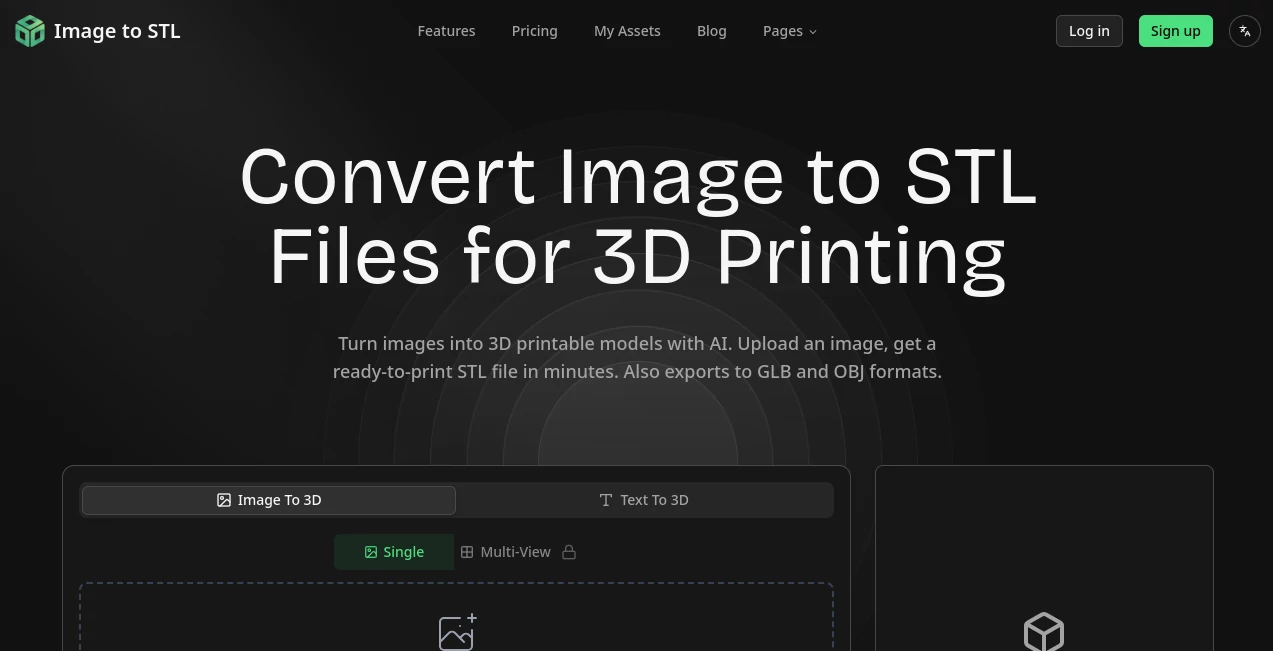
What is Image to STL?
Image to STL stands out as a game-changer for anyone dreaming of turning flat images into tangible 3D wonders, delivering polished models ready for printing or digital worlds in mere minutes. This brilliant platform harnesses cutting-edge smarts to breathe depth into your sketches, photos, or even text ideas, making high-quality creations accessible without the steep learning curve. Creators everywhere are buzzing about how it slashes weeks off modeling marathons, turning everyday uploads into professional-grade assets that spark endless possibilities.
Introduction
Image to STL burst onto the scene with a clear mission: to democratize 3D creation by letting users transform simple images or descriptions into printable masterpieces effortlessly. From its intuitive start, it's captivated hobbyists, designers, and pros alike, with stories pouring in about prototypes that went from concept to print overnight. What elevates it is the seamless blend of power and simplicity—upload a snapshot of a dragon or describe a woodpecker in vivid detail, and watch AI weave it into a detailed mesh complete with PBR materials. It's not just a tool; it's a creative accelerator that's reshaping workflows and igniting imaginations across industries.
Key Features
User Interface
The experience kicks off with a delightfully straightforward four-step flow: drag and drop your image or jot a text prompt, let the magic unfold, preview in an interactive viewer where you can spin, zoom, and inspect every angle, then export with ease. It's refreshingly clean, with handy examples like a sleek car or mythical Nezha ready to inspire, ensuring even newcomers feel right at home without a single confusing click.
Accuracy & Performance
Powered by advanced algorithms, it delivers stunning precision, crafting meshes that capture intricate details down to the triangle—up to 1,500,000 in Pro mode for buttery-smooth topology that prints flawlessly. Generations wrap up in minutes, even with multi-view inputs for enhanced realism, making it a reliable powerhouse that consistently exceeds expectations and keeps your creative momentum soaring.
Capabilities
This powerhouse goes beyond basics, supporting everything from single-image conversions to text-driven designs and multi-angle fusions, all exported in versatile formats like STL for printing, GLB for immersive apps, or OBJ for further tweaks. With PBR materials baked in and options for Standard or Pro quality, it empowers users to build game-ready assets, architectural visuals, or custom sculptures that feel tailor-made for any project.
Security & Privacy
Your creations remain yours alone, with paid plans ensuring full ownership and privacy—no sharing without your nod. Free tiers come with light licensing, but the robust safeguards across the board let you innovate freely, knowing sensitive designs stay locked down and secure from start to finish.
Use Cases
3D printing enthusiasts craft custom figurines from cherished photos, while game developers spin up optimized assets for Unity or Unreal in a flash. Architects visualize sketches for client wow-moments, and e-commerce pros boost sales with interactive 360° product views. From AR/VR prototypes to artistic sculptures, it's the ultimate spark for turning 2D ideas into 3D realities that captivate and convert.
Pros and Cons
Pros:
- Blazing-fast generations that save countless hours on manual modeling.
- Exceptional detail and quality, from 80K to 1.5M triangles for pro-level results.
- Versatile exports and multi-input support for endless creative flexibility.
- Affordable entry with scalable plans that grow with your ambitions.
Cons:
- Credit system may require top-ups for heavy users on lower plans.
- Best results shine with clear inputs, so prep work helps complex scenes.
- Concurrent tasks limited by tier, though rarely a bottleneck for most.
Pricing Plans
Dive in free with 15 monthly credits for no-commitment testing, perfect for sparking ideas without a dime. Pro at $16.90/month (or $202.80 yearly) unlocks 500 credits, private assets, and two concurrent jobs, while Max at $26.90/month (or $322.80 yearly) amps to 1000 credits and three tasks for power users. Add-on packs from $9.90 keep the flow endless, with no-credit-card starts making it a no-brainer investment in your creativity.
How to Use Image to STL
Start by uploading your image or typing a prompt like "golden woodpecker with sharp beak," select Standard or Pro quality, and hit generate. Preview the interactive model, refine if needed, then download in your choice of STL, GLB, or OBJ. Access everything in My Assets for seamless iteration—it's that simple to go from flat file to 3D triumph.
Comparison with Similar Tools
Unlike bulkier suites that overwhelm with options, Image to STL nails focused, lightning-quick conversions with superior mesh quality and print-ready outputs, outpacing rivals in speed and affordability. Where others falter on detail or demand expertise, this gem delivers pro results for all, making it the smarter pick for efficient, inspiring workflows.
Conclusion
Image to STL isn't just a converter—it's a creative revolution, empowering users to sculpt the future from a single snapshot or sentence with unmatched ease and excellence. Whether prototyping gadgets or dreaming up digital realms, it consistently delivers the wow factor that turns heads and fuels passions. If you're ready to elevate your 3D game, this is the tool that's poised to redefine what's possible, one stunning model at a time.
Frequently Asked Questions (FAQ)
What formats can I export?
Choose from STL for printing, GLB for AR/VR, or OBJ for editing—versatile options for every need.
How long does generation take?
Just minutes, even for detailed Pro-mode meshes, keeping your ideas moving fast.
Is commercial use allowed?
Absolutely—paid plans grant full ownership for selling or sharing your creations worry-free.
Can I use text prompts?
Yes, describe concepts like "sharp-beaked woodpecker" for stunning text-to-3D results.
What's the difference between Standard and Pro?
Standard offers quick 80K-triangle builds; Pro dives deeper with up to 1.5M for intricate details.
Photo & Image Editor , AI Design Generator , AI 3D Model Generator , AI Image to 3D Model .
These classifications represent its core capabilities and areas of application. For related tools, explore the linked categories above.
Image to STL details
Pricing
- Free
Apps
- Web Tools
Categories

Image to STL Alternatives Product

Image Text E…
Sketch To

ImageKontext…
Seedream 4.5

SAM 3D

Klyra AI
Project Geni…

PostPlus AI

Banana Pro
