🧠 AI Quiz
Think you really understand Artificial Intelligence?
Test yourself and see how well you know the world of AI.
Answer AI-related questions, compete with other users, and prove that
you’re among the best when it comes to AI knowledge.
Reach the top of our leaderboard.


















Instaposts.ai
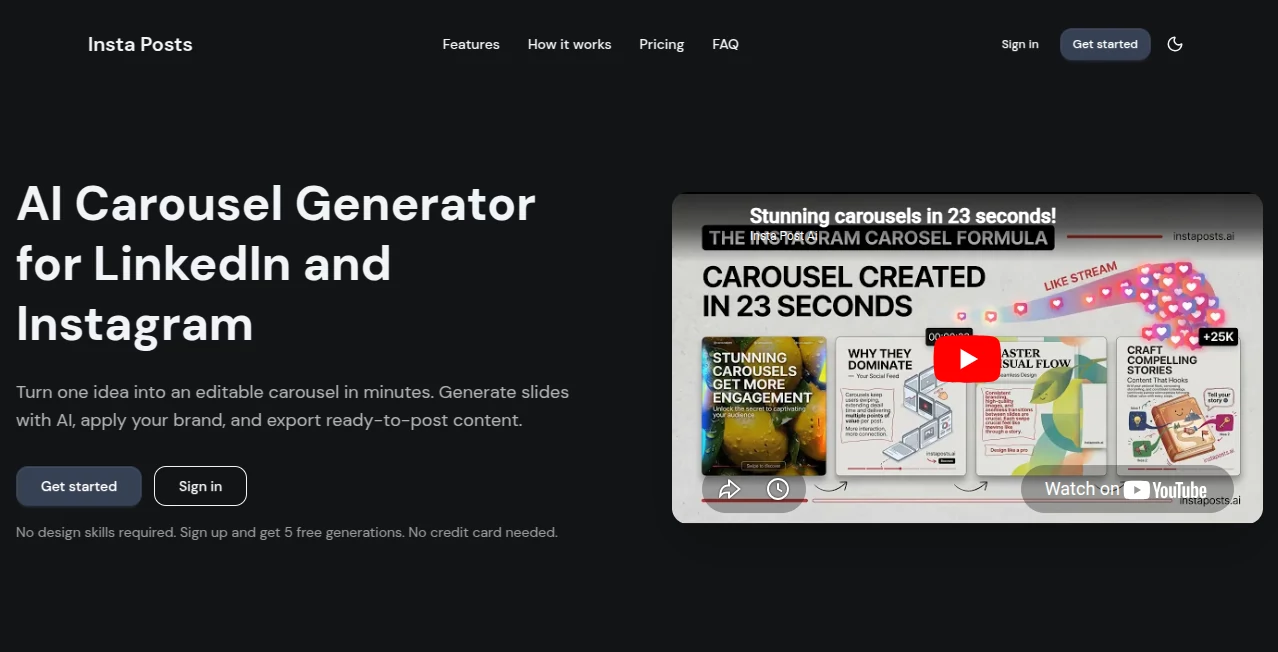
What is Instaposts.ai?
There’s a special kind of frustration when you know you need to post something today, but the blank screen stares back at you and nothing feels right. This tool takes that pressure off. You give it a topic, a tone, or even just a rough idea, and it hands back ready-to-post captions, carousels, or full thread ideas that actually sound like you — or better. I’ve watched busy creators go from “I’ll post tomorrow” to publishing something sharp and engaging in under two minutes. It doesn’t replace your voice; it amplifies it and saves you the mental energy you’d rather spend on strategy or shooting content.
Introduction
Social media moves fast, and staying consistent is tough when inspiration doesn’t strike on schedule. InstaPosts AI steps in as a reliable creative partner that understands platform nuances — what works on Instagram, LinkedIn, Twitter/X, or TikTok. It generates not just single captions but complete post packages: hook, body, call-to-action, hashtags, and even carousel suggestions when needed. The best part? The output feels human — warm, punchy, or professional depending on what you ask for. Many users say it’s the first tool that actually reduced their posting anxiety instead of adding to it.
Key Features
User Interface
The interface is clean and inviting. You start with a simple prompt box where you can describe your product, service, or idea in plain language. A few quick toggles let you pick platform, tone (witty, inspirational, educational, etc.), and post type. Results appear in a well-organized layout with copy-paste buttons and one-click variations. No steep learning curve — most people create their first solid post within 60 seconds of landing on the page.
Accuracy & Performance
It consistently nails tone and platform fit. Ask for LinkedIn-professional and you get thoughtful, value-driven copy. Switch to Instagram-fun and the language becomes lighter and more engaging. Hashtag suggestions feel relevant rather than random, and the length is usually spot-on for each platform. Generation is fast enough that you can create multiple variations and pick the strongest one without losing momentum.
Capabilities
Beyond single captions, it creates full carousels, thread ideas, storytelling sequences, and even reply templates. You can feed it existing content to rewrite, expand, or repurpose across platforms. It handles product launches, behind-the-scenes stories, educational threads, promotional offers, and personal branding posts with equal ease. The ability to generate in different tones and lengths makes it versatile for both solo creators and marketing teams.
Security & Privacy
Your prompts and generated content stay private by default. There’s no unnecessary data retention or training on your specific posts unless you explicitly opt in. For businesses and creators who share sensitive campaign ideas or client information, this respectful approach builds confidence to use the tool freely.
Use Cases
A small business owner struggling with daily Instagram posts uses it to generate a week’s worth of content in one sitting, complete with hooks and calls-to-action that actually convert. A coach creates engaging LinkedIn threads that position her as an expert without spending hours writing. A content creator repurposes one long-form video into multiple short-form captions and carousels across platforms. Teams use it to maintain brand voice while scaling output across multiple accounts. It shines anywhere consistency and speed matter more than starting from a blank page every time.
Pros and Cons
Pros:
- Generates platform-specific content that actually performs, not generic filler.
- Saves hours every week while keeping your unique voice intact.
- Easy to iterate — generate, tweak prompt, generate again in seconds.
- Helpful for both beginners who don’t know what to say and pros who are burned out.
Cons:
- Still benefits from light human editing for the most personal or nuanced campaigns.
- Free tier has usage limits that serious creators will outgrow quickly.
- Very niche or highly technical topics sometimes need more specific prompting.
Pricing Plans
It starts with a free plan that lets you test the quality on real posts without pressure. Paid tiers unlock unlimited generations, advanced tone controls, carousel and thread features, and priority support. Pricing is reasonable for the time it saves — many users say it pays for itself after the first month through increased posting consistency and better engagement.
How to Use InstaPosts AI
Go to the generator, describe what you want to post (product, tip, story, offer, etc.), select the platform and desired tone, then hit generate. Review the suggestions — copy the ones you like or regenerate with small adjustments to the prompt. For carousels or threads, choose the multi-post option and let it build the sequence. Paste the final copy into your social app, add your visuals, and post. The whole process usually takes less than two minutes from idea to ready-to-publish.
Comparison with Similar Tools
Many AI writers produce generic text that needs heavy rewriting. This one is trained specifically for social platforms, so the output feels native and ready to use with minimal changes. Where some tools focus only on long-form or blog content, this one excels at the short, punchy, scroll-stopping format that actually drives engagement on today’s platforms.
Conclusion
Creating consistent, high-quality social content is one of the biggest time drains for creators and businesses today. This tool takes the heaviest part of that burden — coming up with the right words at the right moment — and makes it feel almost effortless. It doesn’t replace your creativity or brand voice; it supports them so you can show up more often and with better material. If you’ve ever felt stuck staring at a blank post screen, this might be the relief you’ve been looking for.
Frequently Asked Questions (FAQ)
Does it really sound like me?
It gets close quickly, especially when you give it a few examples of your style or tone in the prompt. Light editing makes it even more personal.
Can I use it for multiple platforms?
Yes — it understands the differences between Instagram, LinkedIn, Twitter/X, TikTok, and others and adjusts tone and length accordingly.
Is there a free way to try it?
Yes, the free plan gives you enough generations to test real posts and see the quality for yourself.
How long does it take to create a post?
Usually under two minutes from prompt to ready-to-publish copy.
AI Content Generator , AI Social Media Assistant , AI Digital Marketing Generator , AI Copywriting .
These classifications represent its core capabilities and areas of application. For related tools, explore the linked categories above.
Instaposts.ai details
Pricing
- Free
Apps
- Web Tools
Categories

Instaposts.ai Alternatives Product

Overlap

Prompt Sloth

Image Descri…
promptcat

Simplified

Faceless vid…

Apify

Liftburst
PDF to Video