
🧠 AI Quiz
Think you really understand Artificial Intelligence?
Test yourself and see how well you know the world of AI.
Answer AI-related questions, compete with other users, and prove that
you’re among the best when it comes to AI knowledge.
Reach the top of our leaderboard.


















Dex

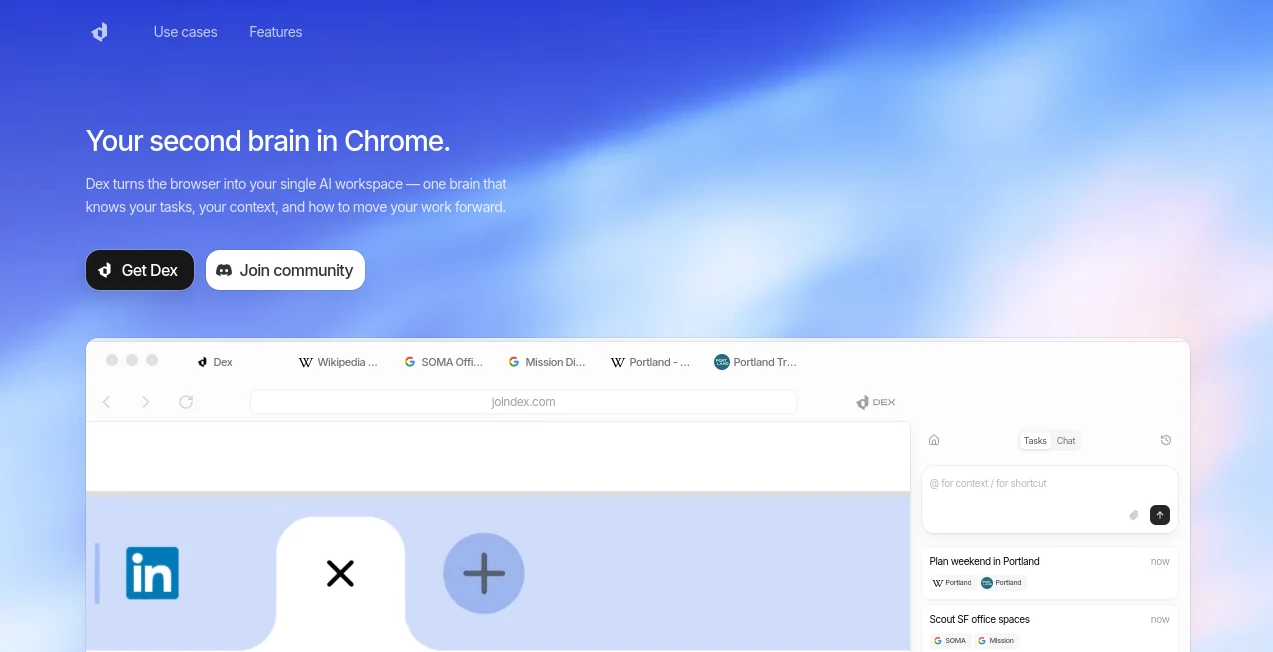
What is Dex?
Imagine having a sharp-minded assistant tucked right into your browser, one that remembers your quirks, pulls together scattered info from dozens of tabs, and quietly handles the tedious bits so you can focus on what matters. That's the everyday brilliance this extension brings—turning Chrome into a smart workspace that feels like an extension of your own thoughts. I've watched friends in sales and research light up when it preps meeting notes or scrapes leads without a single copy-paste, saving hours that used to vanish into tab chaos.
Introduction
In the hustle of modern work, where tabs pile up like unread emails and context switches eat your day, this tool steps in as a game-changer for anyone living in their browser. Built by a team fed up with fragmented AI helpers that force you out of your flow, it embeds deeply into Chrome to connect apps, predict needs, and act on your behalf. From founders juggling pitches to students cramming research, users share how it transformed overwhelming sessions into smooth sails—think pulling LinkedIn details, calendar slots, and email threads into a crisp brief without lifting a finger beyond a quick prompt. It's not just automation; it's that rare companion that learns you, making knowledge work feel less like a grind and more like a conversation with someone who gets it.
Key Features
User Interface
It slips into your browser like it was always meant to be there—a subtle sidebar or quick summon that pops when needed and fades when not, with prompts that feel natural and responses that land right in context. No overwhelming panels or forced windows; just seamless actions across tabs, whether you're highlighting for a summary or chatting for a task. One user I know calls it 'invisible magic'—it anticipates without intruding, keeping your screen clean while delivering power at a keystroke.
Accuracy & Performance
The smarts here cut through noise with impressive precision, grasping full context from open tabs and connected apps to deliver actions that hit the mark first try. It moves fast too—no lagging waits that kill momentum—handling everything from data pulls to email drafts in moments. In real runs, like prepping for a call by weaving calendar, profiles, and past threads, it consistently nails details that would take manual hunts forever, earning trust from high-performers who can't afford slips.
Capabilities
Link over a dozen apps for cross-tool actions: schedule meetings by checking availabilities, scrape profiles into sheets for lead lists, send tailored outreach from data pulls, or generate talking points from scattered sources. It learns from your interactions, building memory for personalized help—like resuming research or refining to-dos with your style in mind. Whether operations, CRM tweaks, or deep dives across tabs, it orchestrates without you juggling windows.
Security & Privacy
Built private from the ground up, with granular controls that let you connect or cut apps anytime, view memories, or wipe data on a whim—no creepy overreach or hidden shares. It respects boundaries, processing only what's needed for the task, giving that rare confidence in an AI tool where your info stays yours. For pros handling sensitive leads or notes, this thoughtful design feels like a breath of relief.
Use Cases
Sales folks build enriched lead sheets from LinkedIn browses, then fire off personalized emails without switching apps. Founders prep investor chats by pulling company intel, past emails, and calendars into sharp briefs. Students track applications, researching firms and crafting cover letters that stand out. Even ops teams fill forms or analyze sheets with context from files, turning multi-hour slog into quick wins that free up headspace for bigger plays.
Pros and Cons
Pros:
- Eliminates endless switching, keeping you deep in flow.
- Learns your patterns for help that feels truly personal.
- Handles real-world tasks across apps with reliable smarts.
- Privacy-focused setup that builds instant trust.
Cons:
- Chrome-centric for now, leaving other browser fans waiting.
- Best with clear prompts—vague ones might need a refine.
Pricing Plans
It launches straight from the Chrome store with a beta that's open and accessible, letting you dive in without upfront hurdles—ideal for testing how it fits your rhythm. As it grows, expect tiers that scale with heavier use or team shares, but the core invites everyone to experience the boost firsthand, keeping barriers low for that first 'aha' moment.
How to Use Dex
Grab it from the store, pin for easy reach, and connect the apps that matter—calendar, Gmail, sheets, LinkedIn. From there, highlight or prompt right on the page: ask to summarize a thread, scrape profiles, or draft from data. It pulls context automatically, suggests actions, and executes with a confirm. Over time, enable memory for it to recall preferences, resuming tasks like old friends picking up where you left off. Start small—a quick meeting prep—and watch it weave into your daily dance.
Comparison with Similar Tools
Standalone agents often yank you out of your workspace, forcing handoffs that break concentration, while this one lives embedded, acting fluidly across your actual tabs. Broader copilots might overload with options, but here the focus on browser-native flow delivers cleaner, faster wins without the bloat. For knowledge workers glued to Chrome, it's the tailored fit that outpaces generalists, turning potential into performance without the usual compromises.
Conclusion
This extension redefines what a browser can be—not just a window to the web, but a thoughtful partner that amplifies your efforts and eases the load. In days packed with info overload, it restores that precious focus, letting ideas flow freer and tasks wrap quicker. If you're ready to reclaim hours lost to busywork, this is the quiet upgrade that's anything but ordinary—worth every click to make your digital life smarter.
Frequently Asked Questions (FAQ)
What apps does it connect with?
Over a dozen, including calendar, Gmail, Google Sheets, LinkedIn, and more for seamless actions.
How does the memory work?
Optional and controllable—it learns context from sessions to resume or personalize, always with your oversight.
Is it safe for sensitive work?
Absolutely, with private-by-design handling and easy disconnects for full control.
Does it slow down the browser?
No—it runs light and efficient, keeping things snappy even with heavy lifts.
Great for teams?
Yes, emerging features support shared workflows as it scales.
AI Productivity Tools , AI Task Management , AI Workflow Management .
These classifications represent its core capabilities and areas of application. For related tools, explore the linked categories above.
Dex details
This tool is no longer available on submitaitools.org; find alternatives on Alternative to Dex.
Pricing
- Free
Apps
- Web Tools
Categories

Dex Alternatives Product

Alai

Zapier

Lime Social

Jujutsu Zero…

FINIITE AI

Vurge

4ga Boards

Miro

MindSnapz
