🧠 AI Quiz
Think you really understand Artificial Intelligence?
Test yourself and see how well you know the world of AI.
Answer AI-related questions, compete with other users, and prove that
you’re among the best when it comes to AI knowledge.
Reach the top of our leaderboard.


















JSON to Excel
What is JSON to Excel?
Introduction
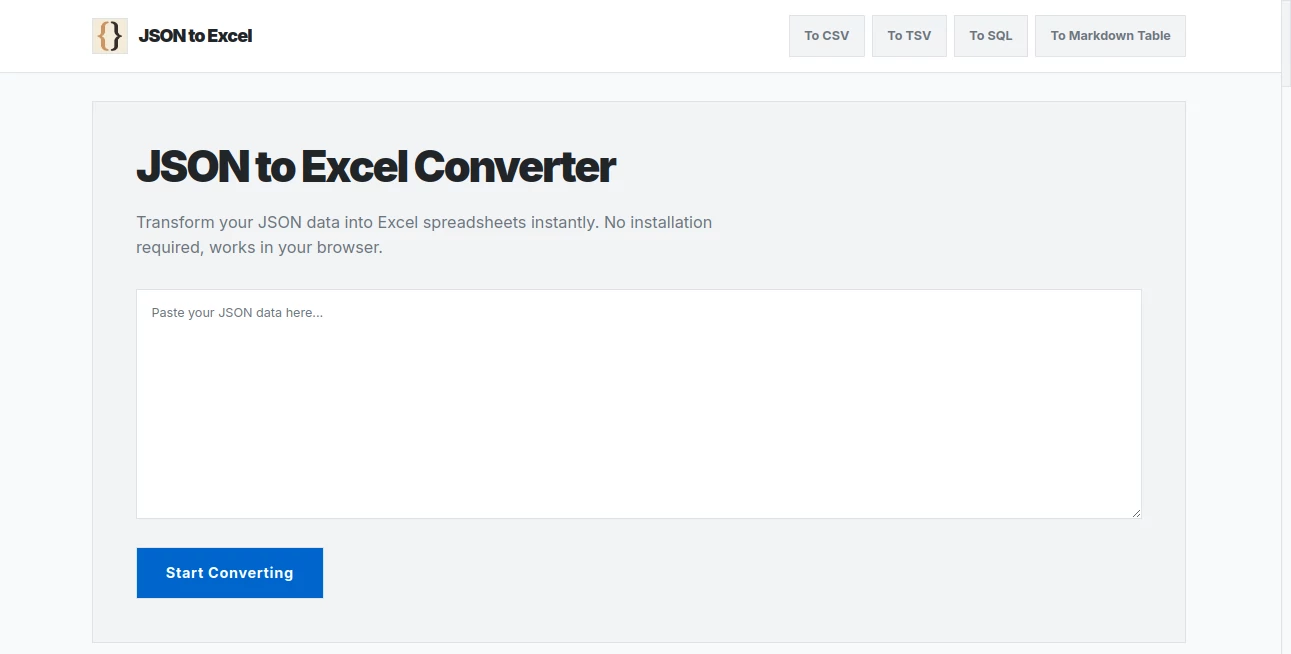
Picture this: you're knee-deep in a project, staring at a wall of JSON output from an API that's equal parts fascinating and frustrating. Suddenly, you need to slice it up, sort it out, and make it sing in a spreadsheet—but who has time for clunky imports or desktop downloads that promise the world and deliver headaches? Enter this gem of a tool, a browser-based wizard that turns that tangled data jungle into a neat, tidy Excel oasis in seconds. I've lost count of the times it's saved my bacon during late-night data wrangles, and honestly, if you're juggling APIs, inventories, or any JSON-heavy workflow, it's like finding an extra hour in your day. What I love most is how it strips away the barriers—no software installs, no server waits—just pure, instant magic that feels tailor-made for folks who actually get stuff done.
Key Features
User Interface
The setup here is refreshingly straightforward, like chatting with an old friend who knows exactly what you need without the small talk. You paste your JSON right into a generous input box up top, and boom—hit convert, and a live preview table unfolds below, letting you eyeball everything before you commit. It's all drag-and-drop friendly, with buttons that beg to be clicked and no overwhelming menus to navigate. On mobile? It shrinks gracefully, turning your phone into a pocket powerhouse for on-the-go tweaks. Last week, I was reviewing some e-commerce pulls during a coffee run, and it handled the switch from laptop to iPhone without missing a beat—smooth as silk.
Accuracy & Performance
When it comes to getting things right, this tool doesn't mess around; it parses even the knottiest nested arrays with a surgeon's precision, flattening them into columns that make perfect sense without a single misplaced value. And speed? We're talking instantaneous—your browser's own muscle does the heavy lifting, so no lagging queues or upload blues, even with hefty files pushing hundreds of megabytes if your machine's up to it. I once threw a massive API dump at it (think thousands of records from a sales feed), and it chewed through it like it was nothing, spitting out a flawless sheet faster than I could brew my next cup. It's that reliability that turns data dread into quiet confidence.
Capabilities
This isn't some one-note wonder; it shines at unpacking complex structures—arrays within objects, deep nests that would make most converters throw a tantrum—and spits out universal XLSX files that play nice with Excel, Google Sheets, or whatever you're running. Want to debug an API response? It'll lay it out row by row for easy anomaly hunts. Migrating from NoSQL chaos to tidy SQL? It validates schemas on the fly. And for marketing mavens, those SEO metric JSONs become pivot-table gold overnight. The real kicker is how it empowers post-conversion play—filter, sort, even conditional formats waiting in the wings—turning raw dumps into insights that actually move the needle.
Security & Privacy
In an era where data leaks are the stuff of nightmares, this tool stands out by keeping everything locked down on your device—no sneaky servers, no uploads to who-knows-where. Your JSON lives and dies in your browser's memory, vanishing the moment you close the tab, which is a godsend for handling sensitive stuff like financials or client lists. I've trusted it with proprietary inventory pulls that I'd never risk elsewhere, and that peace of mind? Priceless. It's not just secure; it's thoughtfully so, respecting your data like it's your own diary.
Use Cases
For the e-commerce hustler buried in Shopify exports, it's a lifeline—those sprawling order JSONs become sortable sales reports that forecast trends before breakfast. Developers debugging GraphQL quirks? One paste, and you've got a spreadsheet screaming anomalies from a hundred rows away. Marketers stitching together crawler data for SEO dashboards find it indispensable, blending metrics into visuals that wow stakeholders. And don't get me started on database migrations; what used to be a weekend slog is now a coffee-fueled afternoon win. It's versatile enough to fit any JSON puzzle, big or small, and that's what makes it indispensable.
Pros and Cons
Pros:
- Lightning-fast client-side magic that respects your hardware—no internet dependency mid-job.
- Spot-on handling of nested nightmares, turning chaos into clarity without a hitch.
- Broad compatibility that opens doors to any spreadsheet app under the sun.
- Zero-cost entry that delivers pro-level results, proving good things really do come free.
Cons:
- Relies on valid JSON input, so a quick linter check might be your best buddy for messy sources.
- Heavy on RAM for monster files, though most modern setups laugh it off.
Pricing Plans
Here's the cherry on top: it's completely free, no tiers, no upsells—just open the tab and go. That means unlimited conversions, no hidden limits beyond your browser's grit, and zero barriers to scaling up your workflow. In a sea of paywalled pretenders, this open-door policy feels like a breath of fresh air, letting you stack value without stacking bills. I've run dozens of batches for clients without a single fee, and it still feels like stealing—except it's all above board and brilliantly executed.
How to Use JSON to Excel Converter
Getting started couldn't be easier: snag your JSON from wherever it's hiding—API console, code editor, or exported file—and paste it straight into the input field. Give it a once-over for syntax snags (the built-in hints are a lifesaver here), then smack that convert button. Watch the preview table bloom below, tweak if your heart desires, and download your XLSX gem with one click. From there, fire it up in your favorite sheet app for the full analysis fiesta. I remember my first go: a wonky inventory pull that turned into a pivot-table party in under two minutes—talk about a workflow wake-up call.
Comparison with Similar Tools
Stack it against the usual suspects, and it pulls ahead with that unbeatable client-side speed—no server slogs or privacy pitfalls that plague cloud-heavy rivals. Where others cap your file sizes or nickel-and-dime for basics, this one swings wide open, handling nests and exports with a finesse that feels custom-built. Sure, desktop apps might offer fancier bells for die-hards, but for 90% of us web warriors, it's the sweet spot of power without the baggage. Hands down, it's the one I'd grab first for quick, secure data dances every time.
Conclusion
At the end of the day, this tool isn't just a converter—it's a quiet revolution for anyone wrestling with JSON's wild side, handing you the reins to tame it without the tantrums. From the solo dev dodging deadlines to the marketing whiz chasing insights, it delivers that rare mix of simplicity and sophistication that sticks with you. I've seen it transform frantic data dives into focused triumphs, and if that's not the mark of a winner, I don't know what is. Dive in, paste away, and watch your spreadsheets soar—your future self will thank you with every sorted column.
Frequently Asked Questions (FAQ)
Got a file size ceiling?
Nope, it's all up to your device's RAM—modern machines gobble up hundreds of megs like it's nothing.
Does my data stick around anywhere?
Not a chance; everything happens in your browser and poofs when you close the page—total peace of mind.
Mobile-friendly for real?
Absolutely, it adapts like a champ, so you can convert on your commute without skipping a beat.
What about wonky JSON?
Needs clean syntax to shine, but the hints guide you through fixes—pair it with a linter for bulletproof results.
Nulls showing up blank?
Smart move—they land as empty cells to keep your tables tidy and true to form.
AI Data Mining , AI Spreadsheet , AI Documents Assistant , AI Files Assistant .
These classifications represent its core capabilities and areas of application. For related tools, explore the linked categories above.
JSON to Excel details
Pricing
- Free
Apps
- Web Tools
Categories

JSON to Excel Alternatives Product

Sourcetable

GLM-OCR Onli…

ReportMaker.…

David One

markdown to …

Rename files…

jpg to excel

TO MD

AI OCR