🧠 AI Quiz
Think you really understand Artificial Intelligence?
Test yourself and see how well you know the world of AI.
Answer AI-related questions, compete with other users, and prove that
you’re among the best when it comes to AI knowledge.
Reach the top of our leaderboard.

















Kling 4.0 AI
What is Kling 4.0 AI?
There's a special excitement when you type a simple scene description or drop in a single photo and watch it transform into a smooth, cinematic clip that actually feels directed. The lighting shifts naturally, motion has weight, and the whole thing holds together without the usual AI weirdness. This tool delivers that experience consistently, turning ideas into short videos that look surprisingly polished. I’ve seen creators go from rough concepts to shareable clips in minutes, and the results often make people pause and ask, “Wait, you made that?” It’s the kind of tool that reignites the fun of visual storytelling without the usual production headaches.
Introduction
Creating video has always been time-consuming and expensive. Even simple clips used to require scripting, shooting, editing, and a bit of luck. Kling 4 changes the equation by letting anyone generate high-quality videos directly from text prompts or images. It understands cinematic basics—camera movement, physics, emotional tone—and produces clips that feel intentional rather than random. Whether you’re a solo creator testing ideas, a marketer needing quick assets, or someone who just wants to bring a wild concept to life, it removes the biggest barriers. The output quality, especially in motion and consistency, stands out in a crowded field of AI video tools.
Key Features
User Interface
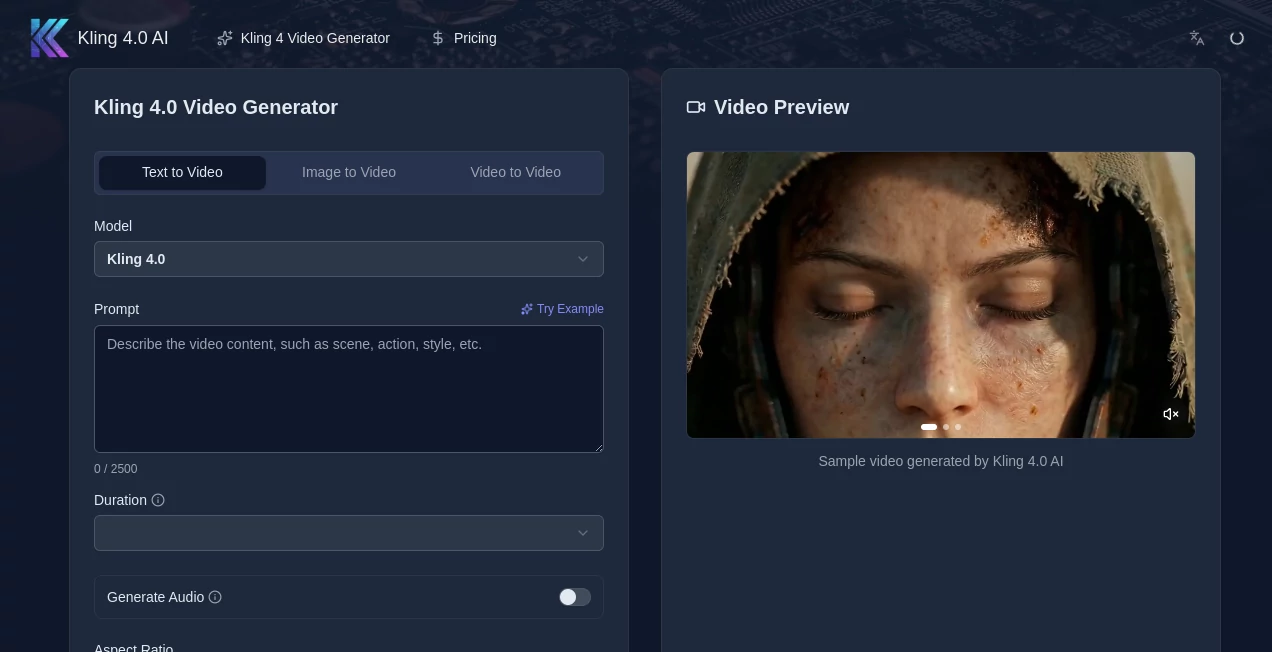
The interface keeps things clean and focused. A prominent prompt box invites you to describe your scene, with an optional image upload for stronger visual guidance. Simple toggles for aspect ratio, duration, and quality sit nearby, and the generate button is impossible to miss. Previews load reasonably fast, letting you iterate without losing momentum. It never feels overwhelming—even first-timers can produce something watchable on their very first try.
Accuracy & Performance
Motion stays coherent across frames, characters keep their identity, and physics behave in believable ways. The model handles complex prompts involving multiple subjects or camera moves without falling apart. Generation times are practical for creative work, and the results hold up at higher resolutions. In practice, it delivers that “wow” factor more often than not, especially when you give it clear direction or a good reference image.
Capabilities
It supports text-to-video and image-to-video generation, with strong hybrid guidance when you combine both. You get native support for different aspect ratios, cinematic camera language, and consistent character appearance across shots. Outputs come at solid resolutions suitable for social media, prototypes, or even rough client previews. The ability to create short, story-driven sequences rather than single random clips makes it particularly useful for real creative projects.
Security & Privacy
Your prompts and reference images are processed securely, with no unnecessary long-term storage. The platform respects user data and focuses on delivering the output without collecting more than needed. For creators working with client concepts or personal ideas, that clean approach provides welcome peace of mind.
Use Cases
A content creator turns a product photo into an engaging lifestyle clip for social media in minutes. An indie filmmaker mocks up key story moments to test pacing and tone before full production. A marketer generates quick video concepts for campaign pitches, iterating rapidly based on feedback. A hobbyist brings wild story ideas to life just for fun, sharing the results with friends who can’t believe it started as simple text. It shines anywhere you need motion and storytelling without a full video team.
Pros and Cons
Pros:
- Strong motion coherence and character consistency that feel cinematic.
- Fast enough generations to support real creative iteration.
- Hybrid text + image guidance gives precise control over the result.
- Clean, focused interface that gets out of your way.
- High-quality output that works for both casual and professional use.
Cons:
- Clip lengths remain relatively short, best for moments rather than full stories.
- Very complex or abstract prompts can still produce unexpected results.
- Unlimited or higher-resolution use requires a paid plan.
Pricing Plans
It offers a free tier generous enough to test the quality and create several clips without spending anything. Paid plans unlock higher resolutions, longer generations, faster queues, and more credits for heavier use. The pricing feels reasonable for the leap in creative capability—many users find that one paid month pays for itself by saving time on traditional production or stock footage.
How to Use Kling 4
Start by typing a clear scene description in the prompt box. Add a reference image if you want stronger visual control. Choose your preferred aspect ratio and duration, then hit generate. Watch the preview, tweak the prompt or reference if needed, and download the result. For better outcomes, be specific about camera movement, mood, and action. The process is fast and forgiving, letting you experiment until the clip feels right.
Comparison with Similar Tools
Many AI video generators still struggle with inconsistent motion, drifting faces, or unnatural physics. This one stands out for its cinematic coherence and reliable character consistency. While some tools focus purely on length or raw speed, Kling 4 prioritizes quality and storytelling intent, making the output feel closer to human-directed work. The hybrid guidance mode gives creators more director-like control than most alternatives.
Conclusion
Video creation has never been easier or more accessible, yet quality still matters. This tool strikes an impressive balance—fast enough to spark ideas, polished enough to share or use professionally. It doesn’t replace human creativity; it amplifies it, letting more people bring their visions to life without a full production pipeline. If you’ve ever wished you could see your ideas move, this is one of the best ways to make that happen right now.
Frequently Asked Questions (FAQ)
How long can generated clips be?
Most generations produce short, focused clips ideal for social media, prototypes, or story moments. Multi-shot workflows help build longer narratives.
Do I need a reference image?
Not required—text-only works well—but adding one improves consistency and visual accuracy.
What resolutions are available?
High-quality outputs suitable for most online uses, with higher resolutions unlocked on paid plans.
Can I use the videos commercially?
Yes, especially on paid plans which include appropriate usage rights.
Is there a free way to try it?
Absolutely—a free tier lets you generate several clips to experience the quality firsthand.
AI Animated Video , AI Image to Video , AI Video Generator , AI Text to Video .
These classifications represent its core capabilities and areas of application. For related tools, explore the linked categories above.
Kling 4.0 AI details
Pricing
- Free
Apps
- Web Tools
Categories

Kling 4.0 AI Alternatives Product

Kling 3.0
Seedance 2.0…

seedream 5

Seedance 2.0…

seedream vid…

Veo4AI

AI Motion Co…

Veo 4 AI
AISeedance2