🧠 AI Quiz
Think you really understand Artificial Intelligence?
Test yourself and see how well you know the world of AI.
Answer AI-related questions, compete with other users, and prove that
you’re among the best when it comes to AI knowledge.
Reach the top of our leaderboard.


















kling 5.0
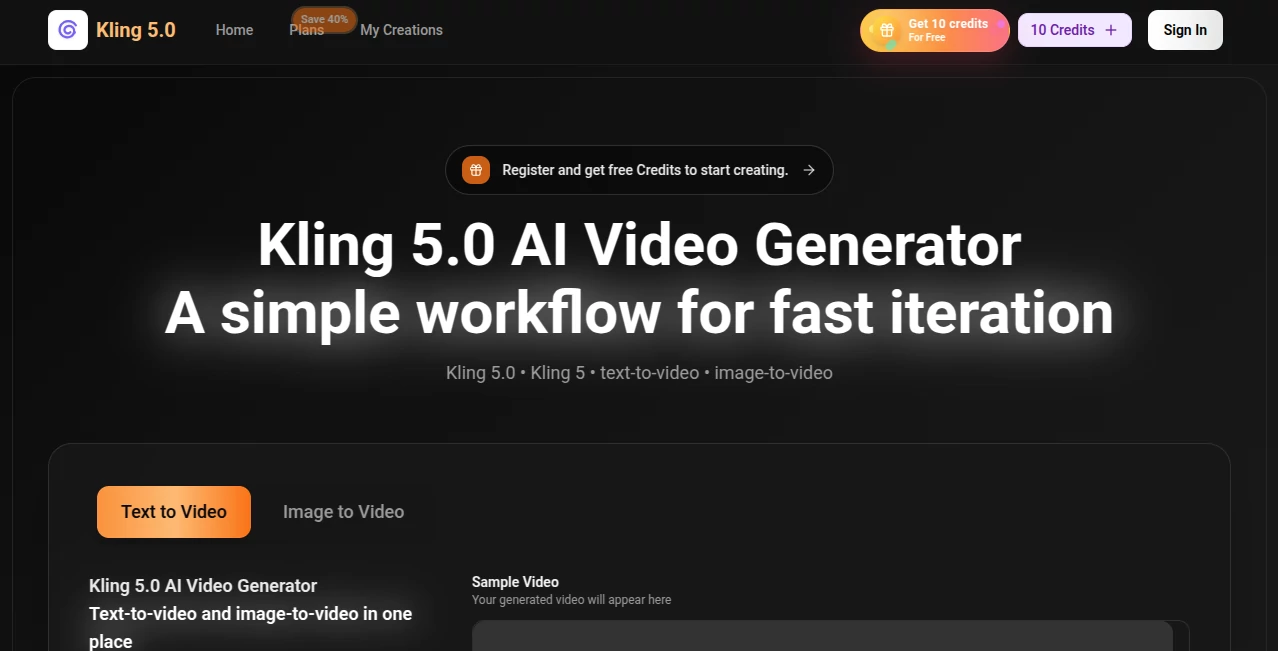
What is kling 5.0?
You type a scene idea, maybe add a reference image, and a minute later a short clip plays that actually moves with purpose—smooth camera work, consistent characters, and lighting that feels intentional rather than random. It’s the kind of result that makes you pause and rewatch because it doesn’t look like the usual jittery AI attempt. I’ve shown these clips to friends who normally shrug at generated video, and their first reaction is usually “wait, that actually looks good.” The motion has weight, the faces stay recognizable, and the overall feel leans cinematic instead of chaotic. That reliability turns experimentation from frustrating to genuinely fun.
Introduction
Creating video has always been time-intensive and expensive. Most AI tools promise the moon but deliver clips that break apart after a few seconds or lose the original idea along the way. Kling 5 changes the conversation by focusing on usable, fast output that respects your prompt and keeps visual consistency across frames. It handles both text-to-video and image-to-video in one clean place, built for creators who want to iterate quickly without starting from scratch every time. The workflow encourages making a few variations, picking the best one, and moving forward—exactly how real creative work often happens. For indie filmmakers, marketers, social creators, and anyone who thinks visually, it feels like having a fast, reliable collaborator who actually understands storytelling basics.
Key Features
User Interface
The interface keeps things simple and focused. A generous prompt area, optional image upload, clear choices for aspect ratio and duration, and one prominent generate button. Previews load quickly so you can compare takes without long waits. It never buries you in options; instead, it gets you from idea to clip with minimal friction. Both beginners and experienced creators appreciate how the tool stays out of the way and lets the video take center stage.
Accuracy & Performance
The model pays close attention to prompt details—characters keep their look across shots, motion follows natural physics, and camera moves feel motivated rather than random. Generation is fast enough to support real iteration; you can try slight variations and compare them side by side without losing your creative rhythm. Consistency stands out: faces don’t suddenly morph, outfits stay coherent, and the overall scene holds together better than many alternatives. It’s the kind of reliability that makes you trust the output instead of bracing for surprises.
Capabilities
It excels at text-to-video and image-to-video, with strong support for hybrid workflows where you guide the result with both words and visuals. You get short cinematic clips with good temporal coherence, natural movement, and decent handling of dialogue or action scenes. Multiple takes are encouraged so you can choose the strongest version, and the output is ready for further editing or direct sharing. The balance of speed and quality makes it practical for prototyping ideas, creating social content, or testing story beats before heavier production.
Security & Privacy
Your prompts and reference images are handled responsibly during generation, with no unnecessary long-term storage. The process is contained, giving creators confidence when working with personal projects, client concepts, or brand-sensitive material. It’s the kind of thoughtful approach that lets you experiment freely without second-guessing where your ideas end up.
Use Cases
A small brand turns a single product photo into a short lifestyle clip that feels more engaging than stock footage. An indie musician creates a quick visualizer that matches the song’s mood without spending days in editing software. A content creator generates daily Reels with consistent character style, saving hours compared to traditional shooting. A filmmaker tests emotional beats or camera moves before committing to full production. It shines anywhere you need fast, watchable video that carries a clear intention rather than generic motion.
Pros and Cons
Pros:
- Strong consistency in characters and motion across frames.
- Fast iteration cycle that keeps creative momentum alive.
- Hybrid text + image guidance gives real creative control.
- Output feels more cinematic and purposeful than many competitors.
Cons:
- Clip lengths remain modest (best for short scenes and social content).
- Highly complex or abstract prompts can still need refinement.
- Advanced features and higher usage sit behind paid access.
Pricing Plans
A free tier lets you test the quality and generate several clips daily, giving a genuine feel for what the tool can do. Paid plans unlock higher resolutions, longer clips, faster queues, and more generous generation limits. The pricing feels balanced for the speed and quality it offers—many creators find the paid tier worthwhile once they start relying on it for regular content or prototyping.
How to Use Kling 5
Open the generator, write a clear scene description in the prompt box, and optionally upload a reference image for stronger visual grounding. Choose your preferred aspect ratio (vertical for social, horizontal for other uses) and desired length. Hit generate and review the results. Generate a few variations if needed, pick the strongest take, and export. For more complex ideas, refine your prompt or combine multiple short clips in your editor. The whole process stays fast enough to keep you in flow rather than waiting.
Comparison with Similar Tools
Many AI video tools still struggle with character drift, unnatural movement, or lighting that changes randomly between frames. This one prioritizes coherence and cinematic feel, often delivering clips that require less cleanup and feel closer to intentional direction. The hybrid guidance and fast iteration give it an edge for creators who want control without complexity. It’s not the longest clips available, but for quality and reliability in short-form work, it frequently outperforms noisier alternatives.
Conclusion
Video creation has always demanded time, skill, and patience. Tools like this quietly lower those barriers while still respecting the craft. It won’t replace directors or cinematographers, but it gives solo creators and small teams a practical way to see their ideas move with speed and surprising quality. When the gap between “I have a concept” and “here’s a watchable clip” shrinks to minutes, storytelling becomes more accessible and more fun. For anyone who works with moving images, that’s a meaningful shift worth exploring.
Frequently Asked Questions (FAQ)
How long are the generated clips?
Best suited for short scenes, typically a few seconds up to around 10 seconds, ideal for social content and prototyping.
Do I need a reference image?
Not required—text-only works well—but adding one often improves character consistency and visual style.
What resolutions are available?
Up to 1080p on paid plans; free tier offers good preview quality for testing.
Can I use the videos commercially?
Paid plans include commercial rights; check specific terms for your intended use.
Is there a watermark on free generations?
Free clips usually carry a small watermark; paid generations remove it.
AI Animated Video , AI Image to Video , AI Video Generator , AI Text to Video .
These classifications represent its core capabilities and areas of application. For related tools, explore the linked categories above.
kling 5.0 details
Pricing
- Free
Apps
- Web Tools
Categories

kling 5.0 Alternatives Product

Seedance 2.0

Fast Wan

Seedance 2 V…
Kling 3 AI

Omnigen Stud…

LTX 2.3

ltx 2.3

AI ASMR Gene…

Veo 3.2