🧠 AI Quiz
Think you really understand Artificial Intelligence?
Test yourself and see how well you know the world of AI.
Answer AI-related questions, compete with other users, and prove that
you’re among the best when it comes to AI knowledge.
Reach the top of our leaderboard.


















Kling O1 AI

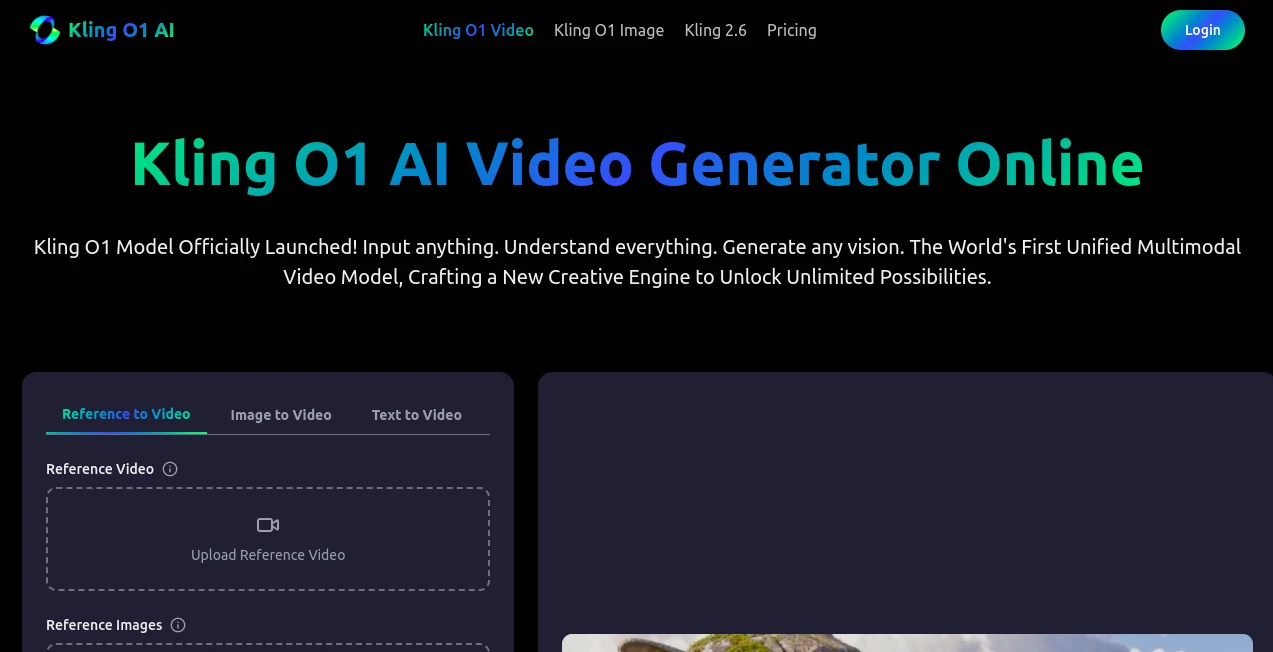
What is Kling O1 AI?
Kling O1 steps into the spotlight as a game-changer for anyone dreaming up moving scenes, pulling together all sorts of inputs to craft polished clips that feel alive and true to your thoughts. This platform lets you toss in pictures, snippets, or simple descriptions and watch them transform into short, dynamic pieces ready for the world. Creators from all walks keep coming back, sharing how it turns scattered sparks into seamless stories that captivate without the usual headaches.
Introduction
Kling O1 came alive from the frustrations of filmmakers and ad folks who juggled too many apps just to get a basic clip off the ground, each one handling only a sliver of the puzzle. A team of innovators decided to knit it all into one smooth ride, launching a tool that handles the whole flow from rough idea to finished frame. It didn't take long for word to spread through creative circles, with users swapping tales of ads that hooked crowds or short films that flowed like magic after just a few tweaks. What hooks people is how it keeps everything consistent—characters stay put, moods carry through—making the end result feel like a pro's touch without the endless back-and-forth.
Key Features
User Interface
The setup greets you with a clean slate where uploading a photo or jotting a note feels as easy as sending a text, with handy previews popping up to show your scene taking shape. Sliders for length and style sit right there, and the whole thing moves without a hitch, letting you swap bits or regenerate on the fly. It's the kind of board that invites tinkering, whether you're plotting a quick promo or a longer narrative, keeping the energy up without overwhelming the screen.
Accuracy & Performance
When you describe a bustling street or a quiet portrait in motion, it captures the little things—the way light shifts or faces hold expression—with a precision that surprises even picky eyes. Clips come together fast, often in under a minute, holding steady even when stacking changes like new angles or weather shifts. Those who've put it through paces often point to how it nails the intent, turning vague hunches into outputs that match what you pictured, with minimal do-overs needed.
Capabilities
From breathing life into a still shot to weaving text into full sequences, it juggles layers like adding props, tweaking backgrounds, or even extending shots to keep the story rolling. You can layer in multiple references for steady looks across frames, or use words to edit out extras and swap vibes on the spot. It shines at blending it all—short bursts of 3 to 10 seconds with built-in sounds that fit naturally—opening doors for everything from quick social bites to polished previews.
Security & Privacy
Your uploads and drafts stay locked down during the process, handled fresh and cleared out once you're done, giving you full say on what lingers in your library. It follows the basics of safe handling, so personal touches or client mocks don't wander off, letting you experiment freely without that nagging doubt in the back of your mind.
Use Cases
Ad teams upload product snaps and scene ideas to whip up showcase reels that highlight features without a full shoot. Fashion scouts stage virtual walks by blending model poses with outfit details, keeping fabrics and fits spot-on. Film editors trim crowds or swap skies in post, speeding up fixes that used to eat days. Directors build consistent worlds by referencing key shots, ensuring heroes and settings carry through without redraws.
Pros and Cons
Pros:
- Pulls everything into one spot, ditching the app-hopping hassle.
- Keeps looks steady across clips, saving time on fixes.
- Handles stacked changes smooth, like edits and extensions in one go.
- Quick turns mean ideas hit the ground running, not crawling.
Cons:
- Short clips cap the storytelling at bites, not full feasts.
- Credit bites add up for heavy hitters chasing volume.
- Fine controls might need a few runs to dial just right.
Pricing Plans
It starts light with a starter pack at about ten bucks for a handful of tries, stepping to popular mid-range at thirty for more room to play and sharper exports. Plus tiers around fifty unlock faster lines, and pro at a hundred brings the full kit with bulk options and round-the-clock help. All come as one-time buys with no strings, letting you stock credits that stick around as long as you do.
How to Use Kling O1
Kick off by dropping in your starting point—a pic, clip, or word sketch—and let it chew on the details to build your base. Peek at the preview to check the flow, tweak the description or swap elements if it needs a nudge, then hit export for a ready-to-roll file. Chain it for longer tales by feeding outputs back in, turning singles into series that build just how you see them.
Comparison with Similar Tools
Where some setups shine at single tricks like basic flips, Kling O1 layers it all in one engine, outpacing the switches that slow others down, though those might edge on raw length for epic builds. Against broader benches, it zeros in on consistent magic without the bloat, trading bells for that focused punch. It stands tall for folks wanting a full toolkit that feels like one seamless swing.
Conclusion
Kling O1 wraps the whirlwind of video dreaming into a tidy package, handing creators the keys to worlds that move just right. It turns the 'what if' of a still into the wow of motion, proving one smart hub can handle the heavy lift without losing the heart. As screens keep calling for fresh frames, this one's poised to keep the flow going, one vivid clip at a time.
Frequently Asked Questions (FAQ)
What can I feed it to start?
Anything from photos and short bits to plain words—it pulls it all together.
How long do the pieces run?
From three to ten seconds, with sounds that match the mood baked in.
Can I use it for paid work?
Yes, all outputs come cleared for commercial spins, no extra nods needed.
What if I need to edit mid-way?
Words do the trick—describe the change, and it reshapes on the spot.
Do credits roll over?
They stick around forever, no rush to burn through before they fade.
AI Image to Video , AI Video Editor , AI Text to Video , AI Video Generator .
These classifications represent its core capabilities and areas of application. For related tools, explore the linked categories above.
Kling O1 AI details
This tool is no longer available on submitaitools.org; find alternatives on Alternative to Kling O1 AI.
Pricing
- Free
Apps
- Web Tools
Categories

Kling O1 AI Alternatives Product

Veo 4 AI

Seedance AI …

wan2-6.org
Kling 3.0 Vi…

Seedance 2.0…

Veo 3.2

Runway Gen-4…

v04 ai

seedance 2