
🧠 AI Quiz
Think you really understand Artificial Intelligence?
Test yourself and see how well you know the world of AI.
Answer AI-related questions, compete with other users, and prove that
you’re among the best when it comes to AI knowledge.
Reach the top of our leaderboard.


















Korgi

What is Korgi?
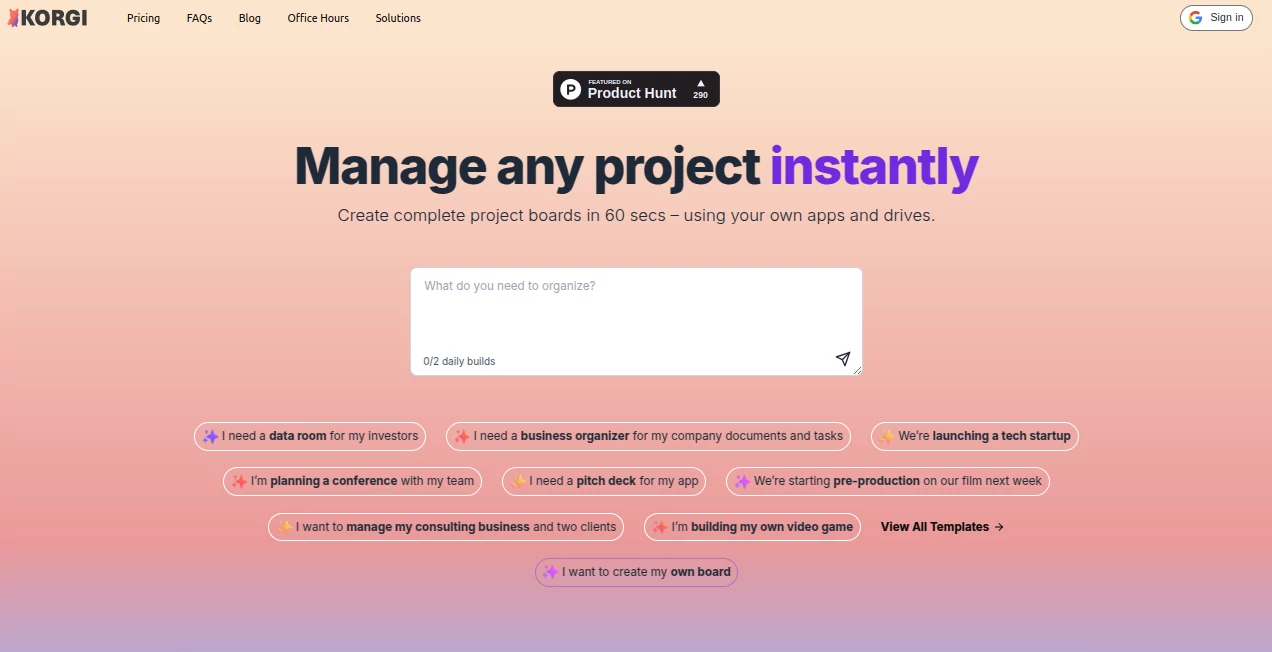
Imagine kicking off a new venture and having a full-fledged workspace pop up in under a minute, complete with tasks, links, and resources tailored just for you. That's the quiet thrill this platform delivers, pulling together your familiar apps into one sharable hub that feels like it was built for your brain. I've watched a friend turn a chaotic startup launch into a streamlined operation overnight, and the relief on her face said it all—this isn't just organization; it's freedom from the endless tab chaos.
Introduction
In the hustle of juggling emails, docs, meetings, and notes across Google and Microsoft tools, it's easy to lose hours hunting for that one file or link. This tool steps in as a clever unifier, using AI to whip up complete project boards from a simple description or ready-made templates. It stores everything in your own drives, launches calls or chats right there, and even exports polished docs with a click. Folks from startups to consultants rave about reclaiming 5-6 hours a week, turning scattered workflows into something visual and fun—especially handy for creative types or remote teams bridging ecosystems without the lock-in drama.
Key Features
User Interface
The layout hits that sweet spot of colorful yet uncluttered, with cards you can drag, color-code, and connect in ways that mirror how ideas actually flow. Clip web pages straight in, launch meetings without leaving, and chat with collaborators or the built-in AI—all from one screen that minimizes those dreaded tab explosions. It's ADHD-friendly in the best way, letting you capture thoughts in any order and rearrange later, feeling more like a playful canvas than a rigid grid.
Accuracy & Performance
That AI builder nails prompts remarkably often, spinning out boards with relevant steps, content, and links that save the usual setup slog—users report boards ready in 60 seconds that actually fit their needs. It runs smooth across devices, syncing seamlessly with your drives for quick access, and handles collaborations without lags that kill momentum. In practice, it's the kind of reliable that turns skeptics into fans, delivering consistent setups that hold up as projects grow.
Capabilities
From pre-built templates for everything like event planning or pitch decks to custom AI generations, it centralizes tasks, docs, calendars, and even Zoom/Meet launches in one spot. Export to formatted Google Docs or Sheets effortlessly, clip research on the fly, and store data securely in Sheets for visual tracking over years. The AI chat assists with queries, while integrations keep you in your preferred Google or Microsoft world—no forced switches.
Security & Privacy
With CASA Tier 3 verification from Google—the top-tier stamp—and data tucked safely in your own drives with your permissions, it's built for trust, especially in enterprise setups. No proprietary black boxes; everything stays under your control, compliant and audited for those handling sensitive client or company info. It's reassuring for teams, knowing collaborations happen without compromising the long-term safety of your work.
Use Cases
A consultant builds client data rooms that impress investors with one-click polish. A filmmaker maps pre-production from script beats to shoots, launching calls mid-board. Startups organize launches end-to-end, from tasks to resources, without ecosystem fights. Even students track college apps with templates that guide every step, or creatives outline books with cards that export to outlines seamlessly—it's versatile enough to fit solo dreams or team drives.
Pros and Cons
Pros:
- AI setups that shave hours off planning, feeling custom without the effort.
- Deep ties to your existing apps, no painful migrations.
- Visual, flexible boards that spark joy in organization.
- Strong security baked in, ideal for pros and teams.
Cons:
- Best with Google or Microsoft setups—pure independents might miss some integrations.
- Advanced launches like meetings gated to Pro.
Pricing Plans
Dive in free to build your first board and feel the magic—no card required. Pro unlocks the full suite, like meeting launches and unlimited AI, at a straightforward seat-based rate that scales with teams. Enterprise adds extra controls for bigger ops, with annual deals sweetening the pot—it's priced to grow with you, rewarding commitment without upfront barriers.
How to Use Korgi
Start by describing your project or picking a template—the AI spins up a board in seconds. Drag in clips from web or drives, color-code cards for clarity, and connect tasks with links or subtasks. Launch chats or meetings as needed, export when done, and share with collaborators who jump in seamlessly. Tweak with the AI assistant for ideas, and watch your workspace evolve from chaos to clarity.
Comparison with Similar Tools
While some boards force proprietary formats or limit integrations, this one embraces your Google and Microsoft stack fully, with AI that builds deeper than basic templates. It's less about rigid lists and more about visual flow that fits creative or mixed teams, outpacing tab-heavy alternatives with speed and native ties that just feel right.
Conclusion
This platform redefines getting things done, blending AI smarts with your trusted tools into boards that are as fun as they are functional. It hands back those lost hours, letting you focus on the work that matters rather than wrestling files. For anyone tired of scattered setups, it's a heartfelt yes—step in, build something, and feel the difference a thoughtful hub can make.
Frequently Asked Questions (FAQ)
Does it lock me into one ecosystem?
No—works beautifully with both Google Workspace and Microsoft 365.
How secure is my data?
Top-tier CASA verified, stored in your drives with your controls.
Can I start for free?
Yes—build and explore your first board at no cost.
What's the AI like?
Helpful chat for queries, plus instant board building from prompts.
Great for teams?
Absolutely—shareable, collaborative, with permissions you set.
AI Productivity Tools , AI Team Collaboration , AI Workflow Management , AI Project Management .
These classifications represent its core capabilities and areas of application. For related tools, explore the linked categories above.
Korgi details
This tool is no longer available on submitaitools.org; find alternatives on Alternative to Korgi.
Pricing
- Free
Apps
- Web Tools
Categories

Korgi Alternatives Product

Kaamfu

Miro

Slackactivity

Zapier

KarmaGuy

photo to URL

Motion

LaunchBoard
AnyToURL
