
🧠 AI Quiz
Think you really understand Artificial Intelligence?
Test yourself and see how well you know the world of AI.
Answer AI-related questions, compete with other users, and prove that
you’re among the best when it comes to AI knowledge.
Reach the top of our leaderboard.

















labgen
What is labgen?
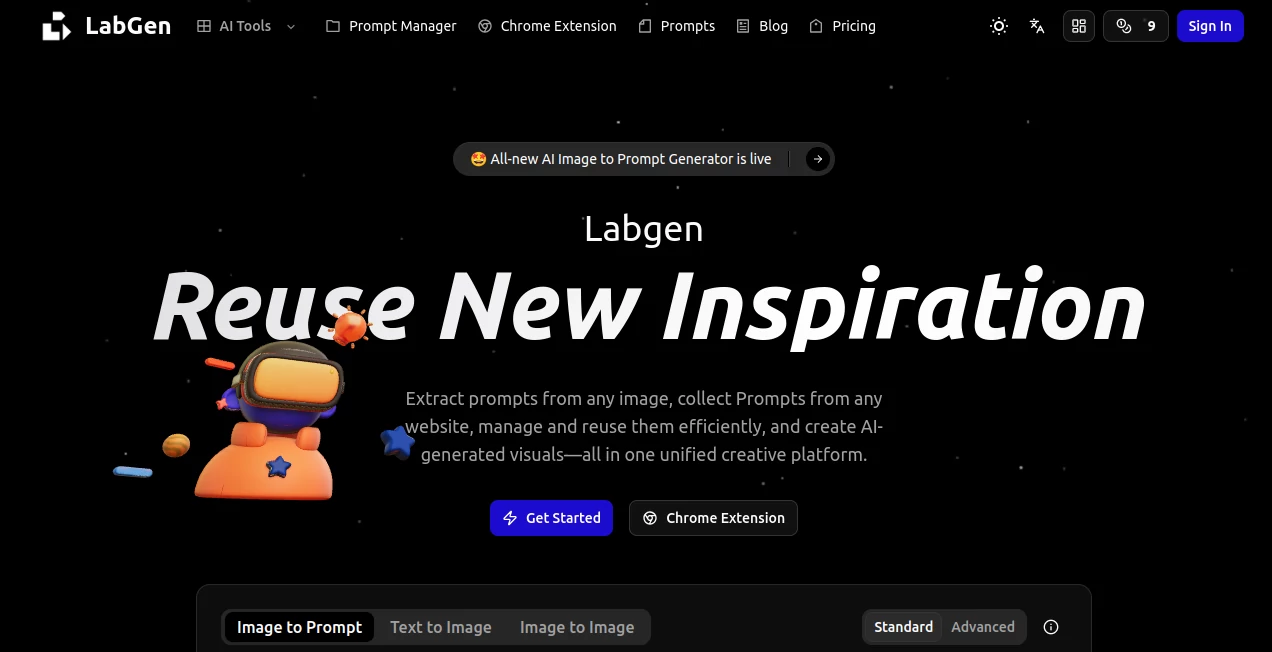
There are moments when you spot an image online that stops you cold and you think, "I wish I could recreate something like this," but figuring out the right words to feed an AI generator feels like solving a puzzle in the dark. This platform changes that entirely. Upload any picture—your own photo, a piece of concept art, a mood board screenshot—and it hands you back a crisp, detailed prompt that's ready to paste straight into Midjourney, Flux, or whatever tool you love. It's the kind of shortcut that makes you feel clever rather than lucky, and once you start saving those prompts, they become your personal arsenal for future ideas.
Introduction
What makes this feel different from the usual AI helpers is how it bridges the gap between inspiration and execution so smoothly. You no longer have to stare at a blank prompt box wondering how to describe lighting or composition; the tool does the heavy lifting by reading the visual story in your image and translating it into language that AI image models actually understand. I tried it with a moody street photo I took on my phone—grainy, imperfect—and within seconds I had a prompt that captured the atmosphere, the color grade, even the subtle emotion in the scene. Suddenly I was generating variations that felt like extensions of my original shot, not random guesses. It's built for people who create regularly and want to keep their best ideas close at hand, not scattered across notes apps or chat histories.
Key Features
User Interface
The moment you land, you're greeted with a generous upload area that accepts drag-and-drop or paste—no fuss, no login wall for basic use. Settings for target model, language, focus (subject, layout, color, style), and word count sit neatly to the side, each with clear labels so you know exactly what you're tweaking. Results appear instantly below, with options to copy, save to your library, or generate an image right there if you want. It's thoughtful design that respects your time—everything is visible, nothing buried.
Accuracy & Performance
The real strength shows when you feed it something tricky—a crowded scene or an abstract illustration—and it still pulls out the core elements without hallucinating extras. Prompts come out structured and precise, often hitting that sweet spot where the description is vivid but not bloated. Speed is impressive too; even on detailed images the response lands fast, and the output feels tuned specifically for the models you choose. In my own tests, prompts for Nano Banana or Seedream read like they were written by someone who knows those tools inside out.
Capabilities
Beyond the core image-to-prompt magic, it lets you dial in focus areas (want to emphasize mood over exact objects?), set word limits, and choose output language—handy for non-English workflows. It also spins marketing copy or short stories from the same image if you're in that mood. The prompt manager side is where it really grows on you: save everything with tags and categories, organize into collections, and pull them back with one click or via the Chrome extension when you're working elsewhere. It's turning fleeting inspiration into lasting creative fuel.
Security & Privacy
Your images and generated prompts stay private—processed on the fly and not used for training or shared anywhere. The library is yours alone, visible only when you're logged in, giving peace of mind especially when uploading client work or personal photos. It's handled with care, so you can experiment freely without second thoughts.
Use Cases
Digital artists reverse-engineer stunning pieces they find online to study techniques and build their own style library. Social media creators turn mood boards into ready captions or full prompts for consistent branding across posts. Product designers drop renderings to generate precise descriptions for team handoffs or client briefs. Even language teachers use it to create rich scene descriptions for students to practice narration. It's the tool that quietly sits in your workflow and makes every visual idea more actionable.
Pros and Cons
Pros:
- Dead-on prompt quality that saves hours of trial-and-error typing.
- Flexible controls let you shape the output exactly how you need it.
- Prompt library with tags turns one-off wins into reusable assets.
- Chrome extension brings the power wherever you're browsing.
Cons:
- Best results come from decent-quality inputs; very low-res or noisy images can dilute precision.
- Advanced organization features shine brightest after you build a library.
Pricing Plans
The standard mode is completely free—no login, no ads, no catch—letting you generate prompts whenever inspiration strikes. For those who want private storage, unlimited saves, and the full Chrome extension experience, registration unlocks everything without aggressive paywalls. It's generous in a way that feels genuinely creator-friendly.
How to Use LabGen
Head to the upload area, drop in your image (or paste it from clipboard), tweak any settings—model, language, focus, length—then hit generate. Review the prompt that appears; copy it directly to your favorite generator, or save it to your library with a quick tag. Next time you're working, pull up saved prompts in seconds or use the extension to grab ideas straight from your browser. It's a loop that gets smoother the more you use it.
Comparison with Similar Tools
Other image-to-prompt converters often spit out generic walls of text that need heavy editing; this one delivers structured, model-optimized descriptions that work right away. The added prompt management and extension make it more than a one-trick tool—it's a full creative companion that keeps your workflow tidy and your best ideas close at hand.
Conclusion
This platform quietly solves one of the biggest bottlenecks in AI art: getting the words right so the visuals can shine. It turns admiration for someone else's image into your own next creation, faster and smarter than trying to describe it yourself. For anyone who spends time making visuals, it's the kind of helper that quickly becomes essential—simple, powerful, and genuinely useful.
Frequently Asked Questions (FAQ)
Do I need to sign up to use it?
No—basic prompt generation works without any account.
What image formats are supported?
JPG, PNG, WebP, AVIF, HEIC, GIF, and more—most common types work fine.
Can I save prompts for later?
Yes, once logged in you get a private library with tags and categories.
Does it work for non-English prompts?
Absolutely—output in Chinese, Japanese, Korean, and others is supported.
Is there a browser extension?
Yes, it lets you generate and manage prompts directly while browsing.
AI Rewriter , AI Creative Writing , AI Content Generator , AI Image Recognition .
These classifications represent its core capabilities and areas of application. For related tools, explore the linked categories above.
labgen details
Pricing
- Free
Apps
- Web Tools
Categories

labgen Alternatives Product
Slogan Gener…

Banana Promp…
PromptFix

Shutterstock
Remove Text
promptcat

SalesPageNow

Jasper
onstyle
