
🧠 AI Quiz
Think you really understand Artificial Intelligence?
Test yourself and see how well you know the world of AI.
Answer AI-related questions, compete with other users, and prove that
you’re among the best when it comes to AI knowledge.
Reach the top of our leaderboard.


















LazyTyper

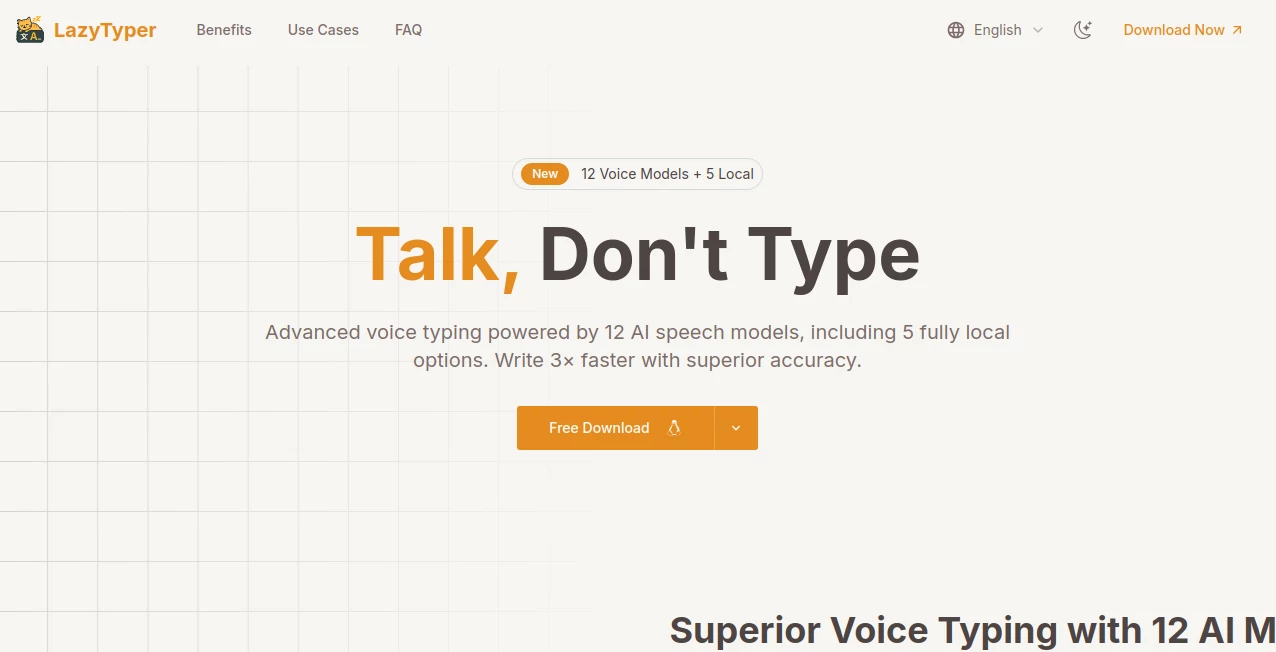
What is LazyTyper?
LazyTyper bursts onto the scene as a game-changer for anyone who's ever felt chained to their keyboard, offering a seamless way to let your voice do the heavy lifting. Powered by an impressive lineup of 12 AI speech models—including five that run fully offline—this app turns spoken words into polished text with astonishing speed and precision. Users rave about how it triples their writing pace while slashing edits to almost nothing, making it an absolute must-have for busy professionals, students, and creators who want to capture ideas as they flow without missing a beat.
Introduction
LazyTyper was born from the frustration of slow, error-prone dictation tools that just couldn't keep up with real-world demands, and boy, has it delivered. Since its launch, thousands of users have embraced this lightweight powerhouse, sharing stories of doubled productivity and effortless workflows that feel like magic. From software developers dictating code docs to journalists transcribing interviews on the fly, it's earned glowing reviews—like a V2EX user calling it a "99/100 experience"—for its multilingual prowess and zero-ad, completely free model. In a world where time is gold, LazyTyper hands you the freedom to think and speak freely, transforming how we turn thoughts into text with unmatched reliability and joy.
Key Features
User Interface
The interface couldn't be more intuitive: a clean, minimal dashboard lets you switch between models in a snap, with simple toggles for local or cloud options that feel as natural as flipping a switch. It runs quietly in the background across Windows, macOS, and Linux, popping up wherever you need it—be it in emails, docs, or code editors—without hogging resources or cluttering your screen. Newcomers find themselves up and running in minutes, praising how it vanishes into your routine like a trusted sidekick, always ready when inspiration strikes.
Accuracy & Performance
Boasting a stellar 90% accuracy rate that means most transcriptions need zero tweaks, LazyTyper outshines competitors by handling accents, tech jargon, and even mixed languages like English and Chinese in one breath. It's three times faster than typing, clocking in at speaking speed without the lags that plague others, and its lightweight design ensures it flies on any machine. Developers and writers alike celebrate this blend of speed and spot-on results, turning what used to be a chore into a fluid, frustration-free flow that keeps creativity humming.
Capabilities
With 12 top-tier models at your fingertips—from Groq Whisper for blazing speed to offline locals for ironclad privacy—LazyTyper adapts to any task, excelling in real-time transcription, multilingual dictation, and hands-free note-taking. It shines for coding comments, content drafting, research jotting, and email composing, even capturing quotes mid-conversation with pinpoint precision. This versatility makes it a Swiss Army knife for productivity, empowering users to tackle diverse workflows with confidence and flair.
Security & Privacy
Privacy is paramount here: voice data zips straight to your chosen API without touching LazyTyper's servers, and five local models keep everything on-device for ultimate control. API keys stay locked on your machine, analytics are optional and easy to disable, and nothing gets stored unless you say so. In an era of data worries, this thoughtful approach earns trust from pros handling sensitive info, letting you dictate freely knowing your words remain yours alone.
Use Cases
Software devs like Alex Chen swear by it for dictating code docs in mixed languages, doubling their output without a single fumble. Content writers such as Sarah Mitchell pour ideas into drafts hands-free, loving the 90% edit-free magic that keeps their voice authentic. PhD students like David Kim capture research notes on the go, far surpassing clunky phone apps, while project managers such as Emily Johnson breeze through emails, calling it a "huge upgrade." Journalists like Lisa Thompson transcribe interviews lightning-fast in the field, making LazyTyper indispensable for dynamic, deadline-driven lives.
Pros and Cons
Pros:
- Completely free and ad-free, with full access to all 12 models for unlimited use.
- Unbeatable 90% accuracy and 3x speed boost that slashes editing time dramatically.
- Seamless multilingual support, including mixed languages, perfect for global creators.
- Lightweight and cross-platform, running smoothly without draining your system.
- Five offline models ensure top-tier privacy for sensitive work.
Cons:
- Relies on internet for cloud models, though locals cover offline needs.
Pricing Plans
LazyTyper delights with its straightforward, no-strings approach: everything's free forever, from the 12 AI models to unlimited transcriptions, with zero ads or hidden catches. Download and dive in—no tiers, no upsells—just pure, professional-grade voice typing at your fingertips. This generous model has won over thousands, proving you don't need to pay to play at the top of your game.
How to Use LazyTyper
Grab the download for your OS—Windows or macOS from the site, Linux via GitHub—and install in a flash. Launch it, pick a model like Groq for speed or a local one for privacy, then start speaking into any app: emails, notes, code, you name it. It transcribes in real-time; switch engines on the fly for the perfect fit, and watch your words flow effortlessly. With minimal setup and maximal results, it's as simple as talking your way to brilliance.
Comparison with Similar Tools
Unlike rigid system dictations that fumble accents and languages, LazyTyper's 12-model arsenal—including unique locals—delivers pro-level flexibility and 90% accuracy that leaves them in the dust. Pinyin typing for Chinese? It's seven times slower by comparison, but LazyTyper breezes through mixed sentences like a dream. While others lock premium features behind paywalls, this free marvel stands alone, earning V2EX acclaim as the ultimate upgrade for anyone serious about voice-to-text.
Conclusion
LazyTyper isn't just a tool—it's a liberation, unshackling creators from keyboards to unleash ideas at the speed of thought. With its stellar accuracy, lightning-fast performance, and unwavering commitment to privacy, it redefines productivity in ways that feel both revolutionary and refreshingly simple. Thousands already hail it as indispensable, from devs to dreamers, and it's easy to see why: in a fast world, this app doesn't just keep up—it propels you forward, one spoken word at a time.
Frequently Asked Questions (FAQ)
Is LazyTyper really free forever?
Yes! All features, including the 12 models, are completely free with no ads or limits—pure value from start to finish.
How accurate is the transcription?
It hits 90% accuracy out of the gate, meaning most of what you say lands perfectly without a single edit.
Does it support multiple languages?
Absolutely, with seamless handling of mixed languages like English and Chinese in the same breath—ideal for global users.
Can I use it offline?
Yes, five local models run entirely on-device for private, internet-free dictation anytime, anywhere.
What platforms does it work on?
It's cross-compatible with Windows, macOS, and Linux, running light and smooth on all.
AI Transcription , AI General Writing , AI Writing Assistants , AI Content Generator .
These classifications represent its core capabilities and areas of application. For related tools, explore the linked categories above.
LazyTyper details
This tool is no longer available on submitaitools.org; find alternatives on Alternative to LazyTyper.
Pricing
- Free
Apps
- Web Tools
Categories

LazyTyper Alternatives Product

Read

Song Lyrics …
TrueSource AI

TurboScribe

NepVox

Quso AI

Alai

Manus

SocialRails
