
🧠 AI Quiz
Think you really understand Artificial Intelligence?
Test yourself and see how well you know the world of AI.
Answer AI-related questions, compete with other users, and prove that
you’re among the best when it comes to AI knowledge.
Reach the top of our leaderboard.


















LightPDF

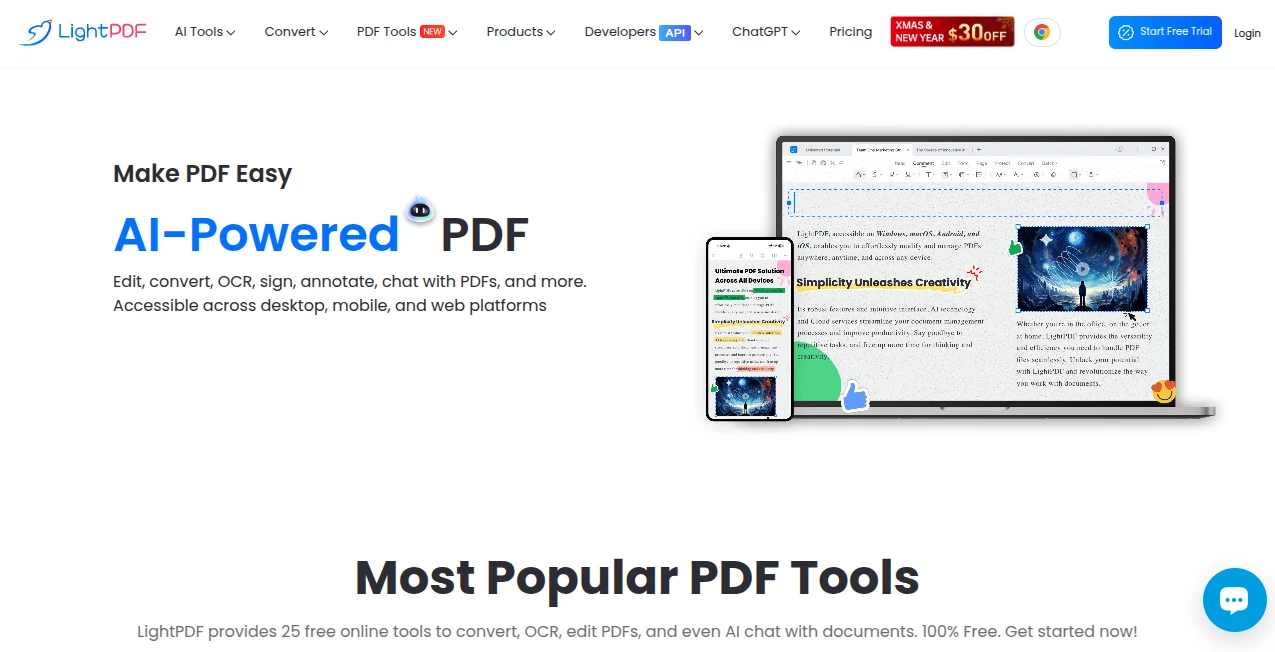
What is LightPDF?
Picture this: you're staring at a dense PDF contract on your phone, needing to highlight key clauses, add notes, and extract a summary—all without downloading heavy software or fumbling through menus. That's where this tool shines, quietly handling the mess with an AI boost that feels almost too good to be true. I've had moments where a quick chat with the document pulled out insights I would've missed in hours of manual reading, and suddenly the whole process felt effortless. It's the kind of helper that makes you wonder how you managed PDFs before.
Introduction
LightPDF has quietly become one of those must-have companions for anyone dealing with documents daily—students cramming for exams, professionals reviewing reports, or freelancers juggling client files. What sets it apart is the smart blend of classic PDF tools with AI that actually understands context, letting you chat with your files, summarize pages, or even generate mind maps from content. Users often share how it saved them from Acrobat's steep learning curve and price tag, turning tedious tasks into quick wins. It's reliable, cross-platform, and keeps evolving with features that make document work feel less like a chore and more like a conversation.
Key Features
User Interface
The layout is refreshingly straightforward—drop a file, and everything you need appears without clutter. Tools are organized logically, with a clean sidebar for editing and conversion options that don't overwhelm. I appreciate how mobile-friendly it is; switching from laptop to phone mid-task never feels jarring. The AI chat pops up naturally, almost like having a helpful colleague ready to explain or rephrase on the spot.
Accuracy & Performance
OCR handles scanned documents with impressive clarity, pulling text from even older PDFs without garbling words or losing layout. Conversions maintain formatting beautifully—Word docs come out looking sharp, and summaries capture the core points accurately. It processes quickly too; large files don't bog down the system, and batch operations run smoothly, which is a lifesaver when deadlines loom.
Capabilities
Beyond basic edits like adding text or images, it lets you merge, split, compress, protect, and sign files with ease. The AI side stands out—chat to summarize, translate, or even rewrite sections, plus generate mind maps or PPTs from your PDF. It supports a huge range of formats, from DOCX to images, and the OCR works across multiple languages, making it genuinely versatile for global work.
Security & Privacy
Files get 256-bit SSL encryption in transit and are deleted automatically after processing, with no long-term storage unless you choose to keep them. They follow GDPR and ISO standards, and the AI doesn't train on your documents—everything stays private. That's reassuring when handling sensitive contracts or personal notes; you can focus on the work without worrying about leaks.
Use Cases
Students use it to annotate textbooks, highlight key passages, and chat for quick summaries before exams. Professionals compress reports for email or add e-signatures to contracts without printing. Freelancers convert client docs to editable formats, then rewrite sections with AI help for proposals. Even small businesses merge invoices, protect sensitive files, and generate quick overviews from long reports—it's the go-to for anyone who hates wasting time on PDFs.
Pros and Cons
Pros:
- Free tier is genuinely useful with no watermarks on core tasks.
- AI chat makes complex documents approachable and saves hours.
- Cross-platform access means it works anywhere you need it.
- Fast processing and accurate conversions that preserve layouts.
Cons:
- Some advanced AI features sit behind a paywall.
- Heavy files can take a bit longer on free plan.
Pricing Plans
The free version covers everyday needs—editing, converting, signing, and basic AI chats—without forcing upgrades. Premium plans unlock unlimited AI credits, faster processing, and extras like advanced OCR or watermark removal, starting at a reasonable monthly rate with yearly savings. It's structured so casual users stay free, while power users get value that pays for itself quickly.
How to Use LightPDF
Head to the site, drag your PDF in—no sign-up needed for basics. Pick what you need: edit text, convert to Word, or chat with the AI for a summary. For AI tasks, upload and ask questions naturally, like "highlight key points" or "rewrite this section." Download or share the result. I once turned a 50-page report into a clean summary and PPT outline in under 10 minutes—start small, and you'll be hooked.
Comparison with Similar Tools
Unlike bloated desktop suites that demand installs and subscriptions, this one lives online and feels lightweight yet powerful. Free alternatives often slap watermarks or limit features, but here core tools stay truly free with AI extras that outshine most competitors. It's the sweet spot for anyone who wants pro results without the hassle or cost of enterprise-grade software.
Conclusion
LightPDF quietly transforms the daily grind of PDF work into something almost enjoyable. With its blend of reliable editing, smart AI assistance, and zero-fuss access, it handles the heavy lifting so you can focus on what matters. Whether you're a student, professional, or just someone tired of PDF headaches, it's the tool that makes documents work for you—not the other way around.
Frequently Asked Questions (FAQ)
Is the free version really unlimited?
Core tools like edit, convert, and sign are free without limits or watermarks; AI features have daily quotas.
Can I use it offline?
Online-only for web version; desktop and mobile apps offer offline editing.
Does it support multiple languages?
Yes, OCR and chat work across many languages, including non-Latin scripts.
How secure are my files?
256-bit encryption, automatic deletion after use, and GDPR compliance keep everything protected.
What's the best way to get started?
Just visit the site, upload a file, and try editing or chatting—no account needed for basics.
AI Documents Assistant , AI PDF , AI Summarizer , AI Files Assistant .
These classifications represent its core capabilities and areas of application. For related tools, explore the linked categories above.
LightPDF details
This tool is no longer available on submitaitools.org; find alternatives on Alternative to LightPDF.
Pricing
- Free
Apps
- Web Tools
- Chrome Extensions
Categories

LightPDF Alternatives Product

GLM-OCR Onli…

UPDF AI
The #1 Text …

Document Chat

jpg to excel

Humanize AI …

Futurwise

ModelsLab

Watermark in…
