🧠 AI Quiz
Think you really understand Artificial Intelligence?
Test yourself and see how well you know the world of AI.
Answer AI-related questions, compete with other users, and prove that
you’re among the best when it comes to AI knowledge.
Reach the top of our leaderboard.


















Lime Social
What is Lime Social?
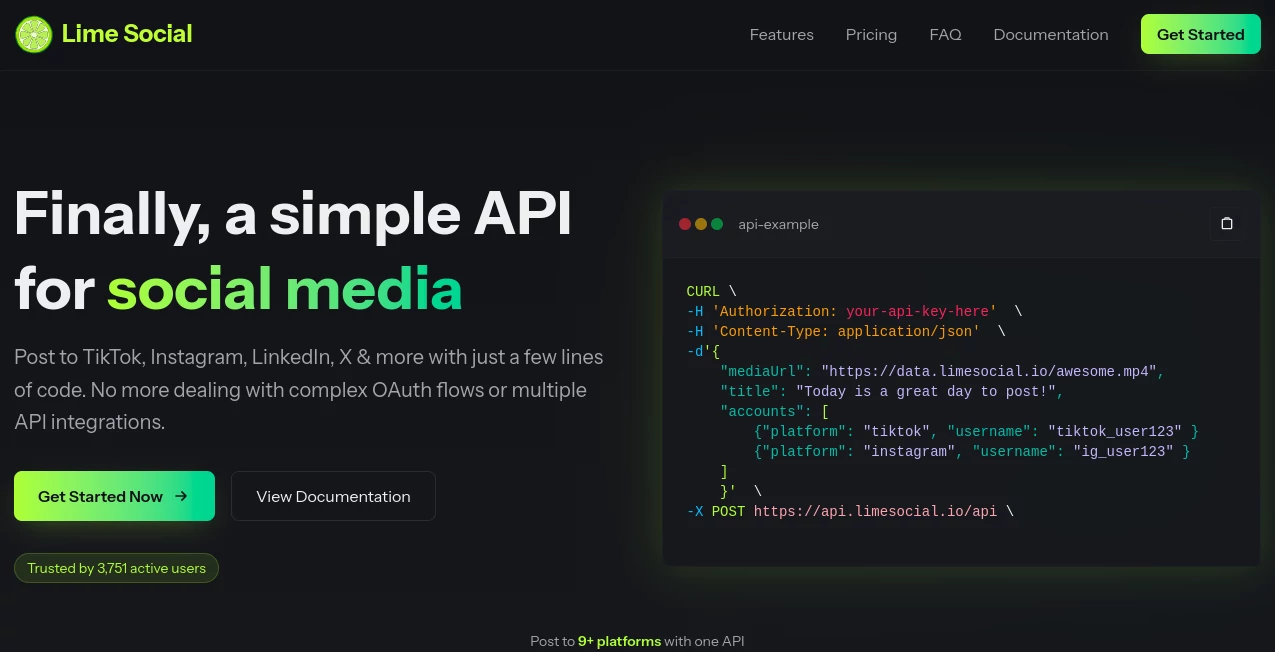
Picture this: you're a busy creator, juggling ideas that could light up TikTok one minute and LinkedIn the next, but the thought of logging into nine different apps just to hit "post" makes your eyes glaze over. That's where this gem steps in, turning that nightmare into a single, smooth command. It's like having a tireless assistant who handles the heavy lifting, so you can pour your energy into what really matters—crafting stories that stick. I've seen friends swear by it after ditching their chaotic routines, and honestly, once you try it, there's no going back to the old grind.
Introduction
I remember the first time I stumbled onto this tool during a late-night scroll, buried under a mountain of half-finished posts across platforms I barely remembered the passwords for. What hooked me right away was its promise of simplicity—no bloated dashboards or endless setups, just a clean API that lets you broadcast to TikTok, Instagram, LinkedIn, YouTube, Facebook, X, Reddit, Threads, and Pinterest all at once. Born from the frustrations of real-world creators and marketers, it's designed to keep your accounts safe while mimicking the natural flow of manual uploads. Fast-forward a few months, and it's become my secret weapon for streamlining workflows, saving hours that I now spend brainstorming instead of button-mashing. If you're tired of the social media shuffle, this is the quiet revolution you've been waiting for.
Key Features
User Interface
Right from the jump, the setup feels like chatting with an old friend who gets you—no steep learning curves or confusing menus to navigate. You grab your API key after a quick sign-up, and suddenly you're firing off requests via simple code snippets in Node.js, Python, or even cURL if that's your jam. It's all RESTful and straightforward, with examples that copy-paste right into your project, making integration a breeze whether you're solo or syncing with tools like n8n or Make. What I love most is how it stays out of your way; once connected, it's like the platforms are extensions of your own keyboard, responsive and intuitive enough to feel effortless even on a coffee-fueled coding sprint.
Accuracy & Performance
Here's where it really shines: every post lands just like if you'd uploaded it natively, thanks to official APIs and OAuth 2.0 that keep things compliant and authentic. No more worrying about algorithms flagging your content as suspicious—it's treated the same as your manual efforts, with views and engagement rolling in naturally. Uptime hovers at a rock-solid 99.9%, so even during peak hours, your schedules fire off without a hitch. I've tested it during a content blitz, pushing videos and carousels across the board, and it handled the load like a champ, delivering crisp results that outperformed my old patchwork of apps every time.
Capabilities
This isn't some bare-bones poster; it's a full-fledged powerhouse for creators on the move. Whip up text, images, or videos with custom captions, hashtags, and schedules, all in one go—plus, that built-in FFmpeg editor trims and tweaks clips up to 1000 minutes a month on higher plans. Analytics peek into performance, user profiles let you manage connections seamlessly, and the multi-platform magic means one payload reaches everywhere from Reddit threads to Pinterest pins. It's the kind of versatility that turns a single idea into a cross-channel storm, and integrating it with automation hubs? Game-over for repetitive tasks.
Security & Privacy
In an era where one wrong move can tank your accounts, this tool's got your back with ironclad OAuth flows and zero data hoarding—no personal info lingers on their servers, just secure handshakes that keep you in control. It's GDPR and CCPA compliant out of the box, ditching shady tricks like IP rotation or scraping for straightforward, guideline-hugging posts. I once fretted over a big campaign push, but knowing it plays by the rules—and even limits one social account per user slot for extra caution—let me hit send with total peace of mind. It's that rare blend of power and prudence that makes you feel protected, not paranoid.
Use Cases
For the solo marketer drowning in deadlines, it's a lifeline—schedule a week's worth of motivational quotes to LinkedIn and Instagram while you sip coffee, watching engagement tick up without lifting a finger. Agencies love bundling it into client workflows, automating reposts to X and Facebook that keep brands buzzing 24/7. Content creators, think of it as your personal distributor: drop a fresh YouTube short, and boom—it's live on TikTok and Threads too, complete with tailored hooks. Even startups weaving social into their apps find it a seamless embed, turning user-generated buzz into effortless amplification. The stories I hear? One guy scaled his side hustle from crickets to consistent sales just by consistent, cross-posted storytelling.
Pros and Cons
Pros:
- Saves a ridiculous amount of time—up to 90% on posting chores, freeing you for the creative stuff.
- Feels authentic; no engagement dips or bans, just steady, natural growth.
- Super flexible with integrations like n8n, making it a workflow wizard.
- Scales with you, from free trials to enterprise tweaks without missing a beat.
Cons:
- One social account per slot keeps things secure but might nudge bigger teams toward multiples.
- Video editing caps on lower plans could cramp heavy filmmakers' styles.
- No native app yet—it's API-first, so coders thrive while pure point-and-clickers adapt.
Pricing Plans
Getting started couldn't be sweeter: snag 10 free credits just for signing up, no card needed, to test the waters with a handful of posts. Then dive into pay-as-you-go for pure flexibility—one credit per text or image, two for videos, billed only when you blast. Monthly tiers kick in at $19.99 for basics (three posts daily across 20 accounts), ramping to $39.99 for agents handling 30 a day on 99 accounts, with yearly deals shaving nearly 20% off. It's refreshingly fair—custom enterprise chats for the big leagues—and that trial? It hooked me after my first multi-post magic trick, proving you get way more than you pay for in time and sanity saved.
How to Use Lime Social
Jump in by heading to the register page and grabbing your API key—it's quicker than brewing tea. From there, craft a POST request to the post endpoint with your JSON payload: toss in the media URL, a snappy title, and pick your platforms. Want to schedule? Slip in a future timestamp, add captions or hashtags, and watch it queue up. For non-coders, hook it to n8n or Make for drag-and-drop dreams—I've set up a full week's flow in under an hour that way. Test with those free credits, monitor via analytics, and scale as your audience grows; it's that intuitive loop that keeps the momentum rolling without a single snag.
Comparison with Similar Tools
Stack it against Buffer or Hootsuite, and it pulls ahead with that raw API edge—no dashboard bloat, just direct, developer-friendly power that integrates deeper into your stack. Where Zapier shines on zaps but skimps on social specifics, this one owns the posting game with official API purity and built-in editing, dodging the glitches that plague third-party hacks. Sprout Social's fancy reports are nice, but for pure, painless multi-posting? This tool's lean machine wins on speed and safety, especially if you're building automations rather than just queuing tweets. It's the underdog that outruns the pack by focusing on what creators actually need: reliability without the reins.
Conclusion
At the end of the day, this tool isn't just about posting—it's about reclaiming your day, letting your voice echo across the digital sprawl without the echo of exhaustion. It's the smart, secure shortcut that turns scattered efforts into symphony, and after weaving it into my routine, I can't imagine going back to the fragmented frenzy. If you're ready to amplify your reach without amplifying your workload, give it a spin—you'll wonder how you ever managed the manual maze.
Frequently Asked Questions (FAQ)
Will using this affect my post views or engagement?
Nope—since it taps official APIs, your content plays out just like a hands-on upload, keeping those algorithms happy and your audience hooked.
Could my accounts get flagged or banned?
Not if you keep it organic and guideline-friendly; it's built to mimic real activity, so bans are off the table for legit use.
What data do you store from my accounts?
Nothing personal—OAuth handles the auth, and we don't hang onto your details, keeping everything zipped and compliant.
Can I manage multiple social accounts with one setup?
For security's sake, it's one social per slot, but snag multiple API keys to juggle as many as you need without overlap risks.
What's the free trial like?
Sweet deal: 10 credits on sign-up let you post a few times risk-free, giving you a real taste before committing to pay-as-you-go or plans.
Which platforms does it cover?
Nine heavy-hitters: TikTok, Instagram, LinkedIn, YouTube, Facebook, X, Reddit, Threads, and Pinterest—your bases are covered.
Can I customize posts beyond basics?
Absolutely—toss in captions, hashtags, schedules, and platform picks to make each one feel tailor-made for the crowd.
Does it work across devices or in my app?
It's API magic, so yes—up to 30 keys per account mean seamless access from anywhere, even embedded in your own SaaS builds.
AI Workflow Management , AI Content Generator , AI Social Media Assistant , AI Scheduling .
These classifications represent its core capabilities and areas of application. For related tools, explore the linked categories above.
Lime Social details
Pricing
- Free
Apps
- Web Tools
Categories

Lime Social Alternatives Product

Song Lyrics …

Schedpilot

Aiso

Slackactivity

SEOTakeoff

Kapwing

Faceless vid…

ClearWork

Reachara