🧠 AI Quiz
Think you really understand Artificial Intelligence?
Test yourself and see how well you know the world of AI.
Answer AI-related questions, compete with other users, and prove that
you’re among the best when it comes to AI knowledge.
Reach the top of our leaderboard.


















AI Lip Sync Generator

What is AI Lip Sync Generator?
Lipsync sweeps in as a game-changer for anyone juggling video clips and sound bites, matching mouth movements to spoken words with a smoothness that feels almost too good to be true. This handy spot lets you drop in your footage and audio, then watches as it weaves them together into clips that look handcrafted by a pro editor. Folks who've given it a whirl often chat about how it cuts down hours of fiddling, turning rough drafts into ready-to-share gems that grab eyes and hold them tight.
Introduction
Lipsync came about a couple years back, sparked by a team fed up with the drag of syncing sounds to sights the old way—endless frame-by-frame tweaks that killed the creative buzz. They set out to bottle that seamless flow into something anyone could grab, and it took off quick among social sharers and clip makers swapping tips on how it nailed a tricky voice-over in minutes. What started as a simple matcher has grown into a go-to for breathing life into stills or cartoons, with users passing around clips of pets or tots "talking" that rack up likes without the sweat. At its core, it's about handing over the reins to something smarter, so you can chase the story while it handles the harmony.
Key Features
User Interface
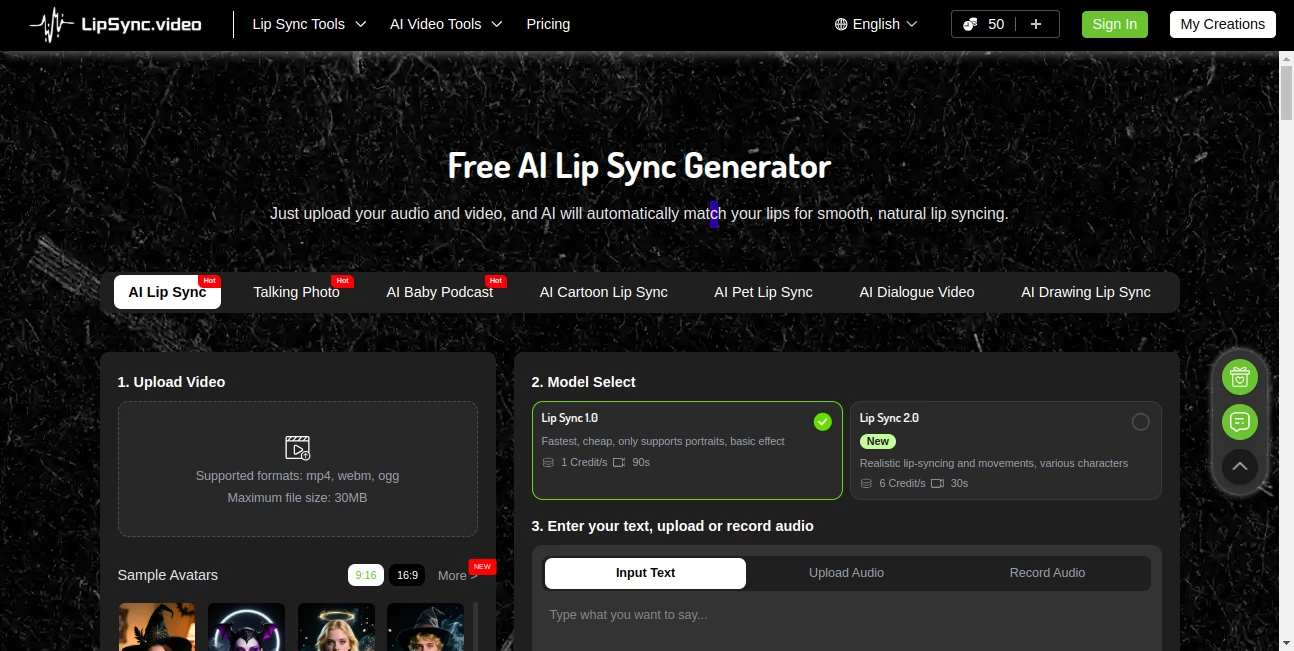
You land on a clean setup that lays it all out front and center—a spot to haul in your video or sound, with easy picks for how deep you want the match to go. Sliders and switches for extras like word overlays sit right there, no digging through menus, and a quick peek lets you test runs before committing. It's the kind of flow that clicks after one glance, like chatting with a sharp assistant who gets your drift without repeating yourself.
Accuracy & Performance
When you pair a voice clip with a face shot, it lines up the motions so spot-on that even picky viewers can't spot the seams, holding steady through quick talks or drawn-out tales. Jobs wrap up in a flash, often under a minute for short bits, keeping your pace brisk without skimping on the polish. Those who've pushed it with real clips note how it shines on everyday footage, dodging the glitches that plague lesser setups and delivering results that pop on any screen.
Capabilities
From livening up a photo into a chatting head to syncing a drawn character with a full script, it juggles a range of tricks that stretch beyond basic matches—think adding flair to animal antics or baby babbles. You can layer in translations or pauses on the fly, and it handles batches for steady workflows, spitting out files ready for social blasts or bigger edits. The real draw is how it adapts to your angle, whether you're after quick fun or something with a bit more bite.
Security & Privacy
Your uploads get treated like quick visitors—processed on the spot and cleared out once the clip's yours, with no long hangs or shares unless you nod. It keeps things buttoned up with standard locks, letting you stash faves in a private nook if you like. Clip makers rest easy knowing their rough cuts stay under wraps, focusing on the fun without a nagging thought about where the bits might wander.
Use Cases
Social folks whip up pet "interviews" that go viral on short-video apps, drawing laughs without staging a shoot. Teachers pair history figures with modern takes, making lessons stick with synced speeches that feel alive. Marketers mock product pitches with avatar hosts, testing tones before the big push. Even family videographers revive old home movies, dubbing in forgotten lines to share stories that hit home harder.
Pros and Cons
Pros:
- Zero barriers to start—no accounts or fees for the basics.
- Matches come out crisp and natural, fooling even close looks.
- Handles a spread from photos to cartoons without skipping a beat.
- Quick turns keep the ideas flowing fresh.
Cons:
- File caps mean bigger projects need chopping.
- Fancier modes eat credits faster than free runs.
- Best on clear faces; fuzzy shots might need a cleanup first.
Pricing Plans
It kicks off free for light lifts, with no strings or sign-ins to snag you, perfect for dipping toes. For heavier hauls, a credit setup steps in—simple packs that last forever once grabbed, often with steals on bundle deals. The tiers keep it fair, nudging up only when you chase the pro polish, so you pay for what you pull without the monthly nag.
How to Use Lipsync
Drag your video and sound into the slots, pick your match level from the quick menu, and toss in any tweaks like holds or captions. Hit the go button and wait a tick—out pops your synced clip, ready to snag and share. Swing back to your saved spot for rounds two and three, building a reel from single sparks without starting over each time.
Comparison with Similar Tools
Where some demand downloads or steep setups, Lipsync keeps it web-light and wallet-friendly, though those might edge in batch beasts for studio crowds. Against free-for-alls that fumble on faces, it lands the sync sweeter, but could bow to heavyweights on endless edits. It fits sharp for quick creators, blending ease with edge where others drag or dull.
Conclusion
Lipsync wraps the wild world of video voices into neat, nifty packages that ignite shares and smiles. It turns the tangle of timing into a triumph, proving that a smart nudge can make clips sing without the symphony. As screens keep calling for content that connects, this one's poised to keep the conversation going, one synced smile at a time.
Frequently Asked Questions (FAQ)
What clips does it take?
Standard video bites up to a modest size, paired with clear sounds.
How long till it's done?
Most wrap in moments, scaling with the sync's depth.
Can I tweak after?
Grab the file and fiddle further in your editor of choice.
Works on drawings too?
Yep, it brings characters to chatty life with the right nudge.
What if it glitches?
Sharpen your inputs or hit the help line for a quick fix.
AI Animated Video , AI Image to Video , AI Video Generator , AI Lip Sync Generator .
These classifications represent its core capabilities and areas of application. For related tools, explore the linked categories above.
AI Lip Sync Generator details
This tool is no longer available on submitaitools.org; find alternatives on Alternative to AI Lip Sync Generator.
Pricing
- Free
Apps
- Web Tools
Categories

AI Lip Sync Generator Alternatives Product

seedance 2.0

Seedance 2 A…

Nano Banana …

Whisper Thun…

Seedance 2.0

vio4 ai video

kling 4.0

Seedance AI …
Seedance 2.0