
🧠 AI Quiz
Think you really understand Artificial Intelligence?
Test yourself and see how well you know the world of AI.
Answer AI-related questions, compete with other users, and prove that
you’re among the best when it comes to AI knowledge.
Reach the top of our leaderboard.


















LitVideo
Spark Life into Videos with Smart Templates

What is LitVideo?
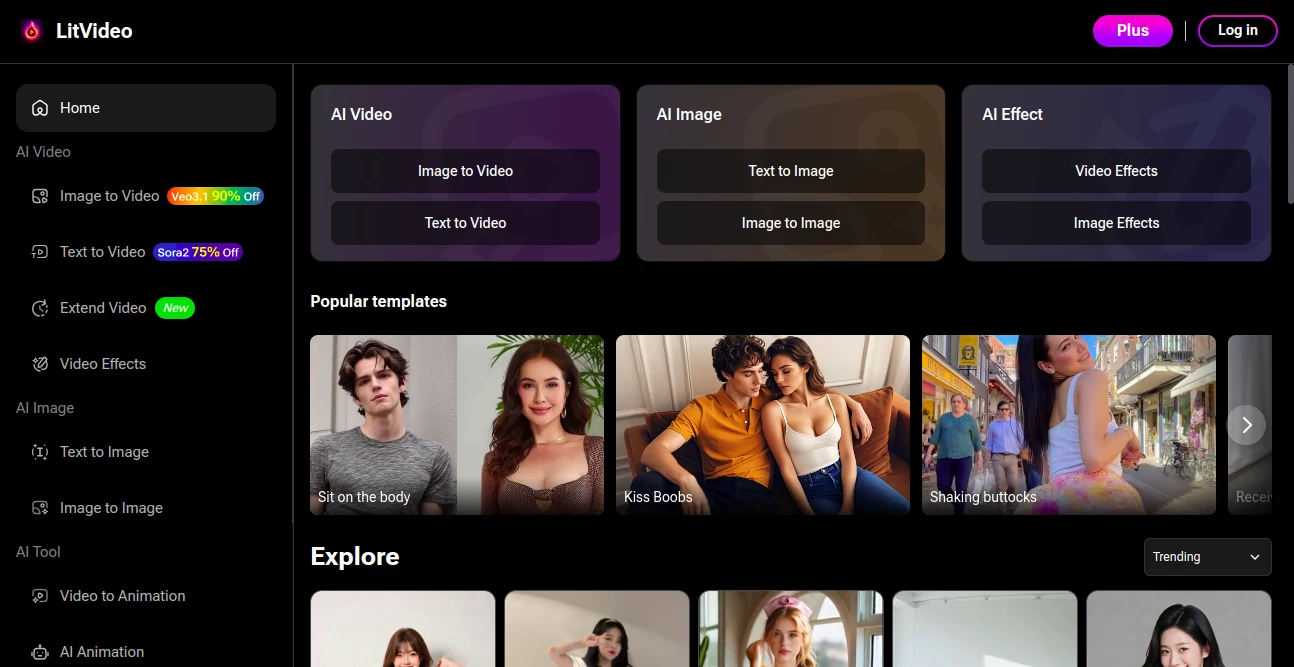
LitVideo lights up the screen with a gallery of ready-to-roll video blueprints that bring your wildest scenes to life in seconds. It's the quick-fix wizard for creators craving dynamic clips without the drag of starting blank, pulling from a stash of crowd-pleasers that fit everything from playful teases to bold statements. Users light up forums with tales of how it turned a lazy afternoon into a viral hit, proving that sometimes the best stories hide in prepped packages waiting for your twist.
Introduction
LitVideo hit the ground running a year or so back, cooked up by a band of video nuts who'd wasted too many sunsets staring at empty timelines. They bottled the essence of what makes clips click—those electric moments that hook eyes and hold 'em—into bite-sized starters anyone could grab. From day one, it drew in bedroom directors and social hustlers alike, who swapped screens of before-and-after magic that shaved hours off edits. What keeps the buzz alive is how it nods to the edgier side of storytelling, offering sparks that feel fresh yet familiar, turning everyday uploads into shares that stick around.
Key Features
User Interface
The landing spot's a vibrant scroll of thumbnails that tease each template's vibe, from sultry poses to cheeky encounters, with a search bar up top for pinning your fancy. Tap one, and it unfolds into a customizable canvas where drags and drops swap faces or tweak timings, all wrapped in a sleek frame that feels more like a playground than a program. No clunky sidebars stealing focus; it's all action, with previews popping live as you play.
Accuracy & Performance
It locks onto your inputs with a grip that rarely slips, blending elements so seamless you'd swear it was shot in one take, clocking near-flawless matches on motion and mood. Renders fly out in a blink, even stacking layers, without the stutter that plagues heavier apps, keeping your groove intact from click to clip. Creators nod to its knack for nailing nuances, like a lingering gaze or fluid sway, that elevate amateur tries to pro glances.
Capabilities
Dive into a lineup that spans intimate whispers to fiery clashes, each template primed for personalization—slot in your cast, amp the intimacy, or remix the rhythm to match your narrative. It handles the full arc, from static setups to flowing sequences, with exports that shine on any feed, plus batch runs for churning multiples without sweat. It's like a director's cut kit, whispering suggestions for amps or cuts that push the envelope just right.
Security & Privacy
Your uploads get a quick pass through the mill, then poof—erased clean, with no trails left for wanderers, locked behind sessions that vanish on close. It keeps the curtain tight on your experiments, sharing only what you push out, so those private previews stay yours alone. Folks in the know appreciate the no-nonsense veil, letting bold plays unfold without a ripple of risk.
Use Cases
Content mills fire up promo reels with a dash of allure, layering brand bits over tempting templates to lure logins. Solo vloggers spice personal diaries, weaving heartfelt hooks into everyday rants for deeper connects. Ad teams test waters with quick mocks, swapping scripts till the click rate climbs. Even event planners craft teaser montages, blending guest glows with playful prompts that build hype without the haul.
Pros and Cons
Pros:
- Vast vault of starters that ignite ideas without the blank stare.
- Blends smooth as silk, dodging the janky joins of old-school edits.
- Speeds the sprint from spark to share, perfect for deadline dashes.
- Embraces the bold, giving edge without the extra grind.
Cons:
- Tuned for punchy pops; epic sagas might feel a tad squeezed.
- Peak-hour queues can nudge waits, though rare as full moons.
- Free peeks cap the party, saving the feast for ticket holders.
Pricing Plans
Sample the spread free with a few freebies to whet the appetite, no hooks attached. Monthly pass at ten bucks opens the floodgates for unlimited spins and full-fidelity pulls, while yearly locks in savings at eighty, tossing extras like priority queues. Teams bump to twenty for shared stashes, and trials let you binge a week before the bill, easing the leap.
How to Use LitVideo
Browse the board for a template that tingles, tap to load, then layer your leads—faces, flair, or flair-ups—with simple slots that snap in place. Scrub the timeline for tempo tweaks, preview the pulse, and hit export for a file that flies to your feed. Stash favorites for future frolics, remixing as moods shift, turning one base into a bouquet of blasts.
Comparison with Similar Tools
Where broad builders bog down in basics, LitVideo leaps to lively layers, though those might suit straight-laced shoots better. Against template troves, it amps the attitude with edgier edges, but could trail in tame variety. It scores for creators chasing quick, quirky kicks over cookie-cutter cuts.
Conclusion
LitVideo fans the flames of video visions, handing hasty makers a hotbed of hooks that hum with life. It shrinks the schlep from sketch to spotlight, letting stories strut without the stall. As screens keep craving the next thrill, this toolkit stays the steady flame, igniting uploads that linger in likes and loops long after.
Frequently Asked Questions (FAQ)
Can I tweak templates beyond basics?
Deep dives welcome—swap scenes, sync sounds, or stretch shots to your spec.
What file flavors come out?
MP4 mains with sidekicks in GIF or quick clips for cross-post pops.
Does it play nice on phones?
Web-wired but thumb-friendly, with app vibes on the horizon.
How fresh are the faces in mixes?
Pulled from polished pools, blending yours for that one-of-a-kind kick.
What if a render rubs wrong?
Regen on the spot or ping support for a swift swap.
NSFW .
These classifications represent its core capabilities and areas of application. For related tools, explore the linked categories above.
LitVideo details
This tool is no longer available on submitaitools.org; find alternatives on Alternative to LitVideo.
Pricing
- Free
Apps
- Web Tools
Categories

LitVideo Alternatives Product

SinfulX.ai

Nectar AI

Soulgen
rule34dle

Joyland

Undress Vide…

NSFWChatbots

Promptchan

CandyAI
