🧠 AI Quiz
Think you really understand Artificial Intelligence?
Test yourself and see how well you know the world of AI.
Answer AI-related questions, compete with other users, and prove that
you’re among the best when it comes to AI knowledge.
Reach the top of our leaderboard.


















LivePhoto.video

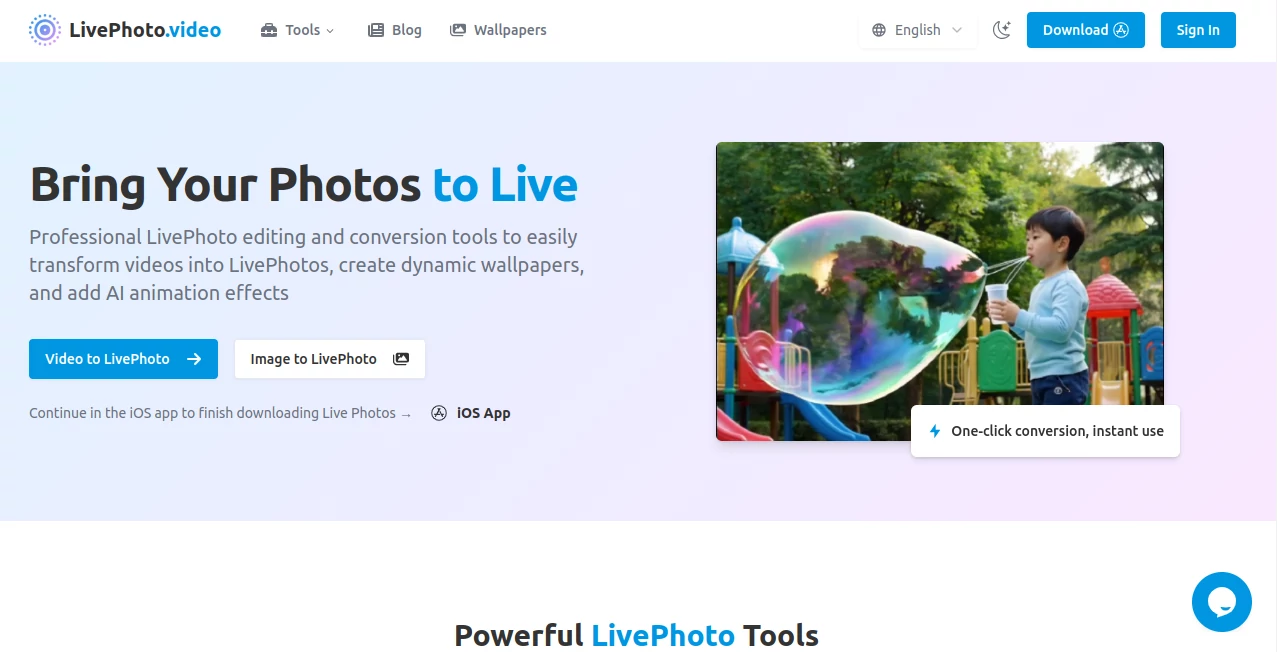
What is LivePhoto.video?
LivePhoto stands as a game-changer for anyone who cherishes capturing those fleeting moments, transforming ordinary snapshots into interactive treasures that pulse with energy. This remarkable platform takes the static world of photos and infuses it with motion and sound, creating LivePhotos that delight at a touch. It's the kind of tool that turns a simple family gathering into a vivid memory you can almost hear and feel, making every share more meaningful and every wallpaper a window to joy.
Introduction
Ever since its launch, LivePhoto has captured the hearts of iPhone users and beyond, offering a seamless way to breathe life into videos and images with effortless grace. Born from a passion for preserving the full essence of moments—not just the frozen frame but the subtle movements and whispers that make them special—it quickly became indispensable for storytellers, families, and creators alike. Imagine scrolling through your camera roll and tapping a photo to watch it come alive; that's the magic LivePhoto delivers, praised by thousands for its intuitive charm and stunning results. It's more than a converter; it's a heartfelt companion that elevates everyday photography into something profoundly alive.
Key Features
User Interface
The interface greets you with a clean, welcoming canvas that's as intuitive as flipping through your own photos, with simple upload buttons and sliders that respond like old friends. Whether you're cropping a clip or selecting an effect, everything flows without a hint of clutter, making the process feel like a natural extension of your creativity. Users often remark on how it just 'gets' what you want, turning potential frustration into pure delight from the first tap.
Accuracy & Performance
LivePhoto excels in preserving every nuance of motion and sound with breathtaking fidelity, ensuring that the 1.5 seconds before and after your shot ring true to life. Processing happens in a flash, even for longer clips, delivering high-quality results that shine on any screen. What sets it apart is that unwavering reliability—no blurry edges or muted audio here—just crisp, vibrant recreations that make you wonder how you ever settled for stills alone.
Capabilities
From converting short videos into enchanting LivePhotos to animating static portraits with AI-driven effects that add natural sway and emotion, the possibilities are endless and exhilarating. It effortlessly turns GIFs into interactive wallpapers or restores faded old photos with lifelike vitality, all while supporting seamless sharing across platforms. This versatility makes it a powerhouse for crafting dynamic content that captivates, whether for personal keepsakes or professional flair.
Security & Privacy
Your precious memories are handled with the utmost care, processed securely and stored only as long as you need, giving you full control over your digital treasures. With no unnecessary data trails, it ensures your private moments stay just that—private—allowing you to focus on the joy of creation without a second thought.
Use Cases
Picture a parent turning a baby's first giggle into a LivePhoto wallpaper that plays back with infectious laughter every time they unlock their phone, or a traveler animating a serene landscape to share the gentle breeze on social media. Photographers use it to add subtle movements to portraits, bringing subjects to life in ways that static shots never could, while educators create engaging visuals for lessons that hold attention longer. It's perfect for those little touches that make big differences in how we connect and remember.
Pros and Cons
Pros:
- Incredibly user-friendly, with one-click conversions that save hours of effort.
- Stunning quality preservation that makes every animation feel authentic and immersive.
- Versatile tools for everything from wallpapers to social shares, expanding your creative reach.
- AI effects that deliver natural, professional results without any expertise required.
Cons:
- Best suited for Apple devices, though conversions open doors to wider compatibility.
- Limited to short clips for optimal performance, encouraging concise, powerful storytelling.
Pricing Plans
LivePhoto keeps things accessible with a generous free tier that unlocks core conversions and basic animations, perfect for dipping your toes into the magic. For those ready to dive deeper, premium options offer unlimited processing and advanced AI effects at an affordable monthly rate, ensuring endless inspiration without breaking the bank. It's a model that rewards exploration while delivering value at every level.
How to Use LivePhoto
Getting started is a breeze: simply upload your video or photo, tweak the duration or crop if desired, and let the tool work its wonder—your LivePhoto is ready in moments to save straight to your camera roll. For wallpapers, head to iPhone Settings, select your new creation, and watch it set the tone for your day. Experiment with AI animations on portraits for that extra spark, then share directly to your favorite apps with optimized formats that look flawless everywhere.
Comparison with Similar Tools
While other apps might offer broad editing suites, LivePhoto's laser focus on seamless LivePhoto creation and AI animation gives it an edge in speed and authenticity, especially for Apple ecosystems where it integrates like a dream. It outshines general converters with its motion fidelity and ease, making it the top pick for anyone prioritizing quality over quantity in dynamic media.
Conclusion
LivePhoto isn't just a tool—it's a spark that reignites the passion in photography, turning passive images into active stories that resonate long after the moment passes. With its effortless brilliance and heartfelt results, it deserves a spot in every creator's arsenal, promising to make your world a little more alive, one tap at a time.
Frequently Asked Questions (FAQ)
What is a LivePhoto, exactly?
A LivePhoto captures 1.5 seconds of video and audio around a still image, animating beautifully on compatible devices for a more immersive experience.
Can I use LivePhotos on non-Apple devices?
Absolutely—convert them to GIFs or videos for universal sharing, though the full magic shines brightest on iOS.
How do I set a LivePhoto as my wallpaper?
Navigate to Settings > Wallpaper > Choose a New Wallpaper, select your LivePhoto, adjust as needed, and set it for lock screen delight.
What's the difference between a LivePhoto and a GIF?
LivePhotos include audio and activate on press for higher quality and interactivity, while GIFs loop silently but work everywhere.
How do I convert a regular video to a LivePhoto?
Upload your clip, fine-tune settings, convert, and save to your roll—it's that simple and stunning.
AI Animated Video , AI Image to Video , AI Video Editor , AI Short Clips Generator .
These classifications represent its core capabilities and areas of application. For related tools, explore the linked categories above.
LivePhoto.video details
This tool is no longer available on submitaitools.org; find alternatives on Alternative to LivePhoto.video.
Pricing
- Free
Apps
- Web Tools
Categories

LivePhoto.video Alternatives Product

Seedance 2.0

Sora 2 Video

Shoorts AI

Aura AI

GoViralTrend

Riverside.fm

AI Motion Co…

seedream 5
Kling 3.0