🧠 AI Quiz
Think you really understand Artificial Intelligence?
Test yourself and see how well you know the world of AI.
Answer AI-related questions, compete with other users, and prove that
you’re among the best when it comes to AI knowledge.
Reach the top of our leaderboard.


















LocalRAG!
Verified Blue CheckMark
Verified Blue CheckMark products are featured above free or unverified listings.
This badge indicates authenticity and builds trust, giving your product higher visibility across the platform.
Upgrade to get verified
Verified Blue CheckMark products are featured above free or unverified listings. This badge indicates authenticity and builds trust, giving your product higher visibility across the platform.
Upgrade to get verified
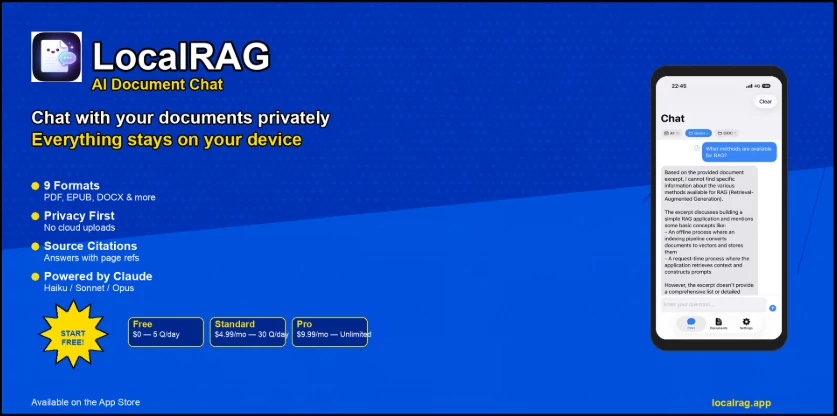
What is LocalRAG!?
There's something liberating about asking a real question about your own notes, research papers, meeting transcripts or scattered PDFs—and getting an answer that actually comes from your documents, not some generic internet summary. No sending sensitive files to the cloud, no waiting for a server halfway around the world, no worrying whether your data is being quietly stored or trained on. This tool lives entirely on your machine. You point it at folders, it quietly builds a private index, and suddenly you have a smart assistant that remembers everything you've ever saved. I once asked it to find every mention of a specific client requirement across 18 months of meeting notes—took seconds, cited exact pages, saved me half a day of Ctrl+F torture. That kind of moment is why people keep it running.
Introduction
Most AI chat interfaces are wonderful until you need them to know your actual work. Then they either demand you upload everything (hello privacy concerns) or give you vague, hallucinated answers. This changes the game by keeping 100% of your data local—indexing, retrieval, generation, everything. No internet required after initial model download. It's perfect for lawyers with confidential case files, researchers with private literature, writers with world-building notes, developers with sprawling documentation, or anyone who wants ChatGPT-level conversation but with their own knowledge base. The experience feels like finally having a second brain that actually read the same things you did.
Key Features
User Interface
The app opens to a simple chat window with a sidebar showing your knowledge bases. Drag folders or files in, give the collection a name, and indexing starts automatically in the background—you can keep working while it happens. Switching between collections is instant. The chat itself is clean: natural language input, source citations you can click to see the exact chunk, export buttons, dark mode, keyboard shortcuts. Nothing feels bolted on; it's all built to disappear into your workflow so you focus on thinking, not managing the tool.
Accuracy & Performance
Retrieval is impressively precise—relevant passages surface even when your question uses different wording from the original text. Citations are accurate and clickable. On decent hardware (especially with GPU), responses come in 2–8 seconds even on collections with thousands of pages. Larger models give deeper reasoning; smaller ones give snappier replies. The balance between speed and quality is tuned well—you rarely wait long enough to lose your train of thought.
Capabilities
Indexes PDFs, Word docs, Markdown, TXT, code files, EPUB—pretty much anything with extractable text. Supports multiple local LLMs via Ollama, LM Studio, llama.cpp and others. Full-text + semantic/hybrid search, multi-collection organization, per-collection custom prompts, chat folders, export to Markdown/PDF, source highlighting, and completely offline operation. You can tweak chunk size, retrieval parameters, and re-ranking if you want to squeeze out extra relevance. It's a full-featured local RAG experience in one approachable package.
Security & Privacy
Zero network calls after model download. Your documents never leave your device. No telemetry, no analytics pings, no cloud sync unless you deliberately enable it (and even then it's optional). Perfect for legal work, medical notes, personal journals, proprietary research, or any file you wouldn't dream of uploading. The privacy promise is absolute: if your computer is secure, your knowledge stays secure.
Use Cases
A consultant indexes years of client reports and asks for patterns across projects—gets instant summaries with source references. A PhD student loads research papers and literature notes, queries for contradictions or gaps in existing work. A novelist builds a knowledge base of character backstories, world rules, and plot timelines—asks for consistency checks or forgotten details. A developer keeps API docs, personal wikis, and code comments searchable without opening twenty browser tabs. A lawyer maintains private case notes and statutes—queries for precedents in seconds. Wherever deep personal or professional knowledge needs to stay private and instantly accessible, this becomes indispensable.
Pros and Cons
Pros:
- Complete offline privacy—your data never leaves your machine.
- Strong, accurate retrieval with clickable source citations.
- Fast enough on consumer hardware to feel like a real conversation.
- Clean, focused interface that doesn't fight you.
- Active updates and responsive developer who listens to feedback.
Cons:
- Initial indexing of very large collections takes time (hours for tens of thousands of pages).
- Requires decent hardware for comfortable speed with larger models.
- Model setup (downloading via Ollama etc.) is a one-time extra step.
Pricing Plans
Core app is free and open-source forever—no usage caps, no hidden tiers. Optional one-time paid license unlocks priority support, early access to builds, premium themes, and helps fund continued development. No subscriptions, no monthly fees, no credit systems. You pay once (if you choose) and own it forever. The free version is already more capable than most paid cloud alternatives when privacy matters.
How to Use LocalRAG
Download and run the app (single file on most platforms). Create a new knowledge base by dragging folders or files into the sidebar. Wait while it indexes (you can use the app during indexing). Open a chat, select your collection from the dropdown, and start asking questions in plain language. Click any citation to see the exact source chunk. Organize chats into folders for different projects. Export conversations or copy answers as needed. Everything stays local, fast, and private from the first question to the last.
Comparison with Similar Tools
Cloud RAG services require uploading sensitive files and often come with recurring costs or vague privacy policies. Other local solutions can be clunky, slow, or limited in file support and model compatibility. This one combines a polished, modern interface with strong retrieval, fast performance on typical hardware, and genuine zero-cloud operation. It's the rare tool that feels both beginner-friendly and powerful enough for serious knowledge work.
Conclusion
Having an AI that truly knows your own documents—without ever phoning home—is one of those quality-of-life upgrades you don't fully appreciate until you have it. No more endless searching, no more trusting external servers with private files, no more generic answers that ignore your specific context. Instead you get fast, accurate, grounded responses whenever you need them. For researchers, writers, students, lawyers, developers—anyone whose thinking lives in text—this quietly becomes one of the most valuable tools on the machine. Once your knowledge is local and instantly accessible, it's hard to imagine working any other way.
Frequently Asked Questions (FAQ)
How fast is it on a normal laptop?
Very usable with smaller models; larger ones benefit greatly from GPU but still work acceptably on CPU.
What file formats can it read?
PDF, DOCX, TXT, Markdown, code files, EPUB—basically anything with extractable text.
Does it send anything over the internet?
No—zero network activity after model download unless you choose a cloud model (optional).
How long to index a big folder?
Hundreds of pages in minutes, thousands in a few hours—runs in background so you can keep working.
Can I use my favorite LLM?
Yes—works with Ollama, LM Studio, llama.cpp, KoboldCPP and other local backends.
AI Knowledge Management , AI Documents Assistant , AI Research Tool , AI Knowledge Base .
These classifications represent its core capabilities and areas of application. For related tools, explore the linked categories above.
LocalRAG! details
Pricing
- Free
Apps
- Web Tools
Categories

LocalRAG! Alternatives Product

UPDF AI
HostFinder

PromptZerk

PDF to MD

GLM-OCR Onli…
MiniValuator

Surmado

jpg to excel

Website Traf…