
🧠 AI Quiz
Think you really understand Artificial Intelligence?
Test yourself and see how well you know the world of AI.
Answer AI-related questions, compete with other users, and prove that
you’re among the best when it comes to AI knowledge.
Reach the top of our leaderboard.


















LTX-3 AI
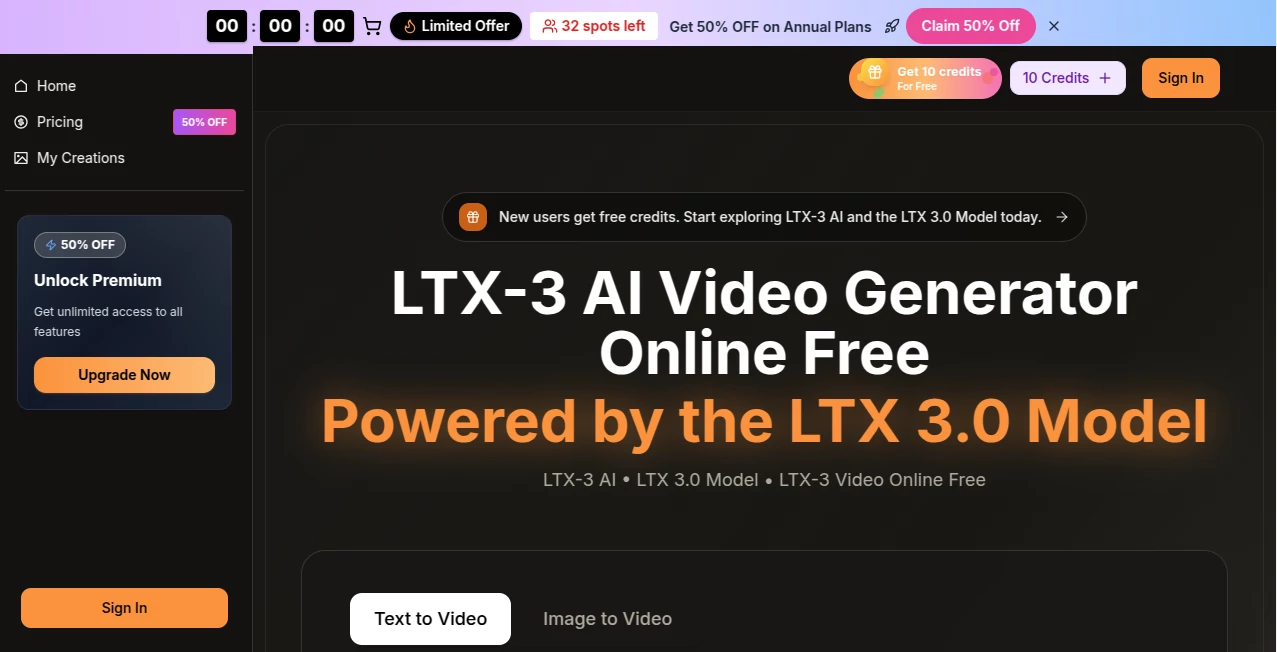
What is LTX-3 AI?
Creating videos that actually look professional used to mean days of editing, expensive software, or hiring a team. Now you can sit down with a rough idea, type it out or drop in an image, and watch a clean, synced clip come together in seconds. The quality is surprisingly high—sharp details, natural motion, audio that matches the beat without extra work. I tried it with a simple product teaser prompt and was genuinely impressed how it nailed the pacing and look on the first go, something that would have taken me hours before.
Introduction
Most people who need video content—marketers, creators, small businesses—don't have time or budget for full production cycles. This tool solves that by putting a powerful model right in your browser, free to preview and easy to upgrade when you're ready to export. Powered by LTX 3.0, it handles text prompts or images and builds complete videos with native audio, so dialogue, effects, and ambience land exactly where they should. The best part is how fast you can iterate: generate, tweak, regenerate, all without leaving the studio interface. It's become a favorite for anyone who wants quick wins that still feel premium.
Key Features
User Interface
Everything happens in one clean workspace. Choose text-to-video or image-to-video, type your prompt or upload, adjust settings if you want, and hit generate. Previews appear almost instantly so you can spot-check before committing. The layout is thoughtful—no clutter, just tools where you need them, like batch options or scene splitters that make longer projects manageable. It's designed so beginners feel comfortable right away, but there's enough depth for people who like fine control.
Accuracy & Performance
The LTX 3.0 model consistently delivers high-fidelity results—sharp 1080p (or 4K-ready), smooth motion, and audio that syncs naturally without manual fixes. Generations are fast enough for real workflows; you can preview in seconds and render finals quickly. It handles complex prompts well, keeping characters and scenes coherent even across multi-shot ideas. In my tests, it rarely needed more than one or two tries to get something usable, which is huge when deadlines are tight.
Capabilities
Text or image input turns into full videos with synchronized sound—dialogue, background effects, music alignment—all in one pass. Switch models mid-project if one fits a scene better, batch generate for volume, split scenes for edits, and use prompt helpers to refine ideas. Resolutions go up to 1080p Full HD (4K-ready), with flexible aspect ratios for social, ads, or widescreen. Commercial rights are built in, so outputs are ready for business use, client delivery, or monetized content.
Security & Privacy
Your prompts, images, and generated videos are handled securely with standard encryption and compliance practices. Nothing gets stored longer than necessary or shared without your control. For creators working on client projects or branded content, that reliability is reassuring—no surprises down the line.
Use Cases
Marketers whip up product ads or social reels that feel polished and on-brand without production costs. Content creators turn script ideas into short stories or teasers that hook audiences fast. Small businesses make explainer videos or promo clips in minutes instead of outsourcing. Even hobby filmmakers test multi-shot concepts before committing to longer shoots. It's especially handy when you need something quick but professional-looking.
Pros and Cons
Pros:
- Native audio sync saves massive time—no separate editing for sound.
- Fast previews and generations keep creativity flowing without waiting.
- Multi-model flexibility means you can pick the best fit for each part.
- Commercial rights included, perfect for ads, social, or client work.
Cons:
- Free tier has limits; heavier users move to paid quickly.
- Longer or very detailed videos can push credit usage.
Pricing Plans
New users get free credits to start experimenting right away—no card required. Paid plans offer great value with discounted annual options: Basic gives plenty of credits for regular use, Professional doubles down for more volume, and Enterprise handles serious output needs. All include unlimited downloads, no watermarks on premium tiers, and cancel-anytime flexibility. It's structured so you only pay for the scale you actually need.
How to Use LTX-3
Head to the studio, choose text-to-video or image-to-video. Write a prompt describing your scene (or upload an image), select resolution and aspect ratio, add audio guidance if wanted. Generate a preview in seconds—review motion, style, sync. Tweak the prompt or switch models if needed, then export the final when happy. Batch for multiple variations or split scenes for finer edits. It's quick to learn and fast to master.
Comparison with Similar Tools
Many video generators focus on single clips or require heavy post-production for audio and polish. This one stands out with native synced sound, multi-model choice, and workflow helpers like batch and scene splitting—all in one place. It's faster for production-ready shorts than tools that leave you editing afterward, and the commercial rights make it safer for business use than some free alternatives.
Conclusion
Video creation shouldn't be a bottleneck. This tool removes so much friction that you can focus on the story instead of the struggle. The speed, quality, and built-in audio make it a genuine shortcut to professional-looking content. Whether you're posting daily or building campaigns, it's the kind of help that makes you wonder how you managed without it.
Frequently Asked Questions (FAQ)
How fast are generations?
Previews in seconds; full renders are quick depending on length and settings.
Can I add my own audio?
Yes—upload tracks and it syncs them naturally to the video.
What resolutions are available?
720p HD and 1080p Full HD, with 4K-ready quality on higher plans.
Are the videos watermark-free?
Paid plans remove watermarks; free previews may have them.
Can I use outputs commercially?
Yes—full commercial rights for ads, social, business, and monetized projects.
AI Animated Video , AI Image to Video , AI Text to Video , AI Video Generator .
These classifications represent its core capabilities and areas of application. For related tools, explore the linked categories above.
LTX-3 AI details
Pricing
- Free
Apps
- Web Tools
Categories

LTX-3 AI Alternatives Product

Sora2 AI Vid…

Seedance 2.0
Render of Dr…

Seedance 2.0

wan2-6.org

Runway Gen-4…

Seedance AI

See dance 2.…

Kling 3.0
