🧠 AI Quiz
Think you really understand Artificial Intelligence?
Test yourself and see how well you know the world of AI.
Answer AI-related questions, compete with other users, and prove that
you’re among the best when it comes to AI knowledge.
Reach the top of our leaderboard.


















LTX 2.3
What is LTX 2.3?
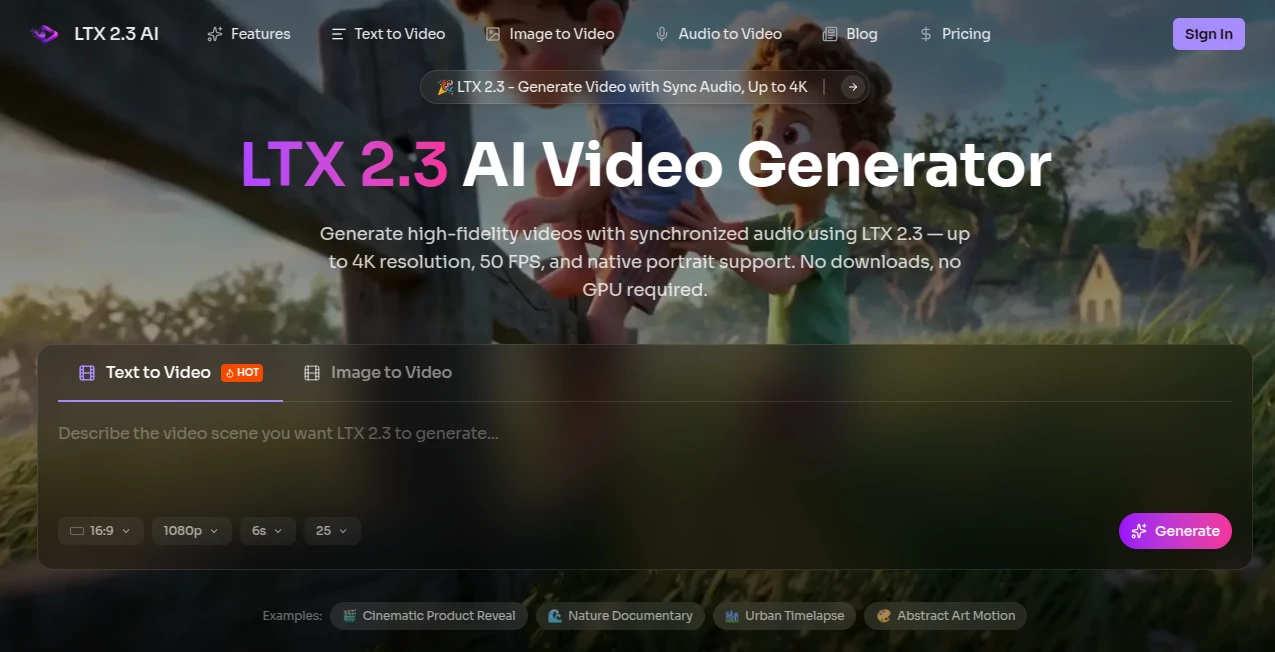
There’s a special kind of excitement when you type a scene description and the video that comes back doesn’t just move—it feels alive. Lighting falls naturally, motion has weight, characters stay consistent, and the audio actually matches what’s happening on screen. That’s the experience this platform delivers through LTX 2.3. No downloads, no local GPU hassle, just open the browser, describe your idea (or drop in a reference image), and watch a polished short clip emerge in minutes. I’ve seen creators go from rough concept to shareable video faster than it takes to brew coffee, and the results often look better than what many teams produce after hours of traditional work.
Introduction
AI video has come a long way, but most tools still struggle with consistency, audio sync, or realistic motion. LTX 2.3 changes the conversation. Built on a Diffusion Transformer architecture by Lightricks, it generates both video and synchronized audio in a single pass. The web platform makes this powerful open-source model instantly accessible—no command line, no heavy setup, no rented GPUs. You get sharp textures, coherent storytelling, native portrait support, and cleaner sound than many competing models. For indie creators, marketers, educators, and filmmakers testing ideas quickly, it removes the usual friction between imagination and a finished clip. The quality upgrade from previous versions is noticeable: better prompt adherence, finer details, and motion that feels intentional rather than random.
Key Features
User Interface
The interface keeps things refreshingly simple. A clear prompt box, optional image upload for image-to-video or first/last frame control, aspect ratio choices (including native portrait), and a prominent generate button. Previews load quickly so you can iterate without losing momentum. No cluttered dashboards or hidden settings—just focused controls that let you spend time on the creative part instead of fighting the tool. Beginners finish their first video in minutes; experienced users appreciate how little gets in the way.
Accuracy & Performance
Characters keep their identity across shots, lighting behaves realistically, and motion follows natural physics instead of the usual AI jitter. Audio sync is native and surprisingly clean—no mismatched lip movements or generic background noise. Generation times stay practical (often under a minute for short clips), and the model handles complex prompts with better adherence than many alternatives. The results hold up when you zoom in—textures look sharp, details don’t melt, and the overall feel is closer to directed footage than typical generative output.
Capabilities
Text-to-video, image-to-video, first-and-last frame guidance, native synchronized audio, support for multiple aspect ratios (including portrait up to 1080x1920), and high-fidelity output up to 4K at 50 FPS in some modes. It excels at storytelling with coherent multi-shot sequences, product reveals, emotional close-ups, and music-synced visuals. The open-source foundation means you get production-ready quality without proprietary lock-in, and the browser access makes it available to anyone with an internet connection.
Security & Privacy
Your prompts and reference images are processed securely and not stored long-term for training purposes. The platform respects user data with standard encryption practices, and since it’s built around an open-source model, there’s transparency around how generations are created. For creators working with sensitive concepts or client work, that balance of accessibility and responsible handling feels reassuring.
Use Cases
A small marketing team turns a product photo into a smooth lifestyle video for social ads in minutes instead of booking a shoot. An indie filmmaker prototypes emotional beats for a pitch deck, testing tone before investing in full production. A musician creates an official visualizer that actually matches the song’s rhythm and mood. An educator builds short explanatory clips with synchronized narration for online lessons. Wherever you need quick, high-quality video with sound that fits naturally, this platform removes the usual barriers and lets the idea shine through.
Pros and Cons
Pros:
- Native audio sync in one pass saves hours of post-production work.
- Strong character and motion consistency across shots.
- Browser-based access—no GPU or complex setup required.
- High-fidelity results with good prompt understanding and detail.
- Native portrait support makes it ideal for modern social formats.
Cons:
- Clip length is best for short, focused scenes (longer narratives need multi-shot workflows).
- Very abstract or contradictory prompts can still produce unexpected results.
- Higher resolutions and unlimited generations require paid access.
Pricing Plans
The platform offers generous free access so anyone can try the quality firsthand. Paid tiers unlock higher resolutions, longer clips, faster queues, priority processing, and commercial usage rights. Pricing is designed to scale with your needs—casual creators stay comfortably on free or light plans, while heavier users and teams benefit from the upgraded capabilities without breaking the bank.
How to Use LTX 2.3
Open the generator page, type a clear scene description in the prompt box, optionally upload a reference image for stronger visual control, choose your aspect ratio and desired length, then hit generate. Watch the preview as it appears—adjust wording or reference strength if the feel isn’t quite right, then download the result. For multi-shot stories, generate individual segments and combine them in your favorite editor. The process is fast enough to experiment with several variations in one creative session.
Comparison with Similar Tools
Many AI video generators still struggle with audio sync, character consistency, or realistic motion. This one stands out by handling synchronized sound and video in a single coherent pass, with better detail retention and cinematic feel than most open-source alternatives. While some tools require heavy local setup or produce noticeable artifacts, the browser experience here keeps things simple and the output quality high. It strikes a sweet spot between accessibility and professional-grade results.
Conclusion
Creating compelling video used to demand time, equipment, or a team. This platform quietly lowers that barrier while raising the quality bar. With native audio, strong consistency, and easy browser access, it turns ideas into watchable clips faster than ever. Whether you’re prototyping concepts, building social content, or testing story beats, it gives you results you can actually use—not just impressive demos. For anyone who wants to tell stories in motion, that kind of practical power is hard to beat.
Frequently Asked Questions (FAQ)
How long can generated videos be?
Best suited for short, focused clips (typically 5–15 seconds); longer sequences work well when built as multiple connected shots.
Do I need a powerful computer?
No—everything runs in your browser with no local GPU or downloads required.
Is audio included?
Yes—synchronized audio is generated natively in the same pass as the video.
Can I use reference images?
Absolutely—image-to-video and hybrid modes give you strong visual control and better consistency.
Is it free to try?
Yes—generous free access lets you test the quality before considering paid plans for heavier use.
AI Animated Video , AI Image to Video , AI Text to Video , AI Video Generator .
These classifications represent its core capabilities and areas of application. For related tools, explore the linked categories above.
LTX 2.3 details
Pricing
- Free
Apps
- Web Tools
Categories

LTX 2.3 Alternatives Product

Aura AI

Klyra AI

Seedance 2

Sora 2
ds video

Veo 4 AI
SkyReels-V4

Seedance AI …

Veo 3.2