🧠 AI Quiz
Think you really understand Artificial Intelligence?
Test yourself and see how well you know the world of AI.
Answer AI-related questions, compete with other users, and prove that
you’re among the best when it comes to AI knowledge.
Reach the top of our leaderboard.


















Ltx AI - Ltx 2.3
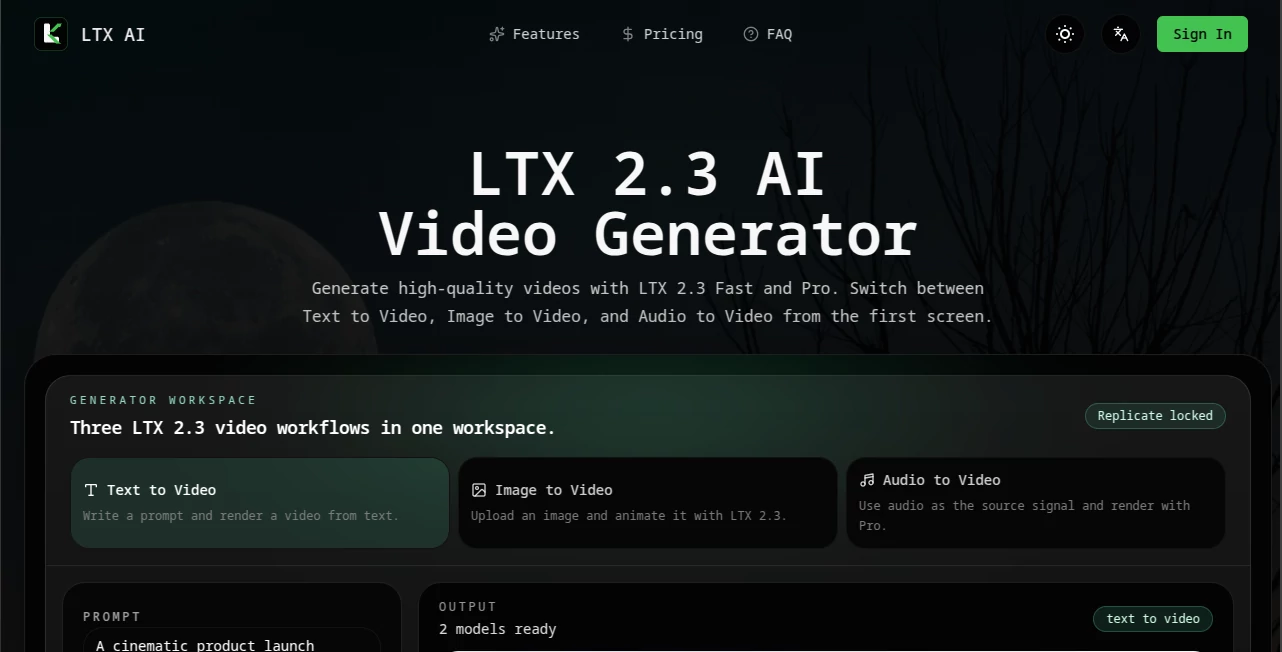
What is Ltx AI - Ltx 2.3?
There's something exciting about typing a scene description or uploading a single image and watching a polished video emerge that actually feels directed. The motion has weight, the lighting feels intentional, and the whole clip carries a cinematic quality that makes you want to watch it again. This tool delivers that experience in a clean workspace, letting you switch between text-to-video, image-to-video, and even audio-to-video without switching tabs or learning new interfaces. I’ve seen creators go from a vague idea to a shareable clip in minutes, and the results often look far more professional than expected from AI video. It’s the kind of tool that makes you excited to experiment again.
Introduction
Video creation has always been time-intensive, requiring storyboards, shooting, and editing. LTX AI simplifies the process dramatically by turning prompts, images, or audio into coherent, high-quality videos using its LTX 2.3 models. You get two tiers—Fast for quick iterations and Pro for higher fidelity—all within one unified workspace. The platform supports three creation modes, making it versatile for everything from quick social clips to more polished cinematic pieces. What stands out is how approachable it feels while still delivering results that hold up for real projects. For filmmakers, advertisers, content creators, and hobbyists, it removes many traditional barriers and lets the focus stay on the story rather than the technical hurdles.
Key Features
User Interface
The workspace is dark and focused, designed to keep you in creative flow. You choose your mode (Text, Image, or Audio to Video) right at the top, adjust resolution, duration, aspect ratio, and fps with simple controls, then generate. Previews load quickly, and the three-step process—choose mode, tune settings, generate—feels natural rather than forced. It’s the type of interface where beginners feel capable immediately, while experienced users appreciate how little gets in the way of their ideas.
Accuracy & Performance
The LTX 2.3 models handle motion, lighting, and subject consistency impressively well. Fast mode is great for rapid testing and ideation, while Pro delivers noticeably higher detail and fidelity. Generation times stay reasonable, and the outputs maintain coherence even with complex prompts involving camera movement or multiple elements. The credit system is transparent, so you know the cost before you hit generate, avoiding unpleasant surprises.
Capabilities
You can generate from text prompts, animate uploaded images, or create videos driven by audio input. Resolution options go up to 4K, with flexible aspect ratios and durations. The unified workflow means you can switch modes without restarting, making experimentation fluid. It’s particularly strong for short cinematic scenes, product visuals, social content, and creative explorations where quality and speed both matter.
Security & Privacy
Your prompts and generated videos are handled with care. The platform focuses on delivering a smooth experience without unnecessary data retention beyond what’s needed for your session. For creators working on client projects or personal ideas, that clean approach provides reassurance while you focus on the creative side.
Use Cases
Content creators use it to quickly produce engaging social videos from simple text ideas or reference images. Advertisers generate polished product launch clips without lengthy production schedules. Filmmakers prototype scenes and test visual concepts before committing to full shoots. Educators and storytellers turn concepts into short explanatory or narrative videos. The tool shines whenever you need high-quality video fast without a full team or heavy equipment.
Pros and Cons
Pros:
- Three versatile creation modes (Text, Image, Audio) in one clean workspace.
- Fast mode for quick ideation and Pro for higher quality output.
- Clear, predictable credit system based on resolution and duration.
- Results often feel cinematic with good motion and lighting coherence.
- Simple enough for beginners yet powerful for more experienced users.
Cons:
- Credit costs scale with resolution and model tier, so high-quality 4K renders add up.
- Best results still depend on well-crafted prompts and good reference images.
- Longer or very complex scenes may require multiple generations or post-editing.
Pricing Plans
It offers a Starter plan at $9.90 for 120 credits, a popular Creator plan at $29.90 for 380 credits, Studio at $49.90 for 700 credits, and Scale at $99.90 for 1500 credits. Credits are used based on model (Fast or Pro), resolution, and duration, making costs transparent before you generate. The structure lets you start small and scale as your needs grow, with the Creator plan often hitting the sweet spot for regular users.
How to Use LTX AI
Open the workspace and choose your creation mode—Text to Video for prompts, Image to Video for animating a photo, or Audio to Video for sound-driven generation. Select Fast or Pro model, set resolution, duration, aspect ratio, and any camera preferences. Enter your prompt or upload your reference, review the settings, and generate. Once the video renders, preview it and download if it meets your vision. Iterate by tweaking the prompt or settings until the result feels right. The three-step flow keeps things efficient even when you’re experimenting.
Comparison with Similar Tools
Many AI video tools focus on one input type or sacrifice quality for speed. This one stands out by offering three modes in a single, unified workspace with clear Fast and Pro options. The credit system is straightforward compared to hidden costs in other platforms, and the cinematic quality of outputs often feels more directed and coherent than generic generators. It’s particularly appealing for users who want flexibility without sacrificing too much on production feel.
Conclusion
LTX AI brings high-quality video generation within reach without the usual complexity or long wait times. It respects your creative time by making the process simple, the results impressive, and the costs predictable. Whether you’re testing ideas quickly or producing polished clips, it serves as a capable partner that helps turn concepts into moving visuals faster than traditional methods. For creators who want to focus on storytelling rather than technical hurdles, it’s a welcome addition to the toolkit.
Frequently Asked Questions (FAQ)
What are the three creation modes?
Text to Video (from prompts), Image to Video (animate photos), and Audio to Video (audio-driven generation).
What’s the difference between Fast and Pro?
Fast is optimized for speed and iteration; Pro delivers higher fidelity and detail at a higher credit cost.
How are credits calculated?
Based on model tier, resolution, and duration—clearly shown before you generate.
Do I need an account to start?
You can explore and test in the workspace; plans unlock more credits and features.
Can I generate 4K videos?
Yes, with the Pro model on higher plans; credit cost increases with resolution.
AI Animated Video , AI Image to Video , AI Video Generator , AI Text to Video .
These classifications represent its core capabilities and areas of application. For related tools, explore the linked categories above.
Ltx AI - Ltx 2.3 details
Pricing
- Free
Apps
- Web Tools
Categories

Ltx AI - Ltx 2.3 Alternatives Product

videodance

JSON to Video

Seedance Art

ai seedance …

Kling 3.0 Vi…

seedance 2

Veo 3.2

Seedance 2.0…

ltx 2.3