🧠 AI Quiz
Think you really understand Artificial Intelligence?
Test yourself and see how well you know the world of AI.
Answer AI-related questions, compete with other users, and prove that
you’re among the best when it comes to AI knowledge.
Reach the top of our leaderboard.


















lyria 3
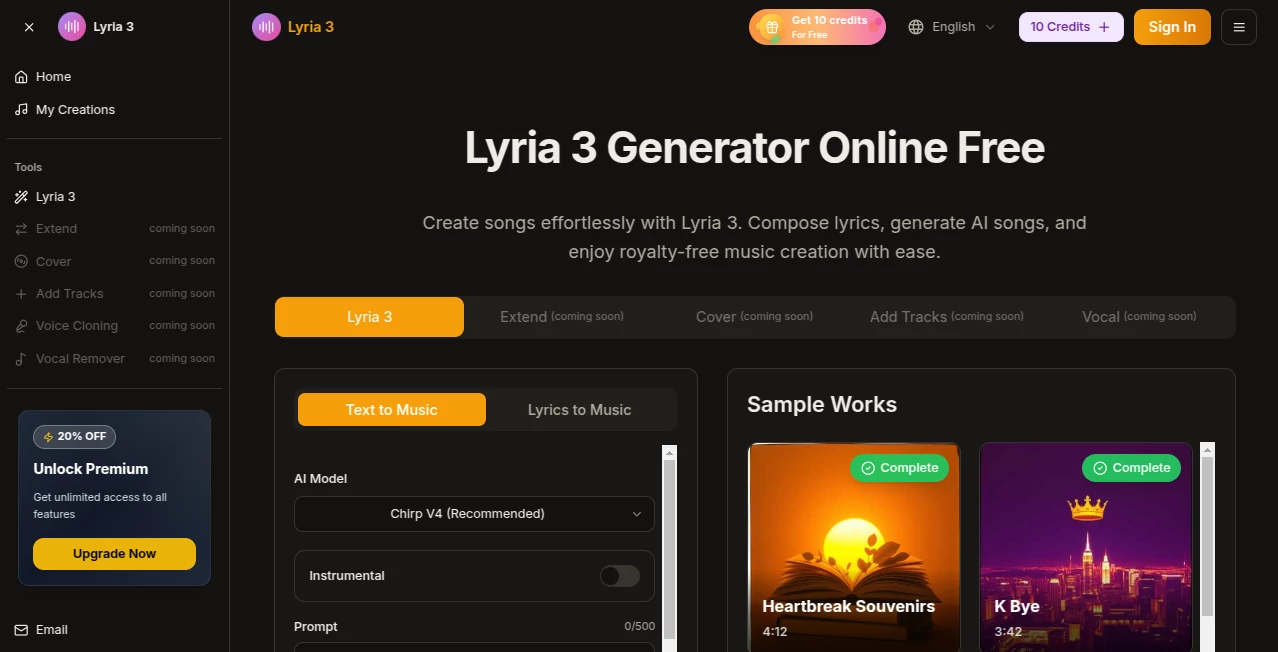
What is lyria 3?
There’s something quietly thrilling about humming a melody in your head and—seconds later—hearing it come back as a full, polished track with vocals, drums, bass, and that perfect atmospheric pad you were imagining. This tool makes that leap feel almost too easy. You describe the vibe (“melancholic lo-fi jazz with warm female vocals, rainy night mood”), maybe hum a rough hook into your phone, and out comes a song that actually sounds like it belongs on a playlist. I’ve watched bedroom producers go from “I can’t sing or play instruments” to posting finished tracks that get real listens. The jump from idea to listenable song has never been shorter, and the quality keeps surprising even skeptical musicians.
Introduction
Making music used to require gear, years of practice, or a lot of money for collaborators. This platform quietly dismantles those barriers. Type what you want, add a hummed melody or style reference if you feel like it, and get a complete track—vocals, instrumentation, mix, everything—in under a minute. It’s built on models that understand genre nuance, vocal emotion, and arrangement flow, so the output rarely sounds “AI generic.” Songwriters, content creators, game devs, and hobbyists use it daily to turn fleeting ideas into something shareable. The moment you hear your own prompt rendered with real musicality, you realize how much creative time this saves—and how much fun it unlocks.
Key Features
User Interface
The workspace is clean and focused. Big prompt box for your description, optional audio upload for melody or style, simple sliders for length and energy, then one prominent “Generate” button. Previews start playing as soon as the first section finishes—no waiting for the whole track. You can extend, remix, or generate variations with a single click. It feels like sketching with sound rather than wrestling software—intuitive even if you’ve never touched a DAW.
Accuracy & Performance
The model nails genre details—lo-fi boom-bap swing feels authentic, orchestral swells have real drama, trap hi-hats snap with attitude. Vocals carry believable emotion and phrasing, not robotic auto-tune artifacts. Generation is fast (20–60 seconds for most tracks), and results are consistent enough that first attempts are often usable. When it misses, it’s usually because the prompt was vague; tighten the description and it locks in. That reliability turns experimentation into actual production.
Capabilities
Text-to-song, melody-guided generation, style transfer from uploaded audio, multi-genre mastery (pop, hip-hop, electronic, cinematic, folk, metal, jazz, etc.), vocal synthesis with natural timbre and expression, instrumental-only mode, extend/remix features, and high-quality 44.1kHz stereo exports. You can create full songs with verse-chorus structure, add lyrics (or let it generate them), and fine-tune energy, tempo, and mood. It handles long-form tracks and even supports vocal removal/replacement for covers. The range is wide enough that most creators find their sound here.
Security & Privacy
Uploaded audio and prompts are processed ephemerally—nothing is stored long-term or used for training unless you explicitly share publicly. No mandatory account for basic use, and paid plans add end-to-end encryption for private generations. For musicians protecting unreleased melodies or lyrics, that clean handling is a real comfort.
Use Cases
A YouTuber creates custom background music for vlogs that perfectly matches the video tone—no more royalty-free library hunting. An indie game dev generates menu themes and boss fight tracks that feel bespoke without hiring a composer. A social media creator drops original short songs daily, building a unique sound without needing to play instruments. A songwriter tests lyric ideas by hearing them sung in different styles before recording demos. The common thread is speed + quality—getting professional-sounding music when inspiration strikes, without waiting days or paying thousands.
Pros and Cons
Pros:
- Vocals feel human—phrasing, emotion, and timbre are remarkably natural.
- Genre accuracy is outstanding; it actually understands what makes trap trap or jazz jazz.
- Fast enough generations that you can iterate creatively in real time.
- Melody-guided mode lets you hum or upload a hook and keep control.
- Free tier is generous—real tracks without paying upfront.
Cons:
- Longer tracks (beyond 2–3 minutes) can lose some coherence.
- Very niche or experimental styles sometimes need prompt tuning.
- Unlimited high-quality exports live behind paid plans.
Pricing Plans
Free daily credits give you several full tracks to test the quality—no card required. Paid plans unlock higher fidelity, longer durations, unlimited generations, priority queue, and commercial usage rights. Pricing stays accessible for hobbyists while scaling well for creators who use it daily. Many say one month covers what they used to spend on stock music subscriptions, with far more creative control.
How to Use Seedance 2 Video
Open the generator, write a clear description (“chill indie folk ballad, male vocals, acoustic guitar and light strings, nostalgic rainy evening mood”). Optionally hum or upload a short melody clip for guidance. Choose length (30s–3min) and aspect ratio if video output is needed. Hit generate. Listen to the preview—tweak prompt wording or melody strength if the vibe isn’t quite there—then download or create variations. For full songs, generate verse and chorus separately and stitch in your editor. The loop is fast enough to refine several versions in one session.
Comparison with Similar Tools
Many AI music generators still sound robotic or limited to basic loops. This one stands out with vocal realism, genre depth, and strong melody control—results often feel like human productions rather than algorithmic approximations. Where others force you into narrow styles, the range here is broad and authentic. The combination of speed, quality, and creative steering puts it ahead for anyone who wants real songs, not just background loops.
Conclusion
Music creation used to demand years of practice or expensive collaborators. Tools like this quietly change that equation—giving anyone with an idea the ability to hear it fully realized in minutes. It doesn’t replace musicians; it amplifies them, letting ideas escape the head and enter the world faster than ever. For creators who think in melody, that’s not just convenient—it’s liberating.
Frequently Asked Questions (FAQ)
How long can generated tracks be?
Typically 30 seconds to 3 minutes; longer pieces possible by combining sections.
Do I need to provide a melody?
No—text prompts work great—but humming or uploading gives much more precise control.
What genres does it handle best?
Very wide range—pop, hip-hop, electronic, folk, cinematic, rock, jazz, lo-fi, metal, and more all sound authentic.
Can I use the tracks commercially?
Yes—paid plans include full commercial rights for monetization, sync, etc.
Is there a watermark on free generations?
Small watermark on free clips; paid removes it completely.
AI Lyrics Generator , AI Music Generator , AI Text to Music , AI Singing Generator .
These classifications represent its core capabilities and areas of application. For related tools, explore the linked categories above.
lyria 3 details
Pricing
- Free
Apps
- Web Tools
Categories

lyria 3 Alternatives Product
AI Music Gen…
gemini music

Solmi AI
MemoTune
AI Song Maker

MusicGPT AI

Custom Gift …

Mp3ToMidi

Lyria3 AI