🧠 AI Quiz
Think you really understand Artificial Intelligence?
Test yourself and see how well you know the world of AI.
Answer AI-related questions, compete with other users, and prove that
you’re among the best when it comes to AI knowledge.
Reach the top of our leaderboard.

















Maginary

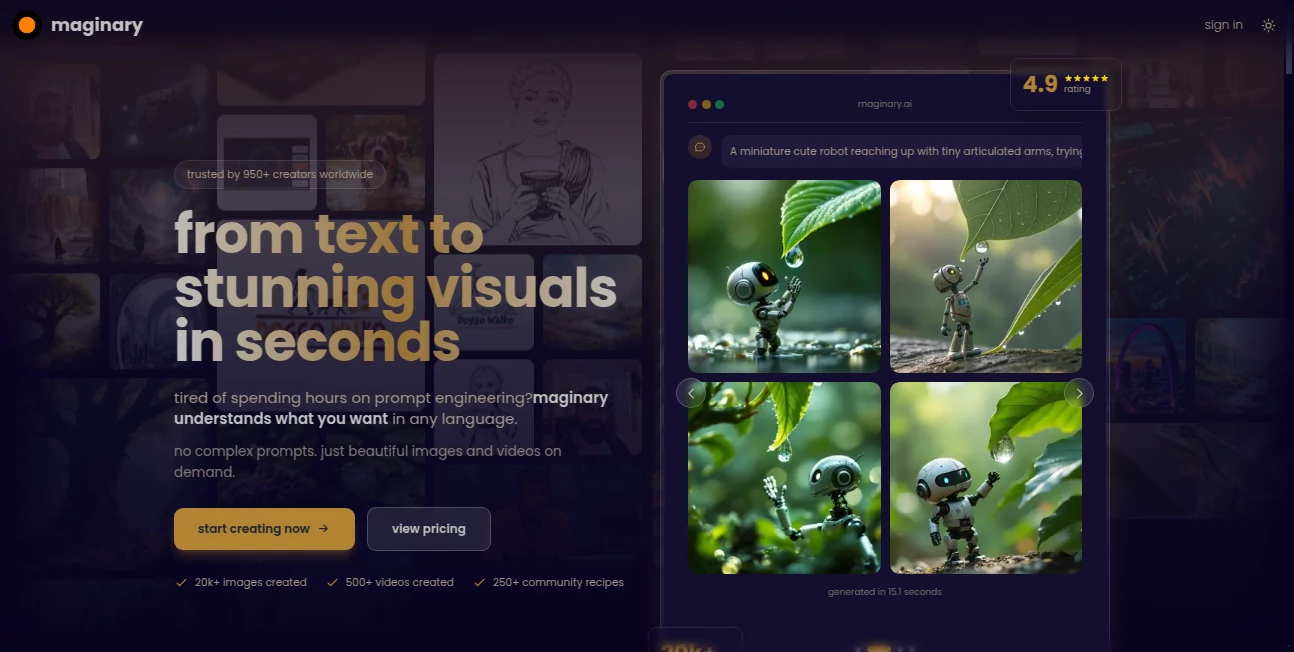
What is Maginary?
There’s something almost childlike and wonderful about scribbling a rough idea on paper and watching it blossom into a full, breathtaking illustration seconds later. This tool captures exactly that feeling. You draw a quick shape—a dragon, a castle, a character—and it transforms your lines into rich, detailed artwork that feels alive and purposeful. I’ve doodled silly stick figures during late-night brainstorming and ended up with finished pieces that looked like they belonged in a storybook. It’s the kind of magic that makes you want to keep creating just to see what happens next.
Introduction
Most AI art generators ask for long, precise prompts and still sometimes miss the mark. This one flips the script: it starts with your sketch—however messy—and builds everything around what you actually drew. No need to describe every detail in words; your lines guide the style, composition, and mood. It’s become a favorite among illustrators, concept artists, game designers, and hobbyists who want to skip the “fighting the prompt” stage and jump straight to something beautiful. The results carry a genuine hand-drawn warmth while still feeling polished and intentional. For anyone who thinks visually but struggles to articulate it in text, this feels like a creative shortcut that actually respects your vision.
Key Features
User Interface
The canvas is inviting from the first second: a large drawing area with simple tools (pencil, brush, eraser, color picker), a style selector below, and a prominent “Generate” button. You can draw directly or upload a rough sketch/photo. Controls are minimal but powerful—adjust strength of adherence to your lines, choose artistic direction (storybook, anime, painterly, etc.), and see live previews as it works. It never feels cluttered; everything is there to help you create, not distract you.
Accuracy & Performance
It follows your sketch lines with remarkable fidelity—your rough dragon silhouette becomes a detailed dragon, not a generic one. Strokes and shapes are respected even when messy or incomplete. Generation is fast (often 5–20 seconds), and the output stays coherent at higher resolutions. The model rarely “invents” elements outside your drawing unless you explicitly allow it, which keeps the result feeling like an extension of your hand rather than a replacement.
Capabilities
Sketch-to-art conversion with multiple styles (storybook, fantasy, anime, realism, watercolor, ink, pixel art, and more), adjustable adherence to your lines, colorization of black-and-white sketches, background generation that complements your subject, upscaling to print-ready resolutions, and iterative refinement (generate variations or edit specific areas). It handles characters, creatures, environments, objects, and even abstract concepts drawn loosely. The output is always high-res and downloadable in PNG or JPEG.
Security & Privacy
Your sketches are processed momentarily and deleted from servers after download—no permanent storage unless you opt to save to your account. No mandatory login for basic generation, so casual doodles stay completely private. For artists working on client concepts or personal projects, that clean, no-strings approach is a real comfort.
Use Cases
An indie game artist roughs out a creature design in five minutes and gets a portfolio-ready illustration instead of spending hours painting it manually. A children’s book author sketches a quick scene and sees it rendered in a whimsical style that matches their story tone. A concept artist tests multiple variations of a character pose without redrawing everything. A hobbyist draws silly doodles on their phone and turns them into charming prints for friends. Wherever imagination starts with a line on paper (or screen), this tool turns it into something shareable and beautiful fast.
Pros and Cons
Pros:
- Faithfully follows your sketch—your lines lead, the AI enhances.
- Style variety is broad and genuinely different, not just filters.
- Fast enough to iterate creatively without losing momentum.
- High-res outputs look great for prints, portfolios, or social.
- Free tier is generous—real results before spending a cent.
Cons:
- Extremely abstract or chaotic sketches can confuse it (best with clear shapes).
- Batch generation and unlimited use require paid plan.
- Very fine line details sometimes get smoothed out (adjustable but noticeable).
Pricing Plans
Free daily credits let you generate several high-quality pieces without paying—enough to experiment and fall in love with the possibilities. Paid plans remove limits, unlock priority queue, higher resolutions, more style options, and commercial-use rights. Pricing stays approachable for hobbyists and pros alike—many say one month covers what they used to spend on stock art or freelance illustrators for a single project.
How to Use Normal Map Generator
Draw directly in the browser canvas or upload a sketch/photo. Select a style from the thumbnails (storybook, anime, realism, etc.). Adjust how closely it should follow your lines (high adherence keeps your shapes, lower lets it get more creative). Hit generate—preview appears quickly. Tweak sliders or style if needed, then download in high resolution. Want variations? Generate multiple at once or refine specific areas. Done—finished artwork in under a minute from rough idea.
Comparison with Similar Tools
Many AI art generators demand long text prompts and still deviate from your vision. This one starts with your actual drawing, so the result feels like an extension of your hand rather than an interpretation of your words. Where others produce generic or inconsistent results, the adherence to sketch lines here is noticeably stronger. It’s less about replacing artists and more about accelerating them—turning rough concepts into polished pieces faster than manual painting or prompt wrestling.
Conclusion
Sketching is where most great ideas begin—loose, fast, honest. This tool honors that beginning and carries it all the way to a finished, beautiful piece without losing the spark. It turns “what if” doodles into portfolio-ready art, storybook pages, game assets, or just personal joy. For anyone who thinks with a pencil (or stylus), it’s the bridge between raw idea and something you’re proud to show the world. The feeling of seeing your quick scribble transformed is addictive—in the best possible way.
Frequently Asked Questions (FAQ)
How rough can my sketch be?
Surprisingly rough—basic shapes and gestures work fine; clearer lines give more precise control.
Do I need to draw in the tool?
No—upload any sketch or photo from your device; in-browser drawing is optional.
Can I use these commercially?
Yes—paid plans include full commercial rights; free tier allows personal use.
What resolutions can I get?
Up to 4K on paid plans; free tier offers solid high-res for most uses.
Are there watermarks on free generations?
Small watermark on free outputs; paid plan removes it completely.
AI Fun Tools , AI Art Generator , AI Design Generator , AI Image to Image .
These classifications represent its core capabilities and areas of application. For related tools, explore the linked categories above.
Maginary details
This tool is no longer available on submitaitools.org; find alternatives on Alternative to Maginary.
Pricing
- Free
Apps
- Web Tools
Categories

Maginary Alternatives Product

Sketchready
genie3
Ao3dle
Ablaze AI
Pixel Art Vi…
Seedream 4.5
We Are Charl…
AI Consisten…

Thumbspick