🧠 AI Quiz
Think you really understand Artificial Intelligence?
Test yourself and see how well you know the world of AI.
Answer AI-related questions, compete with other users, and prove that
you’re among the best when it comes to AI knowledge.
Reach the top of our leaderboard.


















Map Your Voyage

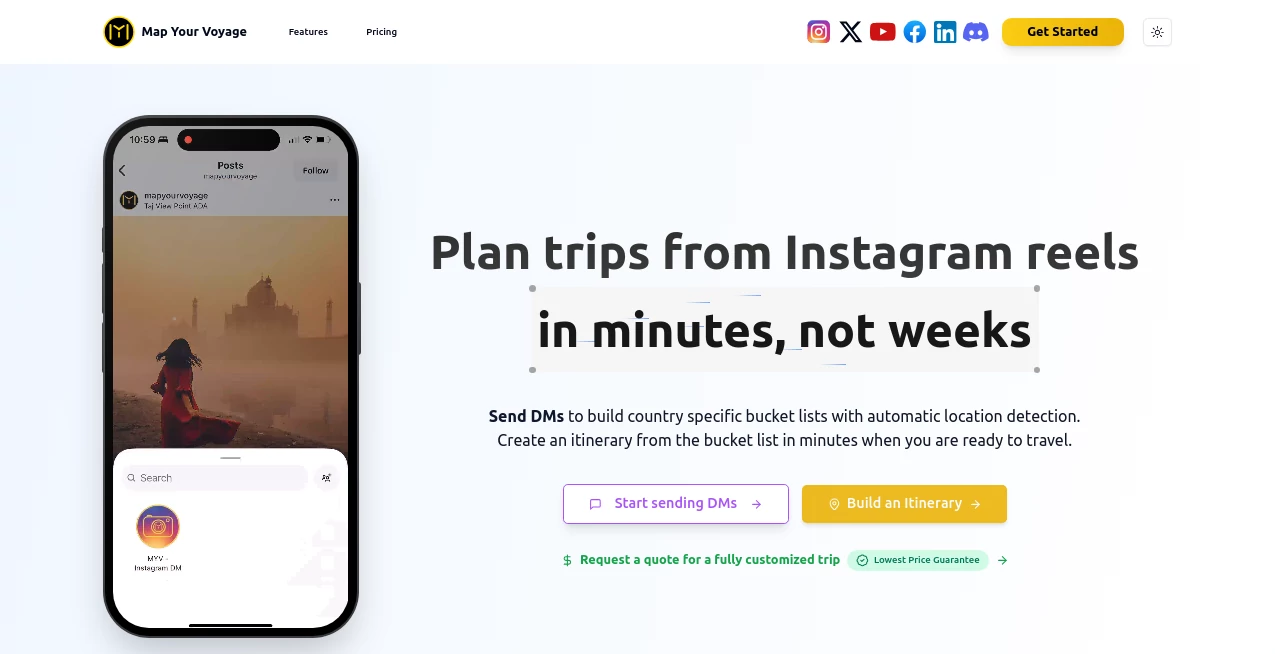
What is Map Your Voyage?
There's something deeply satisfying about looking at a map of your own adventures—pins marking cities you've walked, roads you've driven, moments you've lived—and seeing your story laid out beautifully. This tool turns that feeling into something you can hold, frame, or share with just a few clicks. You drop in your destinations, pick a style that matches your personality, and it builds a clean, elegant map that feels like it was designed by someone who actually gets what travel means to you. I've seen people turn a year of backpacking into a wall-worthy piece of art, or gift a honeymoon route that becomes a treasured keepsake. It's the kind of creation that quietly captures joy.
Introduction
Travel memories fade unless you give them shape. Photos get buried in phones, tickets get lost, stories get told less over time. This platform changes that by letting anyone turn their journey—whether a weekend getaway or a multi-year odyssey—into a visual keepsake that tells the story at a glance. No design skills needed, no hours of fiddling in Illustrator. Choose your route, customize colors and icons, add notes or dates if you want, and export in high resolution. It's become a quiet favorite for couples marking honeymoons, families charting road trips, solo travelers commemorating big leaps, and even corporate teams visualizing retreat routes. The maps don't just show where you went—they remind you how it felt.
Key Features
User Interface
The workspace is calm and inviting. Start by searching or clicking cities on an interactive globe, watch your path draw itself as you add stops. Drag to reorder, click pins to add personal notes or photos. Style picker offers clean, elegant themes—minimal lines, vintage parchment, bold modern, watercolor dreams—each with matching icons and fonts. Preview is always live; change a color and see the whole map shift instantly. It's one of those rare interfaces that feels thoughtful, never rushed.
Accuracy & Performance
Routes follow real roads and flight paths intelligently—no awkward straight lines across oceans unless you choose them. Cities snap to accurate locations, borders and coastlines are crisp even at high zoom. Rendering is fast—full high-res exports generate in seconds—and the output stays sharp at print sizes up to A1 or poster dimensions. The maps look professional without ever feeling sterile; there's warmth in the details.
Capabilities
Multi-stop route mapping (driving, flying, train, or mixed), custom icons for each stop, personal notes and dates on pins, photo uploads for memory markers, multiple map styles and color palettes, curved or straight route lines, ocean path options, high-resolution export (print-ready PNG/PDF), social sharing formats, and framing guides for physical prints. You can mark multiple trips on one map or create separate ones for different chapters of life. The flexibility is generous without ever feeling complicated.
Security & Privacy
Your trip data stays yours—maps are generated on the fly and only stored if you choose to save them to an account. No public sharing unless you decide to post or send a link. Photos you upload for pins stay private to your map. For people mapping meaningful journeys (honeymoons, family moves, solo adventures), that quiet privacy matters a lot.
Use Cases
A couple charts every city they visited on their year-long honeymoon and turns it into an anniversary gift framed above their bed. A father maps family road trips over a decade, adding little notes from each child—becomes a living heirloom. A digital nomad tracks every country worked from, creating a visual resume that sparks conversations. A group of friends pin their annual reunion locations, building a shared memory piece over years. Wherever travel has meaning, this gives it a beautiful, lasting shape.
Pros and Cons
Pros:
- Maps feel personal and elegant—never generic or clip-art-ish.
- Extremely fast from idea to finished high-res file.
- Tons of style variety to match any personality or era.
- Print-ready quality that looks beautiful framed or in albums.
- Affordable one-time purchase or generous free tier for basic maps.
Cons:
- Very complex multi-continent trips with hundreds of stops can require some manual tweaking.
- Advanced custom icons and unlimited saves live behind paid plans.
- No live GPS tracking integration (it's memory-focused, not real-time).
Pricing Plans
Free tier lets you build and export basic maps with watermarks—perfect for testing or small keepsakes. One-time purchase unlocks watermark-free high-res exports, premium styles, unlimited saves, and photo uploads. No subscription pressure; pay once and own your maps forever. For the emotional value (and occasional print cost savings), most users say it's one of the best small investments they've made in memories.
How to Use MapYourVoyage
Start on the map builder—search or click cities to add your stops in order. Watch the route draw itself as you go. Click any pin to add dates, notes, or a photo memory. Choose a style from the palette (minimal, vintage, watercolor, etc.) and tweak colors if you like. Preview the full map, adjust zoom or line curvature, then export in high resolution. Download, print, frame, or share digitally. From first pin to finished map usually takes 5–15 minutes depending on how many stories you want to tell.
Comparison with Similar Tools
Basic map makers spit out plain routes with little personality. Design-heavy tools require hours of manual work. This one sits perfectly in the middle: beautiful results without the time sink, personal touches without needing Photoshop skills. The style variety and photo/memory integration give it an emotional edge over purely functional route plotters, while staying far simpler than full graphic design software.
Conclusion
Travel isn't just places—it's the path between them, the feelings along the way, the proof you were there. This tool turns that path into something tangible and beautiful without asking for design degrees or endless hours. It's a quiet celebration of journeys big and small, a way to hold memories in your hands or on your wall. If you've ever wanted your adventures to look as meaningful as they felt, this makes it possible—and surprisingly easy.
Frequently Asked Questions (FAQ)
How many stops can I add?
Unlimited on paid plans; free tier allows generous but limited stops for testing.
Can I add photos to pins?
Yes—paid plans let you upload personal photos as memory markers on the map.
Are the maps print-ready?
Absolutely—exports are high-resolution PNG or PDF optimized for large prints.
Can I edit the map later?
Yes—saved maps (paid) can be reopened and modified anytime.
Do you offer framing or physical prints?
Not directly, but the site includes framing guides and recommended print specs for best results.
AI Life Assistant , AI Trip Planner .
These classifications represent its core capabilities and areas of application. For related tools, explore the linked categories above.
Map Your Voyage details
This tool is no longer available on submitaitools.org; find alternatives on Alternative to Map Your Voyage.
Pricing
- Free
Apps
- Web Tools
Categories

Map Your Voyage Alternatives Product

Myjourney

MemoTune
Meet in the …

Manus

Lexikon AI

Dating photos

Dialogues wi…

YouMind

Schengen Cal…