🧠 AI Quiz
Think you really understand Artificial Intelligence?
Test yourself and see how well you know the world of AI.
Answer AI-related questions, compete with other users, and prove that
you’re among the best when it comes to AI knowledge.
Reach the top of our leaderboard.


















MaxArt AI
What is MaxArt AI?
There’s a special kind of satisfaction when you take an ordinary video clip and turn it into something cinematic—dramatic lighting, smooth transitions, artistic flair—all without spending hours in editing software. This tool makes that possible in seconds. You drop in your footage, describe the effect you want in plain words, or upload a reference image, and it applies high-quality transformations that actually look intentional and polished. I’ve seen small creators turn simple phone recordings into scroll-stopping Reels and marketers elevate basic product demos into eye-catching ads. The results consistently feel professional without the usual AI weirdness that makes people scroll past.
Introduction
Video content is everywhere, but standing out is getting harder. Most creators don’t have time or budget for complex post-production. MaxArt bridges that gap by letting anyone apply cinematic and artistic effects using simple text prompts or reference images. Powered by advanced models, it transforms regular footage into visually compelling clips with styles ranging from dreamy cinematic looks to bold animated effects. What makes it particularly useful is how respectful it is of your original content—it enhances rather than replaces, keeping the core story and timing intact while adding that extra layer of polish. For busy creators, marketers, and storytellers, it’s become one of those tools you didn’t know you needed until you try it once.
Key Features
User Interface
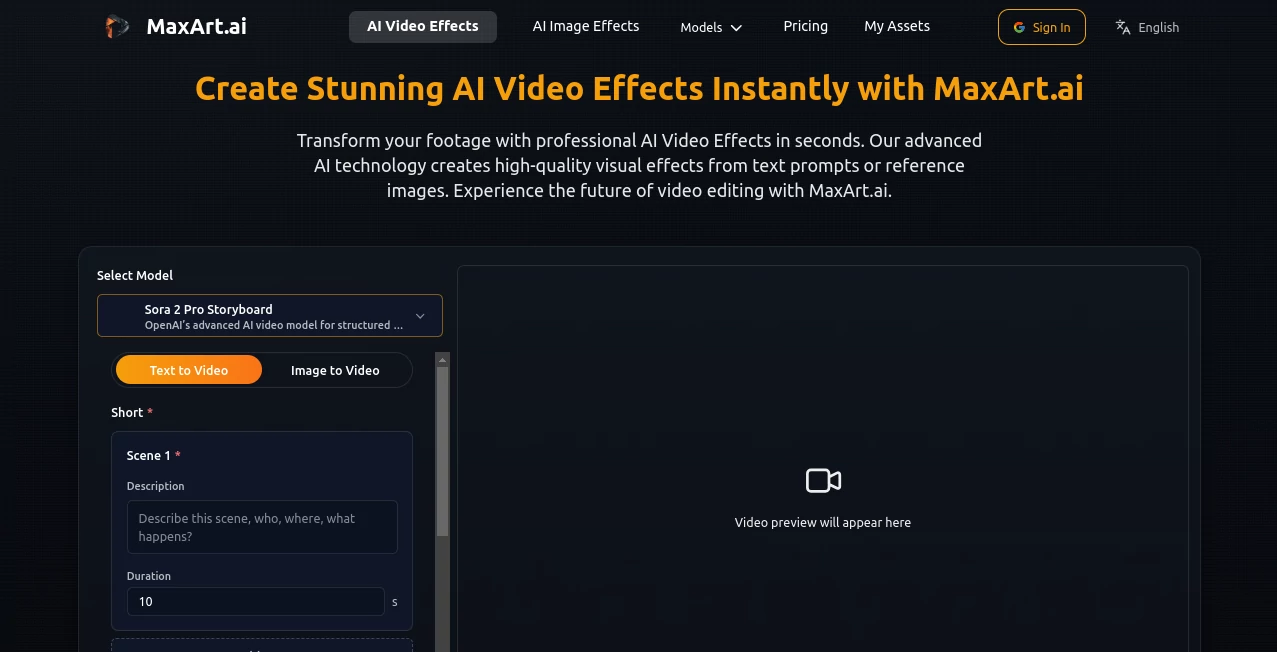
The interface is refreshingly straightforward. Upload your video or start with a prompt, choose from pre-built effect styles or describe your own, and watch the preview generate. Sliders for intensity and simple toggles give you just enough control without overwhelming options. Everything happens in one clean workspace, so you stay focused on the creative side rather than technical settings. Even first-time users can get impressive results quickly because the flow feels natural and intuitive.
Accuracy & Performance
The effects stay true to your source footage—motion remains smooth, subjects keep their identity, and the applied style feels integrated rather than slapped on. Generation is fast enough to support real iteration, and the output quality holds up well for social media, presentations, or even short promotional pieces. It handles a wide variety of input footage without introducing common artifacts, which builds confidence to experiment boldly.
Capabilities
You can transform videos using text prompts (“cinematic golden hour lighting,” “dreamy watercolor animation”), reference images for style transfer, or choose from a library of professional effects. It supports cinematic enhancements, artistic stylization, motion effects, color grading, and more. The tool works well for both short clips and longer sequences, making it versatile for Reels, ads, explainer videos, or creative experiments. The combination of text guidance and visual references gives you precise creative control.
Security & Privacy
Your uploaded videos and generated content are handled responsibly with standard encryption and no unnecessary long-term storage. The platform focuses on delivering the output without over-collecting data, giving creators peace of mind when working with client footage or personal projects.
Use Cases
A small business owner turns plain product demo footage into a stylish ad with cinematic lighting and smooth transitions. A content creator applies artistic effects to everyday vlogs to make them more engaging on social media. Filmmakers use it to quickly test different visual styles on rough cuts before committing to full editing. Educators enhance lecture recordings with subtle effects that make them more visually interesting for students. Wherever ordinary video needs a visual upgrade, this tool delivers fast, high-impact results.
Pros and Cons
Pros:
- Fast, high-quality transformations that look professionally done.
- Simple text prompts combined with reference images give great control.
- Preserves original motion and timing while enhancing visuals.
- Accessible for beginners while powerful enough for regular creators.
- Generous free trial credits let you test real projects.
Cons:
- Very long videos may need to be processed in segments.
- Some highly specific or unusual styles require careful prompting.
- Heavy daily use benefits from a paid plan.
Pricing Plans
It offers a free tier with trial credits so you can experience the quality firsthand without commitment. Paid plans provide more credits, faster processing, higher resolution options, and access to advanced effects. The pricing is practical—many users find the paid tier pays for itself quickly through time saved and improved content performance.
How to Use MaxArt
Upload your source video clip. Write a description of the effect you want (“apply warm cinematic lighting, subtle film grain, slow motion on key moments”) or upload a reference image for style matching. Choose any additional parameters like intensity or duration focus. Hit generate and review the preview. Download the enhanced version or iterate with small prompt tweaks. For best results, start with clear source footage and descriptive language. The whole process usually takes under a minute per clip.
Comparison with Similar Tools
Many AI video enhancers either overdo effects to the point of looking fake or require complex setups. This one keeps transformations natural and integrated while offering easy text and reference control. It strikes a better balance between speed, quality, and usability than most alternatives, especially for creators who need reliable, good-looking results without a steep learning curve.
Conclusion
Great video doesn’t always need a big budget or complex editing—it sometimes just needs the right enhancement at the right moment. This tool makes professional-looking visual upgrades accessible and fast, helping creators focus on storytelling instead of technical hurdles. Whether you’re polishing content for social media, preparing client deliverables, or experimenting creatively, it consistently delivers results worth sharing. In a crowded content world, that kind of reliable visual boost can make all the difference.
Frequently Asked Questions (FAQ)
How long does processing take?
Most clips finish in 10–60 seconds depending on length and complexity.
Can I use my own reference images?
Yes—uploading a style reference often produces the most accurate and desired look.
Is the original audio preserved?
Yes, the tool focuses on visual effects and keeps your original audio intact.
What kinds of videos work best?
Clear, well-lit footage with reasonable motion gives the strongest results, but it handles a wide variety effectively.
Are commercial rights included?
Yes on paid plans—check specific terms for full details on usage rights.
AI Animated Video , AI Image to Video , AI Video Generator , AI Video Enhancer .
These classifications represent its core capabilities and areas of application. For related tools, explore the linked categories above.
MaxArt AI details
Pricing
- Free
Apps
- Web Tools
Categories

MaxArt AI Alternatives Product

Kling 3 AI
seedance2-pro

Happy Horse …

Sora AI Vide…
Seedance 2 V…

Seedance AI …

Seedance AI
VeoNano
VideoFlux