
🧠 AI Quiz
Think you really understand Artificial Intelligence?
Test yourself and see how well you know the world of AI.
Answer AI-related questions, compete with other users, and prove that
you’re among the best when it comes to AI knowledge.
Reach the top of our leaderboard.


















MeetAssist
Verified Blue CheckMark
Verified Blue CheckMark products are featured above free or unverified listings.
This badge indicates authenticity and builds trust, giving your product higher visibility across the platform.
Upgrade to get verified
Verified Blue CheckMark products are featured above free or unverified listings. This badge indicates authenticity and builds trust, giving your product higher visibility across the platform.
Upgrade to get verified
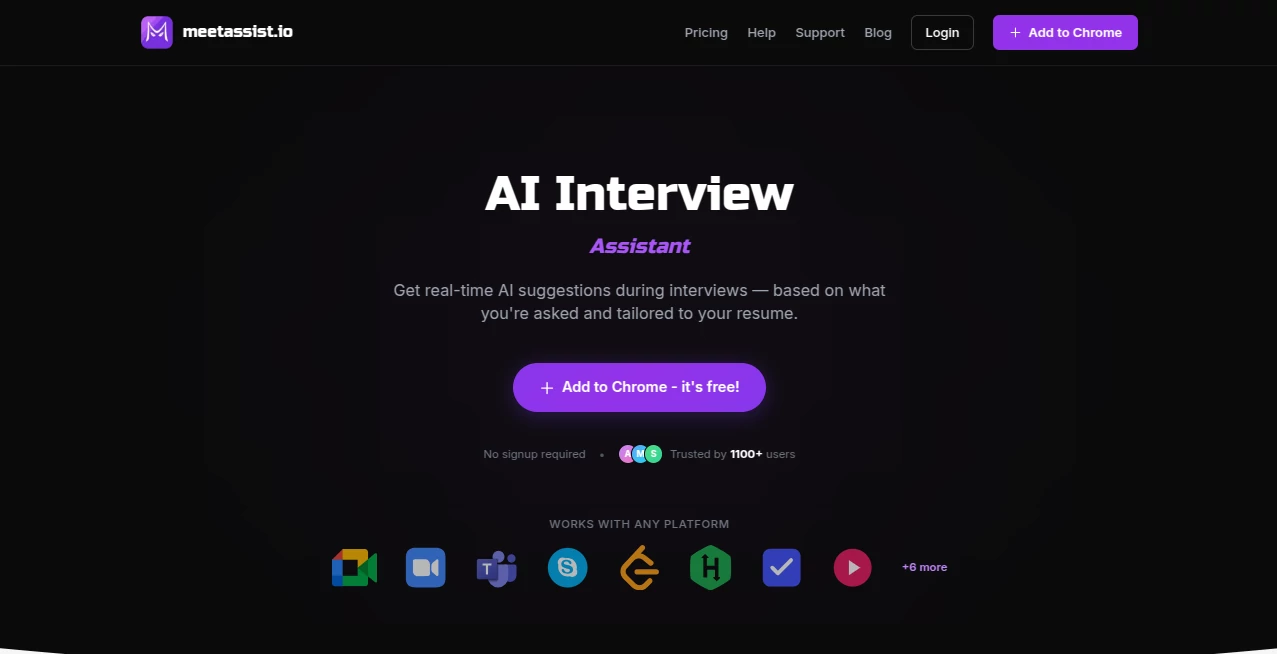
What is MeetAssist?
Walking into a job interview can make your heart race, especially when the questions come fast and you want to give thoughtful answers without fumbling. This tool quietly sits in the background of your video call and does something incredibly helpful: it listens to what the interviewer asks, then feeds you smart, natural-sounding suggestions tailored to your experience. No more awkward silences or generic replies. I’ve heard from people who used it during tough technical rounds and behavioral questions alike, and the common feedback is the same—they felt more confident, sounded more prepared, and actually enjoyed the conversation instead of surviving it. It’s like having a calm, knowledgeable friend whispering the right words at exactly the right moment.
Introduction
Interviews are high-stakes moments where every second counts. Traditional prep helps, but once the camera turns on, nerves can make even well-prepared answers fall flat. MeetAssist changes that by bringing real-time AI assistance directly into Google Meet, Zoom, and Teams. It transcribes questions on the fly, analyzes them, and offers contextual suggestions—whether it’s a behavioral story from your resume or a technical explanation. No signup is required to start, and it works seamlessly without cluttering your screen. Over a thousand users have already trusted it during important interviews, and many say it helped them land offers they might have otherwise missed. It’s not about cheating the process; it’s about showing up as your best self when it matters most.
Key Features
User Interface
The extension installs quickly and stays out of sight until you need it. During the call, suggestions appear cleanly—either on your computer screen or, in Phone Mode, synced to your mobile device so the interviewer never sees anything extra. You can read full natural responses word-for-word or get bullet-point highlights. Switching between modes or adjusting sensitivity feels intuitive, never complicated. It’s designed so the focus stays on the conversation, not the tool.
Accuracy & Performance
It listens carefully and delivers suggestions that feel relevant and personal, pulling context from your resume when provided and matching the tone of the question—whether behavioral, technical, or situational. Responses come quickly with low latency, so you don’t lose the natural flow of the interview. Many users report that the AI catches nuances like follow-up questions and adapts smoothly. The accuracy is high enough that suggestions often sound like something you would have said yourself, just calmer and better organized.
Capabilities
Real-time transcription and contextual answer suggestions for both behavioral and technical interviews, Phone Mode for a completely clean meeting screen, support for multiple AI models including GPT-4.1, Claude, Llama and more, and the ability to analyze coding problems from any tab. It works across Google Meet, Zoom, and Teams, with Microsoft Teams support actively expanding. You can get full scripted responses or concise bullets depending on your preference, and everything stays invisible to the other participants.
Security & Privacy
Your interview data is handled with care—nothing is stored longer than necessary, and the tool is designed to respect the privacy of sensitive conversations. No unnecessary permissions beyond what’s needed for the meeting platform. Users appreciate that it doesn’t record or share the call itself, only processes the audio locally or through secure channels to provide suggestions. That level of thoughtfulness builds trust when you’re discussing career-defining moments.
Use Cases
A software engineer preparing for a FAANG-level coding interview uses it to get clear, structured explanations for algorithm questions without breaking eye contact. A product manager practices behavioral stories and receives natural-sounding responses that highlight achievements without sounding rehearsed. A student going through their first big internship interviews feels more confident because suggestions help them articulate experiences they know but struggle to express under pressure. Even experienced professionals use it for high-stakes promotions or client presentations to stay sharp and articulate.
Pros and Cons
Pros:
- Real-time suggestions that feel natural and tailored, not robotic.
- Phone Mode keeps your main screen completely clean and professional.
- Works across major video platforms with minimal setup.
- Multiple strong AI models give you options for different interview styles.
- Free to try with no signup required—easy to test before any commitment.
Cons:
- Heavy reliance on clear audio; very noisy environments can affect performance.
- Best results come when you provide resume context beforehand.
- Advanced features and higher usage limits require a paid plan.
Pricing Plans
It starts completely free so you can try it on real interviews and feel the difference. Paid plans unlock unlimited usage, priority processing, more AI model choices, and additional features like extended history or advanced analytics. The pricing is reasonable for the confidence and preparation edge it provides—many users say it’s one of the smartest small investments they made during their job search.
How to Use MeetAssist
Install the Chrome extension from the store (it takes seconds). Join your interview on Google Meet, Zoom, or Teams as usual. When the interviewer asks a question, the tool listens and shows suggestions on screen or syncs them to your phone in Phone Mode. Read the natural response, adapt it in your own words, and speak confidently. You can toggle modes or adjust settings anytime. After the call, review any saved highlights if you’re on a paid plan. The whole experience stays discreet and supportive throughout.
Comparison with Similar Tools
Other interview aids often feel clunky, require constant tab-switching, or deliver generic answers that don’t match your background. This one integrates smoothly into the actual meeting, keeps suggestions invisible to the interviewer, and personalizes responses based on real context. The Phone Mode option in particular sets it apart, giving candidates a clean, professional presence while still getting help. It strikes a thoughtful balance between assistance and authenticity that many alternatives miss.
Conclusion
Interviews are nerve-wracking enough without worrying about forgetting key points or struggling to articulate your experience under pressure. MeetAssist acts like a calm, prepared co-pilot that helps you present your best self without ever stealing the spotlight. It turns preparation into real-time confidence, making even tough interviews feel more like genuine conversations. For anyone serious about landing their next opportunity, having this kind of quiet support in the room can make all the difference.
Frequently Asked Questions (FAQ)
Does the interviewer see the suggestions?
No—suggestions appear only on your screen or phone. The meeting stays completely clean.
Which platforms does it support?
Google Meet, Zoom, and Microsoft Teams, with strong performance across all three.
Do I need to upload my resume?
It works without one, but providing resume context makes suggestions significantly more personalized and relevant.
Is it free to try?
Yes—you can start using it immediately with no signup required for basic functionality.
Can it help with coding interviews?
Absolutely—it can analyze coding problems from any tab and provide structured explanations in real time.
AI Voice Assistants , AI Interview Assistant , AI Productivity Tools , AI Meeting Assistant .
These classifications represent its core capabilities and areas of application. For related tools, explore the linked categories above.
MeetAssist details
Pricing
- Free
Apps
- Web Tools
Categories

MeetAssist Alternatives Product

Black Screen

Toolquix

Jamy.ai | Au…

Productivity…

Krisp
AnyToURL

David One

Automaited

WhispriNote
