
🧠 AI Quiz
Think you really understand Artificial Intelligence?
Test yourself and see how well you know the world of AI.
Answer AI-related questions, compete with other users, and prove that
you’re among the best when it comes to AI knowledge.
Reach the top of our leaderboard.


















Mermaid Viewer

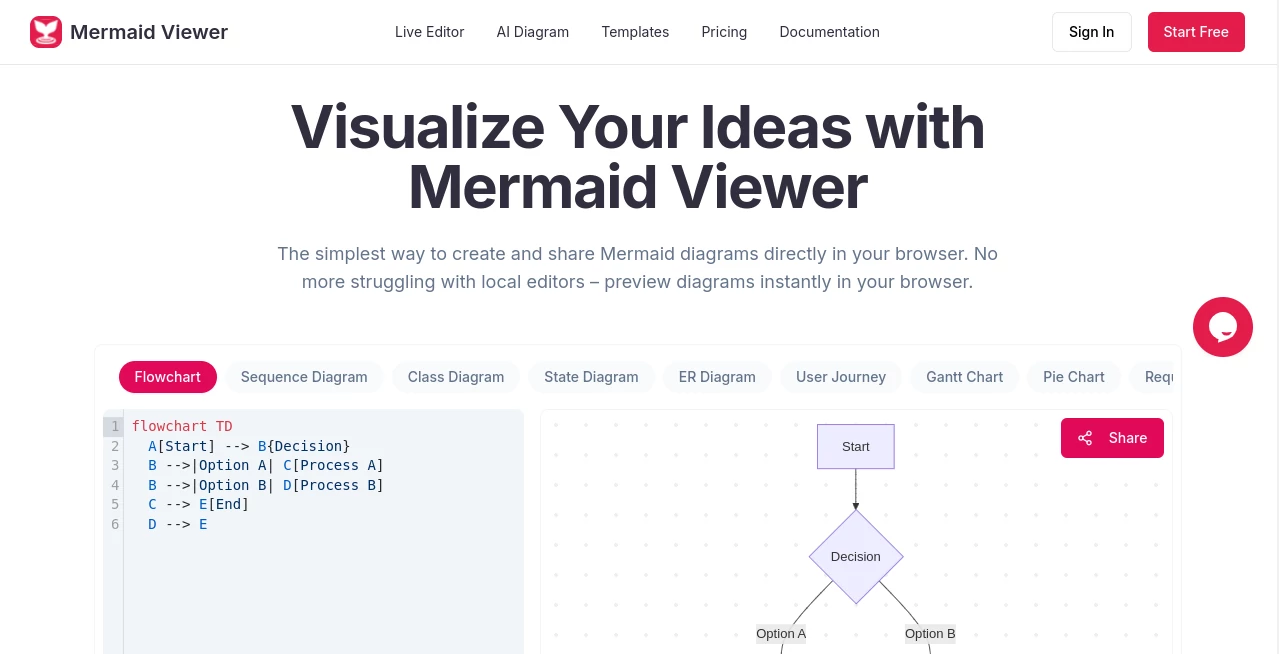
What is Mermaid Viewer?
Picture this: you're knee-deep in a project brainstorm, scribbling connections between ideas on a napkin, but nothing quite clicks until you see it laid out clean and connected. That's the magic at play here—a browser-based haven where your thoughts spring to life as sharp diagrams, no downloads or setups required. I've lost count of the times I've fired it up during a late-night coding session, watching flowcharts bloom right before my eyes, turning vague hunches into crystal-clear roadmaps that actually move the needle.
Introduction
Ever felt that rush when a tangled mess of notes suddenly untangles into something elegant? This tool captures that exact thrill, serving up an online editor that's as intuitive as it is powerful for anyone wrestling with visual ideas. Born from the frustrations of devs and designers tired of clunky local installs, it lets you dive straight into creating Mermaid diagrams with zero barriers—just open your browser and start typing. What hooked me early on was how it feels like a conversation with your own brain: you describe a process, and it sketches it out live, saving hours that used to vanish into trial-and-error hell. Now, teams everywhere are ditching the whiteboard wars, collaborating in real time on everything from agile sprints to architecture overhauls, all while keeping things delightfully simple and secure.
Key Features
User Interface
The setup couldn't be more welcoming—split your screen between a code pane and a live preview that updates with every keystroke, no awkward refresh buttons in sight. Drag-and-drop themes switch between light and dark on a whim, and sharing a link invites your whole crew to edit together without a single signup nagging at you. It's that effortless flow that had me hooked from the first try; imagine sketching a timeline for a product launch, and boom, your collaborators are already dropping comments, all without leaving the page.
Accuracy & Performance
When it comes to nailing your vision, this shines with syntax checks that flag hiccups before they derail you, complete with gentle nudges for fixes that feel more like helpful whispers than scoldings. Speeds are snappy even on beefy diagrams, rendering complex sequences in a heartbeat so you stay in the creative groove. I remember debugging a sprawling decision tree for a governance workflow—errors popped up highlighted, suggestions flowed in, and suddenly it was flawless, proving how it turns potential headaches into quick wins every single time.
Capabilities
From flowcharts charting committee votes to timelines mapping semester milestones, it handles a buffet of diagram types with ease, even tossing in AI smarts via GPT-4 to whip up code from plain English descriptions. Export your masterpieces as crisp SVGs, PNGs, or Markdown embeds, tweaking DPI for that print-ready punch, and dive into templates that jumpstart your next big sketch. The real standout? Real-time collab links that let remote teams build wireframe flows together, turning solo doodles into shared triumphs without missing a beat.
Security & Privacy
In an era where every click feels watched, this stands out by keeping your sketches strictly in-browser—nothing gets stored on distant servers unless you choose to share. It's a breath of fresh air for sensitive projects like internal process maps, where you control every link and access point. Enterprise folks love the Docker option for private setups, complete with role-based gates that keep the right eyes only on what matters, ensuring your ideas stay yours from brainstorm to boardroom.
Use Cases
Think of a dev team mapping out a course lifecycle, from needs assessment to ongoing tweaks—suddenly, everyone's on the same page, spotting bottlenecks before they bite. Or picture marketers collaborating on a wireframe handoff, iterating from brief to build without email ping-pong. I've seen it transform governance flows, where agendas turn into visual trackers that make decisions feel democratic and doable. Whether you're a solo educator plotting academic milestones or a startup crew diagramming agile sprints, it fits like a glove, amplifying those "aha" moments that drive real progress.
Pros and Cons
Pros:
- Instant live previews that keep your momentum unbreakable.
- AI boosts that turn rambling notes into ready code, saving sanity.
- Seamless sharing for teams that thrive on quick feedback loops.
- Privacy baked in, so you create freely without the fine-print fears.
Cons:
- Free tier caps exports, nudging you toward paid for watermark-free wonders.
- Heavy enterprise needs might crave that Docker deep dive sooner than later.
Pricing Plans
Jump in free to taste the basics—unlimited editing with watermarked exports that still dazzle for personal plays. The Starter plan at $69.99 a year unlocks 30 diagrams, 500 AI chats monthly, and clean high-res PNGs, perfect for steady creators who want the polish without the premium price. Go Pro at $119.99 yearly for boundless builds, full format freedom including PDFs and SVGs, plus stats and annotations that turn your workspace into a powerhouse. It's that sweet spot of value, with annual savings that make investing in your ideas feel like a no-brainer.
How to Use Mermaid Viewer
Fire up your browser and paste in some Mermaid code, or hit the AI button to describe your idea in plain words—watch it generate the skeleton for you. As you type, the preview shifts live, letting you tweak nodes or edges until it sings. Grab a template for a head start on timelines or flows, collaborate by firing off a link to your crew, and when it's golden, export in your flavor of choice. Rinse and repeat for versioned wonders, and suddenly, diagramming feels less like drudgery and more like doodling with superpowers.
Comparison with Similar Tools
Where some editors demand downloads and setups that eat your afternoon, this one lives right in your tab, outpacing the locals with its no-fuss previews and AI edge. Against heavier suites loaded with bells that bury the basics, it strips down to what sparks joy—pure, collaborative creation without the overload. It's the lightweight champ for devs who want power without the pomp, leaving bulkier options in the dust for anyone chasing speed and simplicity in equal measure.
Conclusion
This isn't just another diagramming dash—it's the spark that turns scattered thoughts into strategies that stick, all wrapped in a package that's as thoughtful as it is transformative. From solo sketches to squad symphonies, it empowers you to visualize bolder, collaborate closer, and iterate faster, proving that the best tools don't just draw lines; they connect dots in ways that change everything. If you've ever wished for a canvas that catches up to your mind's eye, this is the invitation to make it real.
Frequently Asked Questions (FAQ)
How do I save my diagrams?
Export them as images or Markdown right from the editor, or stash links for easy revisits—your call on how permanent you want the magic.
How do I share diagrams with my team?
Generate a unique link for real-time edits; no accounts needed, just drop it in chat and watch the collaboration unfold.
What types of diagrams are supported?
Flowcharts, timelines, sequences—you name the Mermaid flavor, and it's ready to render with finesse.
Do I need to install anything?
Not a thing—just your browser and a spark of an idea to get the ball rolling.
How do I export high-quality diagrams?
Tweak DPI in settings for that pro sheen, then snag SVGs or PNGs that scale beautifully anywhere.
AI Code Generator , AI Developer Tools , AI Productivity Tools , AI Diagram Generator .
These classifications represent its core capabilities and areas of application. For related tools, explore the linked categories above.
Mermaid Viewer details
This tool is no longer available on submitaitools.org; find alternatives on Alternative to Mermaid Viewer.
Pricing
- Free
Apps
- Web Tools
Categories

Mermaid Viewer Alternatives Product

ChatFlowchart

Screenshot t…

Rierino

SuperAI

MyToolster W…

Alai

Kimi K2.5

GOLANG COLLE…

Klyra AI
