
🧠 AI Quiz
Think you really understand Artificial Intelligence?
Test yourself and see how well you know the world of AI.
Answer AI-related questions, compete with other users, and prove that
you’re among the best when it comes to AI knowledge.
Reach the top of our leaderboard.


















meta ai image
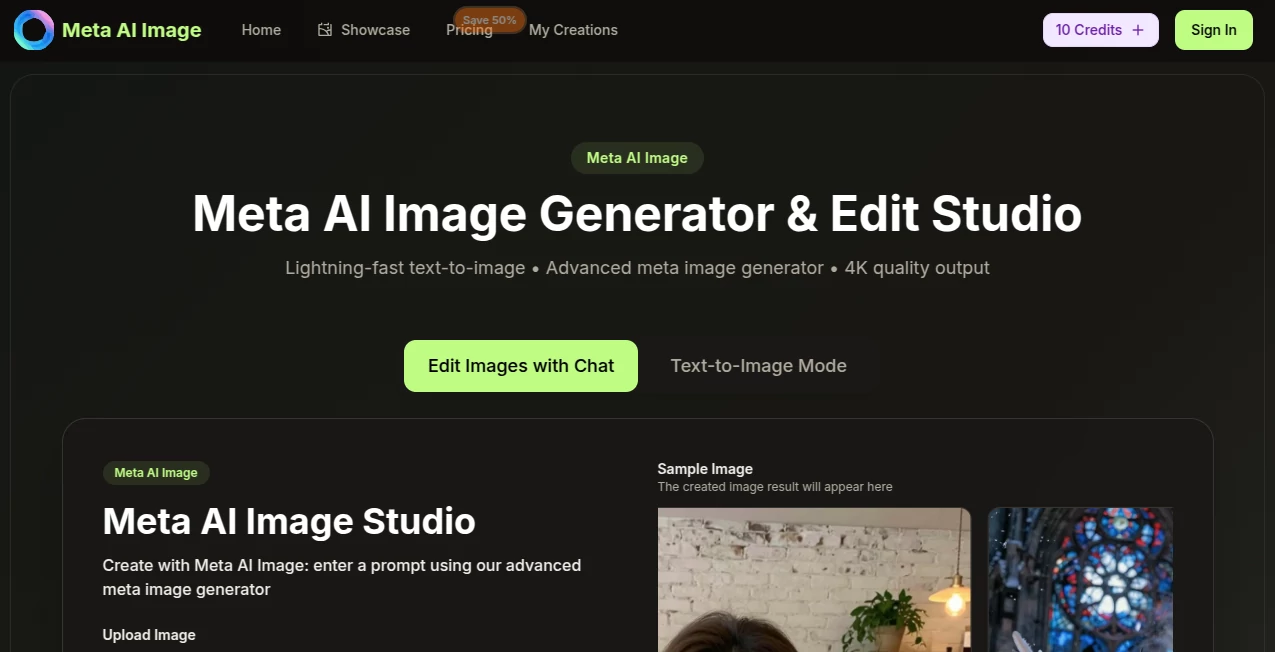
What is meta ai image?
There’s something deeply satisfying about typing a few words and watching an image appear that feels like it was pulled straight from your imagination. This little web tool does exactly that—and does it with a quiet confidence that keeps surprising me every time I use it. No bloated menus, no confusing settings, just a clean box where you describe what you want, hit enter, and suddenly there’s artwork staring back at you that looks like it took hours instead of seconds. I’ve lost count of how many times I’ve shown friends the result and heard “wait, you made that just now?”
Introduction
Most AI image generators overwhelm you with sliders and options before you’ve even started. This one takes the opposite approach: it trusts that you already know what you want to see and gets out of the way so you can focus on the idea itself. The interface is almost disarmingly simple, yet the pictures that come out carry real artistic weight—soft lighting, thoughtful composition, color harmony that doesn’t feel accidental. People who’ve used it for everything from book covers to Instagram posts tend to come back because the results consistently look intentional and polished, not like random AI noise. It’s the kind of tool that makes you want to keep experimenting just to see how far a single sentence can take you.
Key Features
User Interface
Everything happens in one calm, centered screen. You type your description, maybe add a style hint if you feel like it, and press the button. That’s it. No account nagging, no forced login on first visit, no pop-ups trying to upsell you mid-thought. The gallery of your recent creations stays visible so you can compare versions side by side or pick up where you left off. It’s the rare tool that feels designed for humans who just want to create, not wrestle with software.
Accuracy & Performance
The model understands nuance surprisingly well. Tell it “a lone astronaut sitting on the moon watching Earthrise at twilight” and it doesn’t just dump a generic space scene—it gets the quiet mood, the soft blue glow, the sense of solitude. Generation times are consistently fast, rarely more than fifteen or twenty seconds even for detailed prompts. And the images come out sharp enough to use professionally right away—no weird artifacts or melting hands unless you deliberately push the boundaries. It’s reliable in the best way: you describe, it listens, it delivers.
Capabilities
It handles a huge range of styles—realistic portraits, painterly landscapes, cyberpunk cityscapes, cozy children’s book illustrations, vintage posters, surreal dreamscapes—and mixes them convincingly when you ask. You can steer mood with words like “melancholic,” “vibrant,” “cinematic,” or reference artists and eras without the output turning into a bad imitation. Aspect ratios are flexible, and upscaling gives you crisp high-resolution files when you need them for print or large screens. It’s versatile enough to be your only image tool for months.
Security & Privacy
Your prompts and generated images don’t get stored forever or quietly fed into someone else’s training set. The process is straightforward and contained—once you close the tab, nothing lingers unless you choose to save it. That matters more than most people realize when you’re creating personal work or client concepts you’d rather keep close.
Use Cases
A novelist mocks up a cover that finally matches the feeling of the story. A small business owner creates product mockups and social graphics without hiring a designer. A teacher illustrates a lesson plan with visuals that actually engage students. A game developer prototypes character concepts and environments in minutes instead of days. Even a teenager messing around at 2 a.m. ends up with something they’re proud to post. The range is wide because the tool stays out of the way and lets the idea lead.
Pros and Cons
Pros:
- Dead simple—no learning curve, just start typing.
- Images consistently look finished and intentional.
- Fast enough that you can iterate without losing momentum.
- Respects your privacy and doesn’t bombard you with upsells.
Cons:
- Free tier has sensible limits to prevent abuse.
- Very abstract or contradictory prompts can still confuse it (but that’s true of every model).
Pricing Plans
You can jump in completely free and still get solid results—enough generations to play seriously and decide whether you love it. When you’re ready for more frequent use, unlimited runs, higher resolutions, and priority queue the paid tiers are priced gently and feel worth it the moment you start creating daily. No complicated tiers or hidden catches; it’s built for creators, not nickel-and-dimers.
How to Use MetaAIImage
Open the page, type whatever scene or style is in your head—“a fox reading poetry under streetlights in the rain, Studio Ghibli mood”—and hit generate. If the first version isn’t quite right, tweak one word or add a detail and run it again. Download when you’re happy. Want variations? Just ask for a different angle or lighting. Within a few minutes you’ll have a handful of keepers. That’s really all there is to it.
Comparison with Similar Tools
Plenty of generators promise the moon but bury you in options or spit out inconsistent results. This one keeps the promise simple and actually delivers: better coherence, cleaner compositions, and a calmer experience overall. Where others feel like a slot machine, this feels like a quiet collaborator who listens closely and rarely misses the mark. For anyone tired of fighting the interface, it’s a noticeable step up.
Conclusion
Creativity shouldn’t feel like work before you even start. This tool strips away the friction so the only thing between your idea and the canvas is a few seconds. It doesn’t try to be everything—just really good at turning words into pictures that look like they belong in the world. If you’ve ever wanted to see your imagination rendered with care and speed, this is one of those rare places that actually makes it happen.
Frequently Asked Questions (FAQ)
Do I need an account to start?
No—jump straight in and generate right away.
How detailed should my prompt be?
Short and clear works great; longer, descriptive prompts give even stronger results.
Can I use the images commercially?
Yes—once generated, they’re yours to use however you like.
What if I don’t like the first result?
Just tweak the prompt slightly and generate again—most people land on something they love within 2–3 tries.
Is there a mobile version?
The site is fully responsive and works smoothly on phones and tablets.
AI Text to Image , AI Photo & Image Generator , AI Art Generator , AI Design Generator .
These classifications represent its core capabilities and areas of application. For related tools, explore the linked categories above.
meta ai image details
Pricing
- Free
Apps
- Web Tools
Categories

meta ai image Alternatives Product

Nano Banana …

Normal Map G…

Nano Banana …

Flux.2 AI

NanoBanana2F…

Nano Banana …
Nano Figure
NB2 Hub

BananaFrame
