🧠 AI Quiz
Think you really understand Artificial Intelligence?
Test yourself and see how well you know the world of AI.
Answer AI-related questions, compete with other users, and prove that
you’re among the best when it comes to AI knowledge.
Reach the top of our leaderboard.


















Mimo AI
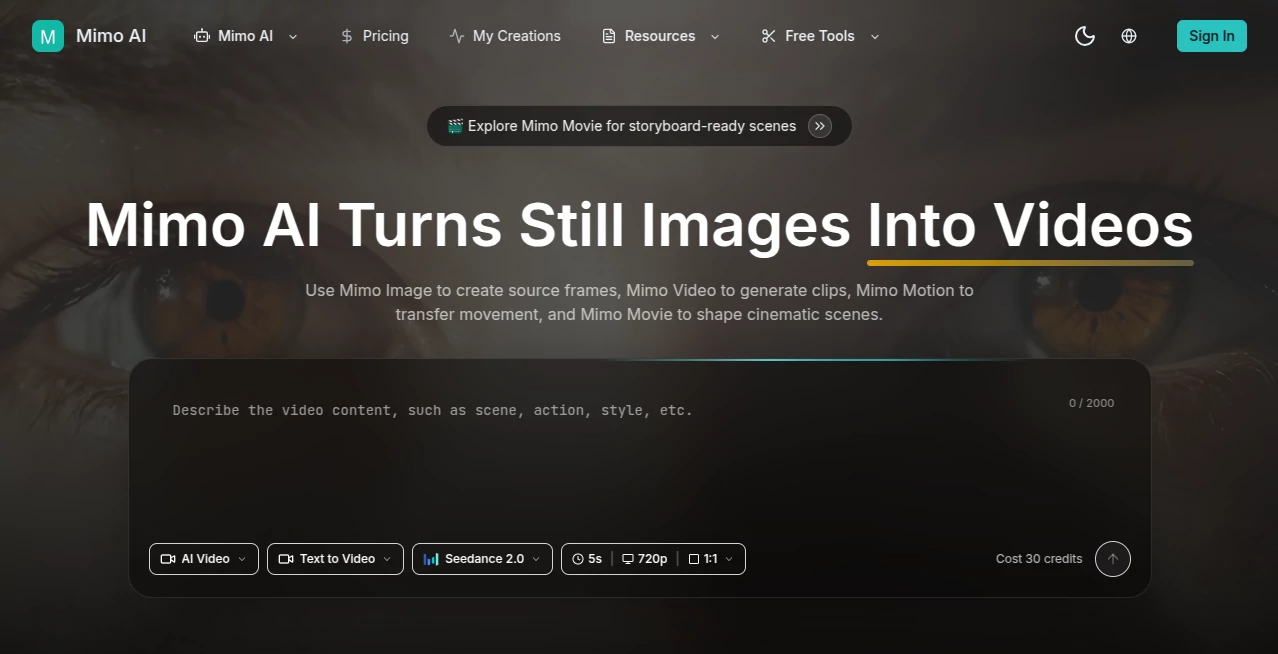
What is Mimo AI?
There’s something special about watching a single still photo suddenly come alive—hair swaying in the wind, a character turning their head, light shifting across a scene in a way that feels natural and cinematic. This tool makes that moment feel almost effortless. You upload an image, add a short description of what you want to happen, and a few seconds later you have a smooth, high-quality video clip that actually looks directed. I’ve seen creators turn product photos into engaging ads and artists bring static concepts to life in ways that would have taken hours of manual animation before. The results consistently surprise people because they don’t look like typical AI output—they feel alive.
Introduction
Creating video content used to mean either shooting footage or spending endless hours in editing software. This platform changes the game by letting you start with nothing more than a still image (or even just a text prompt) and generate compelling video clips in moments. It combines several smart AI tools under one roof—image enhancement, motion generation, and cinematic scene building—so you can go from idea to finished clip without switching apps or learning complex workflows. Whether you’re an influencer needing daily content, a marketer creating product videos, or an artist experimenting with motion, it removes the biggest barriers and lets you focus on the creative part. The speed and quality together make it feel like having a small production team in your browser.
Key Features
User Interface
The workspace is clean and inviting. You upload your image (JPG, PNG, or WebP), type a short prompt describing the motion or scene you want, choose an AI model if you’d like, and hit generate. Previews appear quickly, and the whole flow feels intuitive rather than technical. No overwhelming menus or steep learning curve—just enough controls to guide the result without getting in your way. It’s the kind of interface that makes you want to keep experimenting because it never slows you down.
Accuracy & Performance
The motion looks natural and the character or object consistency is impressive—faces stay recognizable, lighting behaves realistically, and movements have proper weight. Generation is fast, often just seconds for short clips, and the quality holds up well at 720p. It handles a wide range of inputs, from product shots to artistic illustrations, without the usual weird artifacts or sudden style breaks. In practice, the first or second try is often good enough to use, which is rare for AI video tools.
Capabilities
It supports image-to-video, text-to-video, motion transfer, and cinematic scene building. You can enhance source images first, add movement with prompts, or combine tools for more complex results. Multiple AI models (including options like Kling and Runway) give you different stylistic flavors. Outputs are HD and ready for social media, marketing, or creative projects. The connected workflow means you can go from a single photo to a polished short video without leaving the platform.
Security & Privacy
Your images and generated videos are handled securely with a credit-based system that keeps things simple and private. No unnecessary data collection or long-term storage beyond what you choose to keep. For creators working with client assets or personal projects, that straightforward approach provides welcome peace of mind.
Use Cases
An influencer turns a static outfit photo into a dynamic try-on video for Instagram Reels. A product marketer creates smooth reveal clips from product shots without hiring a videographer. An artist brings a character illustration to life with natural movement for a portfolio piece. A small business owner generates engaging social content from everyday photos to promote their services. The common thread is turning static assets into moving stories quickly and affordably.
Pros and Cons
Pros:
- Transforms still images into surprisingly natural and cinematic video clips.
- Fast generation that keeps creative momentum going.
- Multiple AI models and tools in one connected platform.
- High-quality outputs suitable for professional-looking content.
- Generous free credits to start experimenting right away.
Cons:
- Clip lengths are best for short social or marketing content.
- Very complex scenes may need prompt refinement or multiple generations.
- Higher usage requires purchasing more credits.
Pricing Plans
You start with free credits so you can test the quality without any commitment. Additional credits are available on a pay-as-you-go basis, making it flexible for both light users and heavier creators. The cost per video is reasonable, especially when you consider the time and money saved compared to traditional video production. It scales nicely with your needs—no long-term subscriptions required if you prefer to pay only for what you use.
How to Use Mimo AI
Upload your starting image (or type a text prompt if you prefer). Describe the motion or scene you want to see—be as specific or creative as you like. Choose your preferred AI model if you have a favorite style in mind. Hit generate and watch the preview. If you like the result, download the video; if not, tweak the prompt and try again. The process is quick enough that you can create several variations in one sitting. For more advanced results, use the connected tools to enhance the source image first or build multi-shot scenes.
Comparison with Similar Tools
Many AI video tools still produce jittery motion or inconsistent characters. This one stands out for its natural movement, good consistency, and thoughtful cinematic quality. While some competitors focus only on text or only on images, the combination of strong image-to-video and supporting tools in one place makes the workflow smoother. It’s particularly strong for creators who want professional-looking short clips without the usual AI weirdness.
Conclusion
Turning a still image into a moving video used to be time-consuming and technical. This tool makes it feel almost magical—fast, accessible, and surprisingly high quality. It opens the door for creators of all levels to produce engaging video content without expensive equipment or long editing sessions. Whether you’re building a brand, telling a story, or just having fun with visuals, it gives you results that look intentional and polished. In a world where video dominates attention, having a reliable way to create it quickly is a real advantage.
Frequently Asked Questions (FAQ)
How long are the generated videos?
Most clips are short and optimized for social media and marketing—perfect length for quick, engaging content.
Do I need video editing skills?
Not at all. The tool handles the heavy lifting so you can focus on the creative idea.
Can I use my own images?
Yes—upload any JPG, PNG, or WebP image as your starting point.
Is there a free way to try it?
Yes, you get free credits when you start so you can test the quality immediately.
What kind of content works best?
Product shots, character illustrations, lifestyle photos, and any image where you want to add natural motion.
AI Animated Video , AI Image to Video , AI Video Generator , AI Text to Video .
These classifications represent its core capabilities and areas of application. For related tools, explore the linked categories above.
Mimo AI details
Pricing
- Free
Apps
- Web Tools
Categories

Mimo AI Alternatives Product

Seedance 2 A…

Faceless vid…
Seedance 2.0

Seedance 3.0

Seedance 3.0

Seedance 2.0…

RenderFlow AI

Nano Banana …

Sora by Open…