🧠 AI Quiz
Think you really understand Artificial Intelligence?
Test yourself and see how well you know the world of AI.
Answer AI-related questions, compete with other users, and prove that
you’re among the best when it comes to AI knowledge.
Reach the top of our leaderboard.


















Monet AI

What is Monet AI?
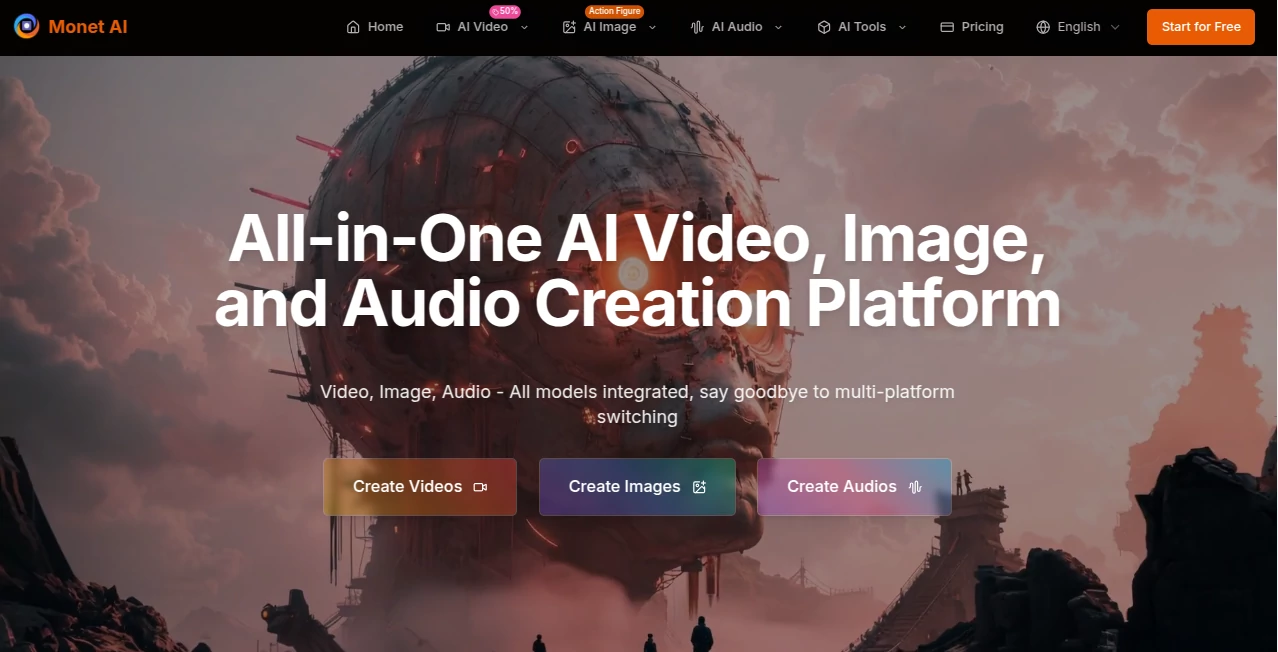
There's something almost magical about sitting down with a half-formed idea and watching it blossom into a full video, a stunning image, or even a voiceover that feels custom-made. This platform makes that happen without the usual headaches of switching apps or learning new interfaces. I remember the first time I tried it—typed a quick concept for a short promo, picked a couple models to compare, and within minutes had three different takes to choose from, all looking like they'd come from a pro studio. It just works, and it saves so much time that you actually feel creative again instead of bogged down.
Introduction
For anyone who's ever bounced between a dozen different AI tools just to get one decent piece of content, this all-in-one spot is a breath of fresh air. It pulls together the best models for video, images, audio, and even style transfers under a single roof, so you can experiment freely without subscriptions piling up or accounts multiplying. What started as a smart way to streamline workflows has turned into a favorite among creators who want flexibility without the friction. A designer friend of mine switched over from juggling separate services and hasn't looked back—she says it's like having a whole creative team in her browser, always ready to riff on her ideas.
Key Features
User Interface
The dashboard keeps things clean and focused, with clear sections for video, image, and audio generation that guide you without overwhelming. You can jump straight into a prompt, tweak parameters if you're feeling hands-on, or let it handle the heavy lifting. Switching between models or comparing outputs happens in one spot, and everything loads fast enough that you stay in the zone. It's the kind of layout that makes you forget you're using a tool—feels more like a natural extension of your creativity.
Accuracy & Performance
Results come back sharp and consistent, whether you're generating a quick image or a full video sequence. The platform pulls from top models and lets you compare them side by side, so you always end up with something that matches your vision closely. Speed is impressive too—most generations finish in under a minute, even when you're running multiple at once. I've thrown some tricky prompts at it, and it rarely disappoints; the output quality holds up well for both casual and professional use.
Capabilities
From text-to-video to image-to-video, text-to-speech, and style transfers that can turn a plain photo into a Ghibli scene or cyberpunk masterpiece, the range here is impressive. You can mix models for hybrid workflows—like generating an image with one, then animating it with another—all in the same session. Batch processing saves time on bulk work, and the unified credit system means you don't waste resources. It's built for creators who like to experiment across mediums without starting from scratch each time.
Security & Privacy
Your creations stay yours, with data handled responsibly and no unnecessary sharing. The platform follows standard compliance practices, keeping things secure so you can focus on the work instead of worrying about leaks. It's reassuring when you're uploading personal concepts or client assets, knowing everything remains private.
Use Cases
Social media creators whip up Reels with synced audio and consistent visuals, turning quick ideas into polished posts. E-commerce sellers generate product shots in different styles, then animate them for engaging ads. Marketers build full campaign visuals from scratch, comparing models to nail the perfect tone. Even educators craft animated explainers or styled images for lessons, saving hours while keeping everything on-brand. It's versatile enough for solo creators and teams alike, making complex projects feel straightforward.
Pros and Cons
Pros:
- One platform for everything—video, image, audio, no more tab overload.
- Model comparison lets you pick the best output without guesswork.
- Fast generations and batch support keep workflows humming.
- Generous free tier that actually lets you create meaningful content.
Cons:
- Daily limits on free plan can feel tight for heavy users.
- Some advanced features wait behind paid tiers.
Pricing Plans
Start free with 10 credits on signup and 5 daily check-ins that stack up nicely for light use. The standard plan at around $10 monthly unlocks 1000 credits, watermark-free outputs, and priority access. Premium jumps to $25 for 3000 credits and early feature drops. Credits never expire, and annual discounts make it even sweeter—it's fair pricing that rewards regular creators without feeling punitive.
How to Use Monet AI
Sign up quick, then head to the generator you need—video, image, or audio. Drop your prompt, pick a model or two to compare, tweak settings if you like, and hit go. Results pop up fast; save the favorites or refine and regenerate. For video, add an image or audio for extra control. I start simple, generate a few versions, then pick the one that sparks joy—it's that easy to build a whole project in one sitting.
Comparison with Similar Tools
Where single-model tools force you to compromise on style or quality, this one lets you test the best of each and mix them freely. It's less about raw power and more about practical versatility—saving time and hassle compared to juggling subscriptions. For creators who want options without chaos, it stands out as the smarter, more enjoyable choice.
Conclusion
This platform quietly transforms how creators bring ideas to life, making AI feel less like a gadget and more like a true collaborator. It strips away the friction, leaving you with the fun parts—experimenting, comparing, and crafting. If you're tired of fragmented tools, this one's a welcome change that actually delivers on its promise.
Frequently Asked Questions (FAQ)
Do I need to pay for every generation?
Free tier gives solid daily credits; paid plans remove limits and watermarks.
Can I use the outputs commercially?
Yes, all content is yours to use however you like.
How good is the video quality?
Professional-grade, especially with the right model and prompt.
What if my prompt doesn't work well?
Compare multiple models or tweak details—results improve fast.
Is there early access to new features?
Premium plans get first dibs on updates and new models.
AI Image to Video , AI Video Generator , AI Text to Speech , AI Text to Image .
These classifications represent its core capabilities and areas of application. For related tools, explore the linked categories above.
Monet AI details
This tool is no longer available on submitaitools.org; find alternatives on Alternative to Monet AI.
Pricing
- Free
Apps
- Web Tools
Categories

Monet AI Alternatives Product

S2LIfe AI
gpt image

Seedance 2

Inpodcast AI

Overlap

seedance 3.0

Nano Banana 2

Artguru

loraai.me