🧠 AI Quiz
Think you really understand Artificial Intelligence?
Test yourself and see how well you know the world of AI.
Answer AI-related questions, compete with other users, and prove that
you’re among the best when it comes to AI knowledge.
Reach the top of our leaderboard.


















Motion Control Club
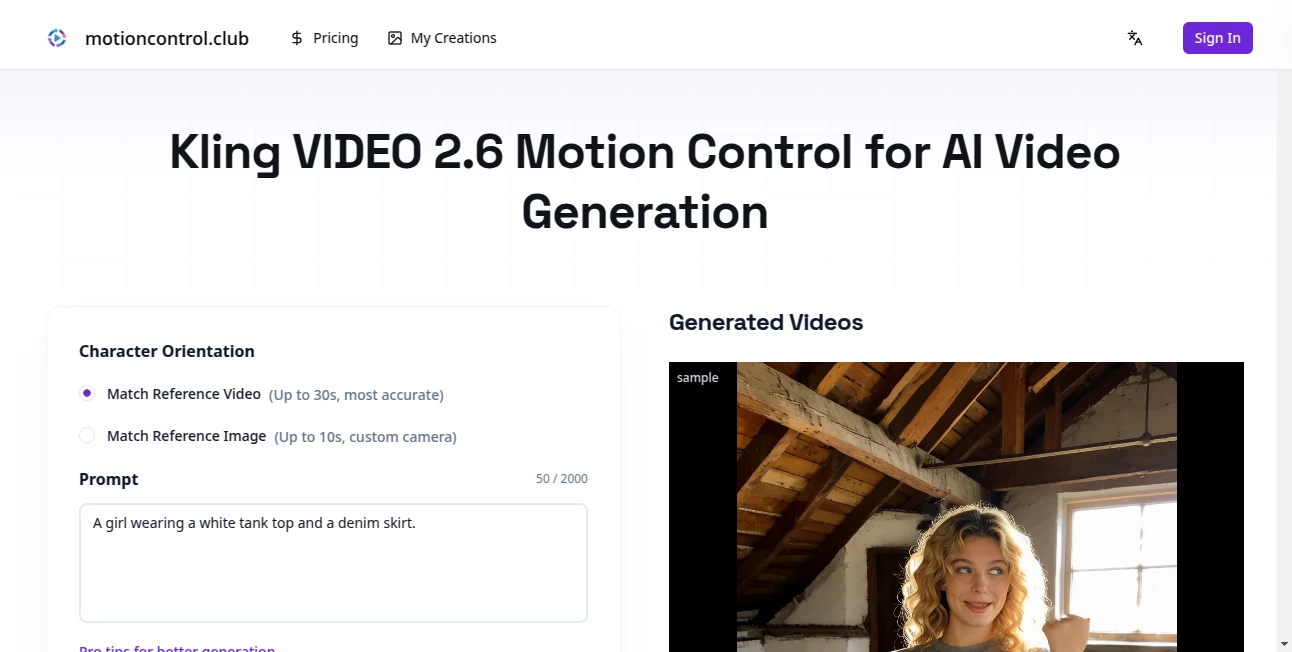
What is Motion Control Club?
There’s a certain joy in seeing a static idea suddenly come alive—shapes gliding, text floating in, transitions breathing. This platform captures that exact feeling and hands it to you in a way that feels almost too easy. You describe what you want, maybe drop a rough sketch or reference clip, and within moments you’re watching a clean, professional-looking animation that would’ve taken hours in After Effects. I’ve seen designers who normally dread motion work light up when they realize they can iterate five versions in the time it used to take to finish one.
Introduction
Motion graphics used to be the domain of people who could afford the time, the software subscriptions, and the patience to wrestle keyframes. This tool quietly changes that equation. It’s built for creators who want beautiful movement without drowning in timelines and easing curves. Whether you’re a solo freelancer polishing client deliverables, a startup founder needing scroll-stopping social assets, or a YouTuber tired of generic templates, it meets you right where you are. The excitement comes from how quickly it turns vague thoughts (“make the logo pulse like a heartbeat”) into something tangible and shareable—often in under a minute.
Key Features
User Interface
The workspace is calm and focused. You type or speak your idea, drag in assets if you have them, choose a style vibe (minimal, cinematic, playful, etc.), and hit generate. The preview appears almost instantly, and every tweak—speed, easing, direction—happens live with sliders that feel intuitive. No nested comps, no confusing layer stacks. It’s the kind of interface that disappears while you’re creating, which is exactly what motion designers have been quietly begging for.
Accuracy & Performance
What impresses most is how well it understands intent. You say “text enters from bottom with a soft bounce,” and it doesn’t just slide—it gives that gentle overshoot and settle that feels human-timed. Generation times stay snappy even on more complex scenes, and the output quality holds up at 4K. I’ve thrown deliberately tricky prompts at it (overlapping elements, staggered reveals) and watched it resolve them cleanly more often than not. That level of reliability is rare.
Capabilities
It handles everything from logo reveals and kinetic typography to full UI motion prototypes, social media ads, explainer snippets, and even short looping backgrounds. You can feed it reference videos for style matching, control camera movement, add subtle particle effects, or generate seamless loops. Exports come in multiple formats (MP4, GIF, Lottie, ProRes), and the ability to iterate quickly means you can test five different moods before lunch.
Security & Privacy
Your assets stay yours. Uploaded references and generated files are processed securely and not used for training. For client work or branded content, that matters. The whole system is designed with professional use in mind, so you’re never left wondering if your next big campaign idea is quietly being repurposed somewhere else.
Use Cases
A freelance motion designer uses it to send three polished logo animation options to a client by end of day instead of one rough draft. A SaaS marketing lead creates scroll-triggered UI animations for their landing page without opening Principle or Figma plugins. A small e-commerce brand generates product reveal clips for Instagram Stories that feel custom instead of templated. Even educators animate simple diagrams to explain concepts in short videos—fast, clean, and surprisingly expressive.
Pros and Cons
Pros:
- Speed that lets you explore far more creative directions in the same amount of time.
- Output quality that looks hand-timed and thoughtfully composed.
- Reference-based control that bridges the gap between inspiration and execution.
- Multiple export formats ready for web, social, broadcast, and Lottie integration.
Cons:
- Still best on clearly described scenes—very abstract or chaotic prompts can need rephrasing.
- Free tier generous but limited; serious daily use benefits from a paid plan.
Pricing Plans
The free tier gives you enough generations to really feel the tool and decide if it fits your rhythm. Paid plans unlock unlimited runs, higher resolution, faster queue times, and priority access to new features. Pricing is straightforward and creator-friendly—no surprise usage fees or hidden tiers. Most people find the step-up worthwhile once they start relying on it for client work or consistent content.
How to Use Motion Control
Start with a clear sentence: “A sleek tech logo fades in with orbiting particles, then pulses once before settling.” Drag in your logo file or a reference clip if you want style matching. Choose aspect ratio and mood, hit generate, then watch. Tweak timing, easing, or add secondary motion with simple controls. Preview in real time, export when it feels right. The loop is fast enough that you can refine five variations before the coffee’s cold.
Comparison with Similar Tools
Traditional tools like After Effects give total control but demand time and skill. Template-based platforms are fast but feel generic. This sits in a sweet middle ground: fast enough for rapid iteration, smart enough to produce non-cookie-cutter results, and flexible enough to match your brand language instead of forcing you into presets. For anyone who wants motion design without the full production overhead, it’s hard to beat.
Conclusion
Motion isn’t just decoration anymore—it’s how ideas breathe, how attention is held, how brands are remembered. This platform lowers every barrier that used to keep beautiful movement out of reach for most creators. It doesn’t replace skill; it amplifies it. You bring the vision, it brings the polish. And suddenly, making things move feels less like work and more like play again.
Frequently Asked Questions (FAQ)
Do I need design skills to get good results?
Not really. Clear descriptions help, but the AI handles most of the finesse. Good prompts get great output; vague ones still look decent.
Can I use my own assets?
Yes—logos, characters, UI elements, anything transparent or clean works beautifully.
What export formats are available?
MP4, GIF, Lottie, ProRes, WebM—ready for social, web, presentations, or broadcast.
How long are the animations?
Typically 3–15 seconds, perfect for intros, transitions, ads, and social hooks.
Is there a watermark on free generations?
Yes on free tier; paid removes it completely.
AI Animated Video , AI Video Generator , AI Design Generator .
These classifications represent its core capabilities and areas of application. For related tools, explore the linked categories above.
Motion Control Club details
Pricing
- Free
Apps
- Web Tools
Categories

Motion Control Club Alternatives Product

Seedance 2.0…

Voe4 AI Video
AI Baby Video

HypeClip

Sora AI Vide…

RGB to CMYK …

Gemini AI vi…

Seedance 2.0…

UniVideo