
🧠 AI Quiz
Think you really understand Artificial Intelligence?
Test yourself and see how well you know the world of AI.
Answer AI-related questions, compete with other users, and prove that
you’re among the best when it comes to AI knowledge.
Reach the top of our leaderboard.


















Mp3ToMidi
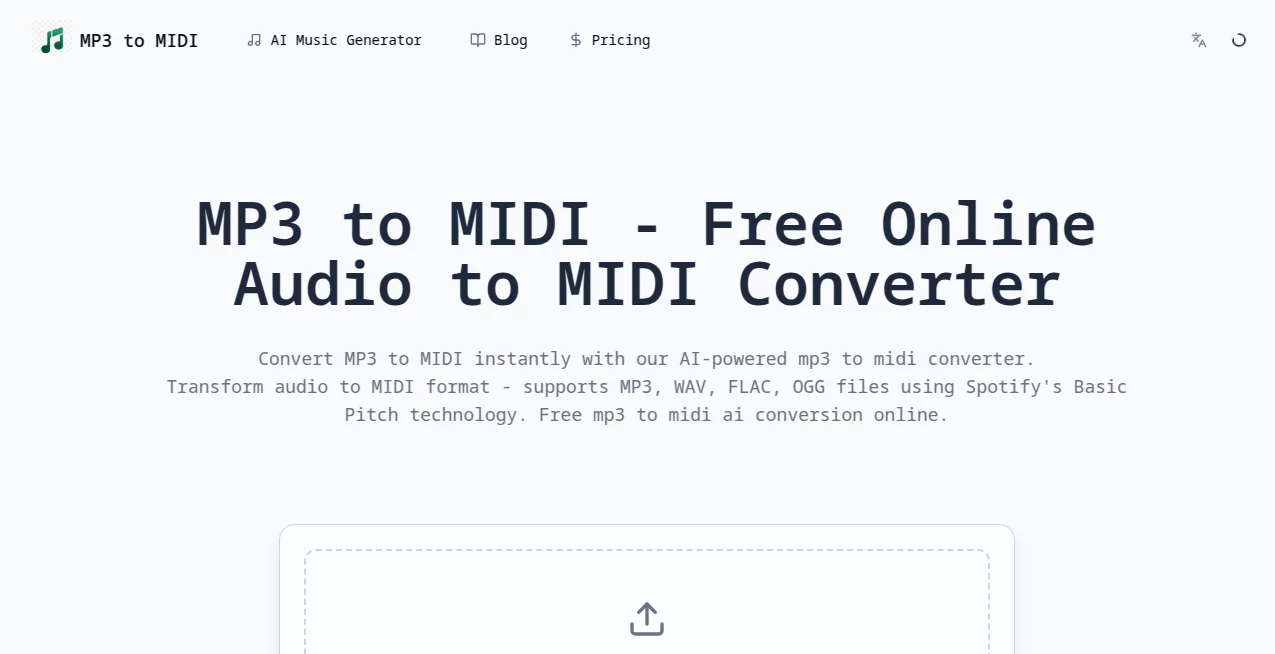
What is Mp3ToMidi?
There's a special kind of excitement when you take a song you love, drop the audio file in, and suddenly see clean, editable notes appear on screen. No more guessing chords by ear or spending hours transcribing. This tool makes that magic happen in seconds. It listens to your MP3 (or any audio file) and turns it into a proper MIDI file you can open in any DAW, notation software, or even play back on a real instrument. I’ve watched musicians go from frustrated humming to smiling as they tweak the melody they just heard. It feels like having a patient, tireless transcriber sitting next to you.
Introduction
Turning recorded audio into editable sheet music or MIDI has always been one of those tasks that either took forever or required expensive studio gear. This platform changes that completely. It uses smart AI to analyze the audio, separate instruments where possible, and deliver a clean MIDI file that you can actually work with. Whether you're a producer wanting to remix a track, a teacher preparing lesson material, or a hobbyist trying to learn your favorite song, it removes the biggest headache in the process. The best part? You don’t need to be a music theory expert to get great results.
Key Features
User Interface
The interface is wonderfully straightforward. You drag and drop your MP3 or click to upload, choose a few simple options if you want (like tempo or key detection), and hit convert. The progress bar is satisfying to watch, and when it finishes, you get a clean preview with playable notes. Downloading the MIDI is one click. No complicated menus, no account required for basic use—it respects your time and keeps the focus on the music.
Accuracy & Performance
It does a remarkably good job separating melody, chords, and rhythm, even on complex tracks with multiple instruments. The resulting MIDI is usually very close to the original recording, with accurate note timing and pitch. Processing is fast—most songs finish in under 30 seconds. Of course, extremely dense or poorly recorded audio can still need minor cleanup, but for clean recordings the accuracy is impressive and saves hours of manual work.
Capabilities
It converts MP3, WAV, and other common audio formats into editable MIDI files. You can adjust tempo detection, choose how many tracks to extract, and even get basic sheet music export in some cases. The output works beautifully in Ableton, FL Studio, Logic, GarageBand, MuseScore, and pretty much any other music software. It handles everything from simple piano pieces to full band recordings with surprising clarity.
Security & Privacy
Your audio files are processed securely and deleted from the servers shortly after conversion. No accounts are forced, so your music stays private unless you choose to save it. For musicians working on original material or client projects, that peace of mind is genuinely appreciated.
Use Cases
A bedroom producer drops in a vocal demo and quickly extracts the melody to build a new beat around it. A piano teacher records a student performance and converts it to sheet music for feedback. A guitarist wants to learn the exact chords of a new song and gets a clean MIDI file to slow down and study. A band transcribes their live recording to analyze the arrangement and improve the next gig. It’s useful for anyone who works with music and hates spending time on tedious transcription.
Pros and Cons
Pros:
- Extremely fast conversion that actually saves real time.
- Surprisingly accurate note and chord detection for most genres.
- Simple interface that anyone can use, regardless of music theory knowledge.
- Works with common audio formats and exports clean MIDI ready for any DAW.
- Generous free tier lets you test it on real projects before upgrading.
Cons:
- Very dense or poorly recorded tracks may need manual cleanup afterward.
- Free version has usage limits that heavier users will outgrow.
- Drum separation and complex polyphonic parts can still be challenging.
Pricing Plans
The free tier gives you enough conversions to try it on real songs and see the quality for yourself. Paid plans remove limits, unlock higher accuracy modes, batch processing, and priority support. Pricing stays reasonable—many musicians say one month pays for itself after transcribing just a couple of full tracks they would have spent hours on otherwise.
How to Use MP3 to MIDI
Go to the converter page, drag your MP3 or audio file into the upload area, or click to browse. Wait a few seconds while it analyzes the track. Review the detected tempo and key (you can adjust if needed), then hit convert. When it finishes, listen to the MIDI preview, make small tweaks if you want, and download the MIDI file. Open it in your favorite music software and start editing. The whole process is fast and repeatable, making it easy to convert multiple tracks in one session.
Comparison with Similar Tools
Older transcription tools were either painfully slow or required expensive software. Many online converters still produce messy MIDI that needs heavy editing. This one stands out for its speed, clean output, and ease of use. It’s not perfect on every track, but for the majority of songs it delivers usable results much faster than manual transcription or more complicated alternatives.
Conclusion
Music should be about creativity and expression, not spending hours transcribing what you already hear. This tool removes one of the biggest time sinks in the process and lets you get back to what matters—making music. Whether you’re producing, teaching, learning, or just having fun with songs you love, it turns a frustrating chore into a quick, satisfying step. The ability to go from audio to editable MIDI in seconds is genuinely liberating for anyone who works with music.
Frequently Asked Questions (FAQ)
How accurate is the conversion?
Very good on clean recordings with clear melody and chords. Dense or low-quality audio may need some manual adjustment afterward.
What audio formats are supported?
MP3, WAV, and most common audio files work well.
Do I need to create an account?
No account is required for basic conversions, though signing up unlocks more features on paid plans.
Can I use it for commercial projects?
Yes—paid plans include rights suitable for professional and commercial use.
How long does conversion take?
Usually under 30 seconds for a standard song length.
AI Audio Enhancer , AI Music Generator , AI Speech to Text , AI Voice & Audio Editing .
These classifications represent its core capabilities and areas of application. For related tools, explore the linked categories above.
Mp3ToMidi details
Pricing
- Free
Apps
- Web Tools
Categories

Mp3ToMidi Alternatives Product

Custom Gift …

Lyria3 AI

AI Describe …
Lyria 3 AI M…
AI Makes Song

TurboScribe

Zeemo AI

Songtell

Adobe Podcast
