
🧠 AI Quiz
Think you really understand Artificial Intelligence?
Test yourself and see how well you know the world of AI.
Answer AI-related questions, compete with other users, and prove that
you’re among the best when it comes to AI knowledge.
Reach the top of our leaderboard.


















AIGAZOU
Verified Blue CheckMark
Verified Blue CheckMark products are featured above free or unverified listings.
This badge indicates authenticity and builds trust, giving your product higher visibility across the platform.
Upgrade to get verified
Verified Blue CheckMark products are featured above free or unverified listings. This badge indicates authenticity and builds trust, giving your product higher visibility across the platform.
Upgrade to get verified
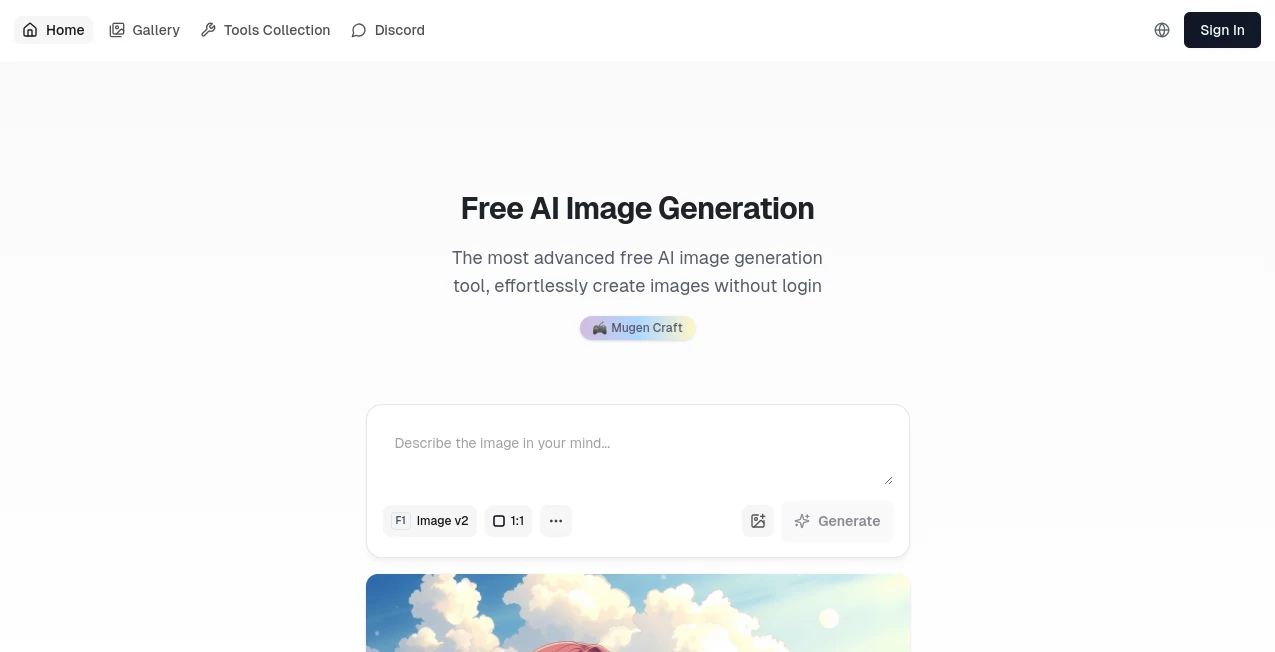
What is AIGAZOU?
Imagine sitting down with a half-baked idea for a logo or a wild scene from your latest story, and just like that, it springs to life on your screen—vibrant, detailed, and ready to tweak or share. That's the everyday magic this gem delivers, stripping away the barriers so anyone can play creator without the usual setup hassles. I've lost count of the times I've fired it up during a coffee break, typing in a quirky prompt like "a fox in a tuxedo debating philosophy under neon lights," and ended up with something so spot-on it made my morning. It's the kind of tool that feels like a generous friend, handing over pro-level results without asking for a dime or your details upfront.
Introduction
Picture this: you're knee-deep in a project, whether it's jazzing up a blog post or dreaming up visuals for a side hustle, and suddenly you need an image that captures the vibe just right. Enter a breath of fresh air in the crowded world of digital tools—one that's all about keeping things simple, speedy, and utterly free. No endless sign-ups, no paywalls lurking in the shadows; it's designed for those "aha" moments when inspiration strikes and you don't want anything slowing you down. What hooks me every time is how it turns a casual scribble of words into something polished and personal, like it reads your mind and adds a dash of its own flair. Over the months I've tinkered with it, it's become my go-to for everything from quick mood boards to surprising a friend with a custom birthday sketch, proving that real creativity shouldn't come with strings attached.
Key Features
User Interface
The setup couldn't be more welcoming if it tried—a clean canvas that invites you to just start typing, with a handful of toggles for things like square crops or landscape spreads right there at your fingertips. No overwhelming menus or hidden gems; it's all front and center, so even if you're glancing at it on your phone during lunch, you can whip up something wonderful without squinting or scrolling. I remember the first time, fumbling a bit with the aspect ratio picker, but by the second go, it felt like chatting with an old pal who anticipates your next move.
Accuracy & Performance
Here's where it really shines: feed it a prompt packed with specifics, and it doesn't just guess—it delivers layers of detail that pop with life, from subtle shadows to textures that beg for a closer look. Speeds are a dream; that initial buzz of waiting melts into delight as the image blooms in seconds, crisp and ready, no matter if you're on a sluggish connection or not. In my trials, even rambling ideas like "steampunk city at dusk with floating lanterns" came back nailing the mood, saving me from the frustration of endless regenerates that plague lesser setups.
Capabilities
It goes beyond the basics, handling everything from whimsical fantasies to grounded illustrations with a finesse that surprises, all while juggling prompts in English or Japanese for that global touch. Want to layer in cultural nods or tweak for a certain style? It adapts on the fly, spitting out high-res gems you can download or fling straight to social spots. The real joy is in the history tab, where past creations linger like a personal gallery, letting you revisit and remix without starting over—it's like having a bottomless sketchbook that never runs out of pages.
Security & Privacy
In an age where every click feels like a potential leak, this one's a safe harbor—no logins means no profiles to poke at, and that quick human-check step keeps bots at bay without invading your space. Your ideas stay yours, processed in the moment and gone when you're done, so you can experiment with wild concepts or client previews without a whisper of worry. It's that quiet confidence that lets you dive in fully, knowing the spotlight stays on your creativity, not some data grab.
Use Cases
For the blogger staring at a blank header slot, it's a lifesaver—punch in "cozy library nook at golden hour" and boom, a header that draws readers in like a warm hug. Crafters use it to visualize patterns before cutting fabric, turning vague sketches into vivid mocks that guide the glue gun. Even teachers snag custom visuals for lessons, like "ancient Rome market bustling with traders," making history feel alive without raiding stock photo vaults. And don't get me started on social media whizzes; one prompt for a themed post, and you've got content that scrolls stop for.
Pros and Cons
Pros:
- Zero barriers to entry—jump in and create without the signup song and dance.
- Outputs that wow with detail, often better than what you'd cobble together manually.
- Blazing quick, turning "maybe later" into "look at this now."
- Versatile enough for fun flings or serious sketches, all at no cost.
Cons:
- Prompts that ramble too far might need a gentle nudge for peak results.
- While free forever in spirit, heavy daily use could nudge toward future tweaks.
Pricing Plans
Here's the best part: it's yours to enjoy without a single cent slipping from your pocket, a true free-for-all that keeps the core magic unlocked for everyone. They've hinted at optional upgrades down the line for those power users craving endless runs or extra bells, but for now, it's pure generosity—no tiers, no traps, just open doors to endless imagination. In a sea of "freemium" facades, this one's the real deal, letting you scale your creativity without scaling your spend.
How to Use AIGAZOU
Fire it up in your browser, type out your vision—keep it vivid, like painting with words—and pick a frame that fits, square for icons or wide for banners. Hit generate, pass that friendly "prove you're you" nod, and watch the wonder unfold; from there, snag the file or share it off with a tap. I usually jot a quick history note after, so revisiting that "midnight cityscape with glowing bridges" feels like picking up an old favorite book mid-chapter.
Comparison with Similar Tools
Sure, there are flashier outfits with bells and whistles galore, but they often demand your email on a silver platter just to peek, leaving you wary from the get-go. This one sidesteps all that, offering the same high-caliber visuals with a lighter touch—no bloated apps or credit chases, just pure, prompt-to-picture bliss. Where others shine for the pros with deep custom dials, it steals the show for everyday sparks, delivering that "just right" feel without the fluff or fees that can sour the fun.
Conclusion
At the end of the day, it's the unassuming heroes like this that remind us creativity shouldn't be gated or graded— it should flow free, fast, and full of surprise. Whether you're doodling dreams or drafting designs, it wraps you in that rare comfort of "this just works," turning fleeting fancies into keepers you'll cherish. Dive in, play around, and let it surprise you; in a world that's anything but simple, this slice of simplicity might just become your new favorite escape.
Frequently Asked Questions (FAQ)
Do I really need to sign up to start?
Not a chance—it's built for instant action, so you can create right away without any account drama.
What languages can I use for prompts?
English and Japanese roll off the tongue here, making it a breeze for bilingual brainstormers.
How detailed should my descriptions be?
The richer the words, the richer the reward—think colors, moods, and quirks for images that sing.
Can I save or share my creations easily?
Absolutely, downloads are a snap, and sharing buttons whisk them to your favorite spots in seconds.
Is there a limit to how much I can generate?
For now, it's wide open, though they might add gentle guides later to keep things fair for all.
AI Text to Image , AI Photo & Image Generator , AI Art Generator , AI Design Generator .
These classifications represent its core capabilities and areas of application. For related tools, explore the linked categories above.
AIGAZOU details
Pricing
- Free
Apps
- Web Tools
Categories

AIGAZOU Alternatives Product

Nanosora

Flux2 Klein

string art g…

Mage

bananaai.app

Nano Image AI

NanoBananaPro
Z-Image Free

nana banana …
