
🧠 AI Quiz
Think you really understand Artificial Intelligence?
Test yourself and see how well you know the world of AI.
Answer AI-related questions, compete with other users, and prove that
you’re among the best when it comes to AI knowledge.
Reach the top of our leaderboard.

















nano banana
What is nano banana?
There’s something exciting about typing a few words and watching a vivid, detailed image appear almost instantly—colors pop, lighting feels right, and the composition actually makes sense. This tool delivers that experience consistently. Whether you’re a designer needing quick concepts, a marketer creating social visuals, or just someone who loves playing with ideas, it turns imagination into polished pictures without the usual frustration. I’ve thrown in messy, half-formed prompts and still gotten results that looked thoughtfully composed. It’s fast, it’s sharp, and it keeps getting better with each generation.
Introduction
Good image generation should feel like a creative partner, not a guessing game. Nano Banana 3 strikes that balance beautifully. Powered by advanced Google models, it handles complex prompts with impressive understanding of lighting, composition, style, and detail. You can generate from text alone or use reference images for stronger guidance. The results often surprise users with how naturally they look—realistic skin tones, coherent scenes, readable text when needed. For creators tired of generic or low-quality outputs, this one stands out as a reliable daily driver that respects both speed and quality.
Key Features
User Interface
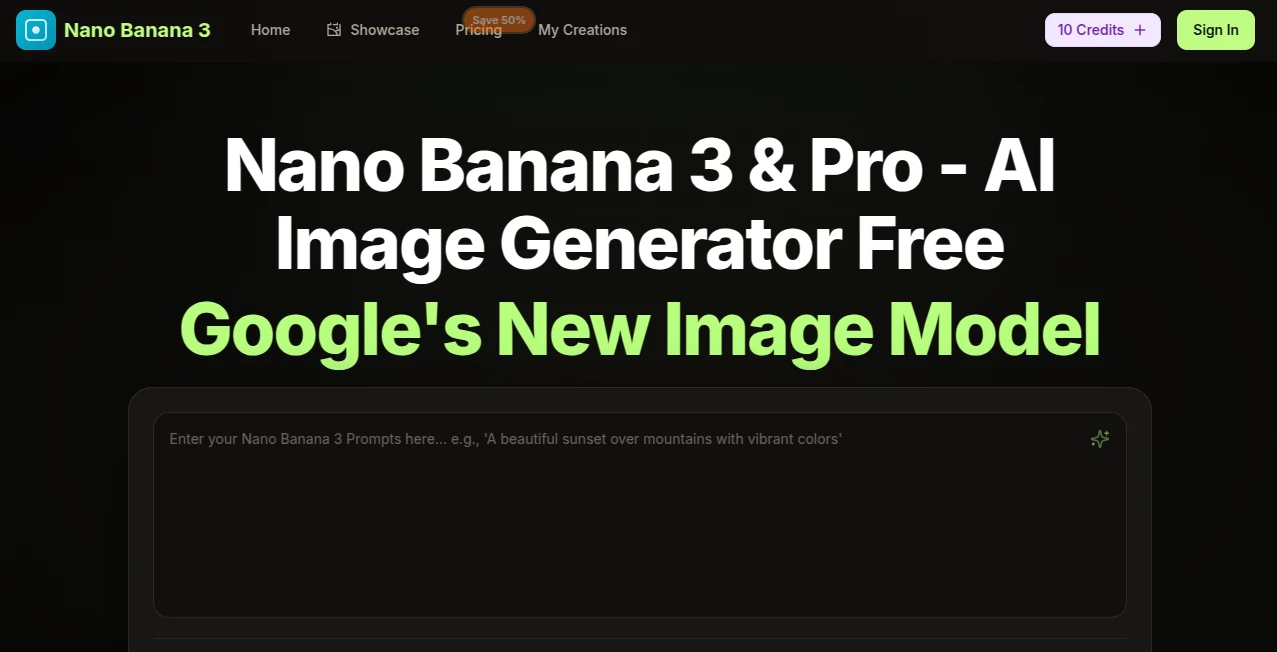
The interface is clean and inviting. A prominent prompt box takes center stage, with easy options to upload reference images, choose aspect ratios, and adjust quality settings. Generation starts with one click, and results appear quickly for immediate review. You can iterate by refining the prompt or uploading new references without losing your flow. It never feels overwhelming—everything you need is visible, and nothing unnecessary clutters the screen.
Accuracy & Performance
It excels at understanding intent. Ask for specific styles, moods, or compositions, and it usually delivers on the first or second try. Character consistency is strong when using references, and details like hands, text, and complex scenes come out cleaner than many competitors. Processing is fast enough to keep you in the creative zone rather than waiting around. The balance of speed and quality makes it feel responsive and dependable.
Capabilities
From photorealistic scenes to stylized illustrations, anime, painting styles, and product mockups, it covers a wide creative range. You can generate, edit, upscale, and refine with text instructions. Reference image support helps maintain consistency across multiple generations. It handles both simple concepts and detailed, multi-element prompts well, making it useful for concept art, social media graphics, presentations, and personal projects alike.
Security & Privacy
Your prompts and generated images are handled with care. The platform focuses on user-friendly creation without unnecessary data collection or long-term storage of your work. You can generate privately and download what you need without worrying about your ideas being used elsewhere.
Use Cases
A product designer quickly mocks up packaging concepts from text descriptions. A content creator generates eye-catching thumbnails and social graphics in minutes. An author visualizes book cover ideas or character portraits to spark inspiration. Teachers create custom illustrations for lessons. Hobbyists turn weekend ideas into beautiful digital art to share with friends. Wherever visuals are needed fast and with quality, it delivers without the usual headaches.
Pros and Cons
Pros:
- High-quality outputs that often look professional on the first try.
- Fast generation speed keeps creativity flowing.
- Strong support for reference images and style control.
- Clean, simple interface that’s easy for beginners and powerful for pros.
- Generous free access to test and create without immediate pressure.
Cons:
- Very complex or highly specific artistic styles may need prompt refinement.
- Heavy daily use benefits from paid plans for unlimited generations.
- Some advanced editing features are still evolving.
Pricing Plans
It offers a solid free tier for everyday creation and testing. Paid plans provide higher limits, faster processing, priority access during busy times, and additional features for heavier users. Pricing stays reasonable, making it accessible for individuals and small teams who want reliable image generation without breaking the bank.
How to Use Nano Banana 3
Head to the generator page and type your description in the prompt box—be as detailed or simple as you like. Upload a reference image if you want to guide style, colors, or composition. Choose your preferred aspect ratio and quality level. Click generate and review the result. Like it? Download immediately. Want variations? Tweak the prompt or strength settings and try again. The process is fast enough that you can explore multiple ideas in one creative session.
Comparison with Similar Tools
While many AI image tools produce decent results, this one consistently delivers cleaner details, better prompt understanding, and more natural-looking outputs. The interface is simpler than some overloaded platforms, yet the quality rivals or exceeds more expensive options. It strikes an excellent balance between ease of use and creative control, making it a strong choice for both casual users and serious creators.
Conclusion
Great visuals shouldn’t require hours of work or expensive software. This tool brings high-quality image creation within easy reach, letting you focus on ideas instead of technical hurdles. Whether you need quick concepts, polished graphics, or just want to explore creative fun, it delivers reliable, impressive results with minimal fuss. In a crowded field of AI image generators, it stands out by being both powerful and genuinely enjoyable to use. Give it a prompt and see where your imagination takes you.
Frequently Asked Questions (FAQ)
How detailed should my prompt be?
More detail usually yields better results, but even short prompts often produce strong images. Experimentation is encouraged.
Can I use reference images?
Yes—uploading references significantly improves consistency in style, characters, or composition.
Is there a free way to try it?
Absolutely—the free tier offers generous daily generations to test quality before upgrading.
What file formats can I download?
High-quality PNG and other common formats are supported for easy use in design or sharing.
AI Photo & Image Generator , AI Art Generator , AI Design Generator , AI Text to Image .
These classifications represent its core capabilities and areas of application. For related tools, explore the linked categories above.
nano banana details
Pricing
- Free
Apps
- Web Tools
Categories

nano banana Alternatives Product

ModelsLab

Logo Animati…
AI Image Enh…

Undertale Te…

Reztune

Nano Banana …
BeYourCover

MDZ.AI
Nano Banana …
