🧠 AI Quiz
Think you really understand Artificial Intelligence?
Test yourself and see how well you know the world of AI.
Answer AI-related questions, compete with other users, and prove that
you’re among the best when it comes to AI knowledge.
Reach the top of our leaderboard.


















Nano Banana

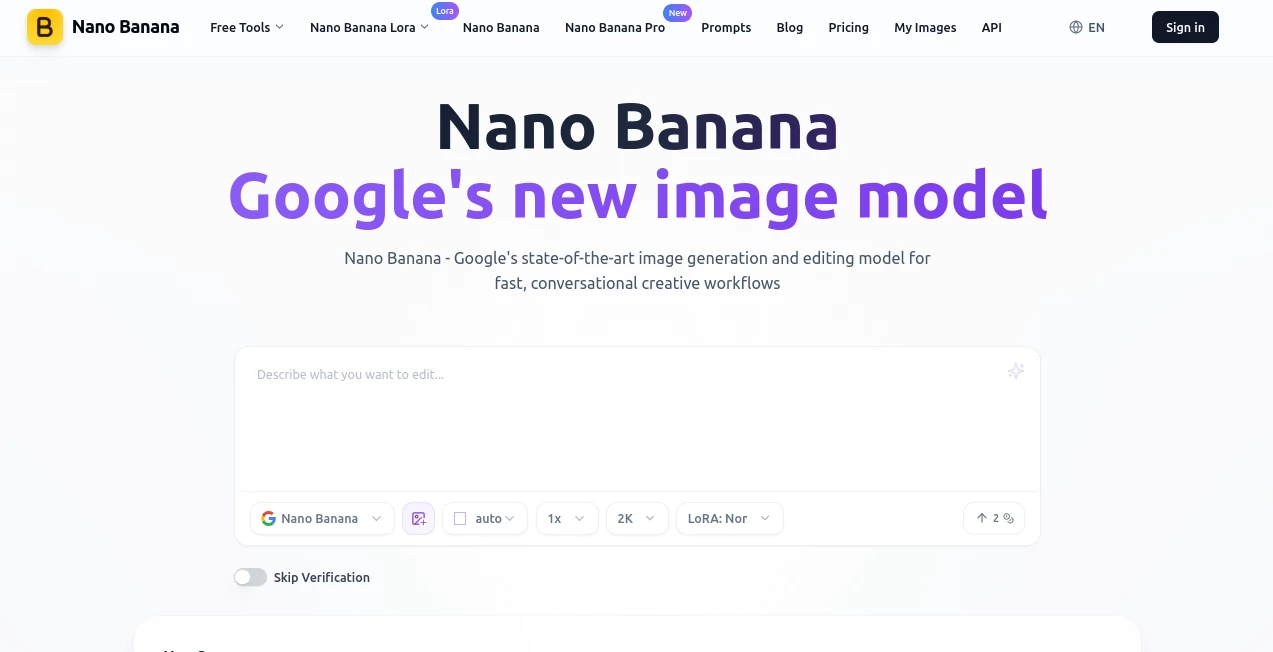
What is Nano Banana?
There's something downright satisfying about uploading a simple snapshot and watching it morph into a flawless, professional-grade visual with just a few words typed in. This tool nails that experience every time, blending Google's sharp tech with an ease that makes editing feel like chatting with a talented artist who gets you instantly. A friend of mine turned a casual phone pic into a holiday card masterpiece in minutes—character details spot-on, background swapped seamlessly—and it looked like a studio shoot. It's the rare find that delivers on the hype, especially when you need consistency across a series of shots.
Introduction
Built on Gemini's latest advancements, this platform shines for anyone juggling creative visuals, from quick social posts to polished marketing assets. It excels at holding onto character details no matter how many tweaks you throw in, fusing elements from multiple uploads, and understanding those rambling instructions we all type when inspiration hits. Free to dip into with a login perk, it's drawn crowds for its speed and reliability—think blurring distractions, swapping scenes, or breathing color into old photos without the usual glitches. What keeps users hooked is that conversational flow: edit once, nail it, move on. No wonder it's become a quiet favorite for turning rough ideas into standout pieces that feel thoughtfully crafted.
Key Features
User Interface
Drop your file right on the page—no fuss with menus or sign-ups to start—and pair it with a prompt box that feels like texting a friend. Pick how many variants you want, toggle a LoRA for special styles if the mood strikes, and results roll in crisp and ready. It's browser-simple, with examples scattered to spark ideas, making the whole thing welcoming whether you're on a laptop or sneaking a quick edit on your phone during lunch.
Accuracy & Performance
Consistency here is unreal: faces, outfits, even subtle expressions stay locked across edits, dodging those awkward shifts that ruin lesser attempts. It processes fast—often seconds for complex fusions—and lands precise on natural language cues, like repositioning a figure in a new setting without mangling the light or proportions. In practice, it hits that sweet spot where first tries feel final, saving the back-and-forth that drags down other options.
Capabilities
Upload one or blend several, then guide changes with everyday words—remove clutter, shift poses, infuse styles via LoRAs like vintage restores or futuristic glows. It grasps world knowledge for smarter outputs, handles text overlays sharp, and embeds invisible watermarks for responsible sharing. Perfect for crafting brand series, reviving faded memories, or prototyping product views that convince at a glance.
Security & Privacy
Every output carries SynthID marking for traceability, while your sessions stay straightforward and contained—no unnecessary data hoarding. It's backed by solid standards that put creators at ease, especially for commercial spins where provenance matters. That subtle assurance lets you focus on the fun part without glancing over your shoulder.
Use Cases
Marketers whip up consistent influencer mocks for campaigns, keeping the look uniform across moods or outfits. Families restore heirloom shots, adding vibrant hues and smooth skins that bring smiles back to life. Designers fuse concepts for mood boards, placing elements in fresh contexts to sell ideas faster. Social folks craft themed series—like holiday ornaments from selfies—that rack up shares without the studio hassle.
Pros and Cons
Pros:
- Character hold is top-tier, making series feel cohesive and pro.
- Conversational tweaks land accurate, cutting edit loops short.
- Fast blends and styles via LoRAs open endless playful paths.
- Free start with real utility, scaling gentle for heavier needs.
Cons:
- File caps keep things manageable but might nudge batches to paid.
- Best on clear uploads—grainy starters need a gentle hand first.
Pricing Plans
Login snags a couple free credits to feel the power firsthand, no card required. Plans kick in affordably for more volume, unlocking unlimited dimensions or priority spins that fit growing habits. It's straightforward—pay for what fuels your flow, with options that grow alongside your projects without overwhelming upfronts.
How to Use Nano Banana
Head straight to the create page, drag in your image (keep it under 5MB for smooth sails), and spill your edit wishes in the prompt—like "shift her to a beach at sunset, keep the dress flowing." Choose variants or a LoRA twist, generate, and browse the lineup. Grab favorites, iterate with fresh words if needed, and build from there—I've chained a portrait into a full themed set over a lazy evening, each step building on the last seamlessly.
Comparison with Similar Tools
Against rivals that falter on fusions or demand precise phrasing, this one grasps nuance better, preserving scenes and subjects with a finesse that's hard to match. It's quicker on conversational loops, dodging the stiffness others carry, while LoRAs add flair without the bloat. For folks craving reliable, character-strong edits over sheer volume tricks, it pulls ahead comfortably.
Conclusion
This platform quietly redefines casual editing into something reliably brilliant, handing creators a tool that listens well and delivers beautifully. It's the bridge from "good enough" snapshots to visuals that linger, all with a gentleness that invites experimentation. Give it a prompt or two; the results might just surprise you into a whole new creative habit.
Frequently Asked Questions (FAQ)
What file types work best?
JPEG, PNG, or WebP up to 5MB—clear and centered for that extra magic.
How's the consistency on people?
Unmatched; details like hair and expressions hold firm across wild changes.
Any special styles available?
LoRAs for restores, Y2K vibes, studio portraits, and more to mix in.
Outputs watermarked?
Invisibly via SynthID for responsibility, no visible marks on paid.
Good for commercial stuff?
Absolutely—pro quality with the backing to use confidently.
Photo & Image Editor , AI Image to Image , AI Art Generator , AI Design Generator .
These classifications represent its core capabilities and areas of application. For related tools, explore the linked categories above.
Nano Banana details
This tool is no longer available on submitaitools.org; find alternatives on Alternative to Nano Banana.
Pricing
- Free
Apps
- Web Tools
Categories

Nano Banana Alternatives Product
Nano Banana …

Photo Locati…

claude image

Generador De…

Createimg.ai

Banana AI
chibi art

qwen image 2…

Art-Neurona