
🧠 AI Quiz
Think you really understand Artificial Intelligence?
Test yourself and see how well you know the world of AI.
Answer AI-related questions, compete with other users, and prove that
you’re among the best when it comes to AI knowledge.
Reach the top of our leaderboard.


















NanoBanana2
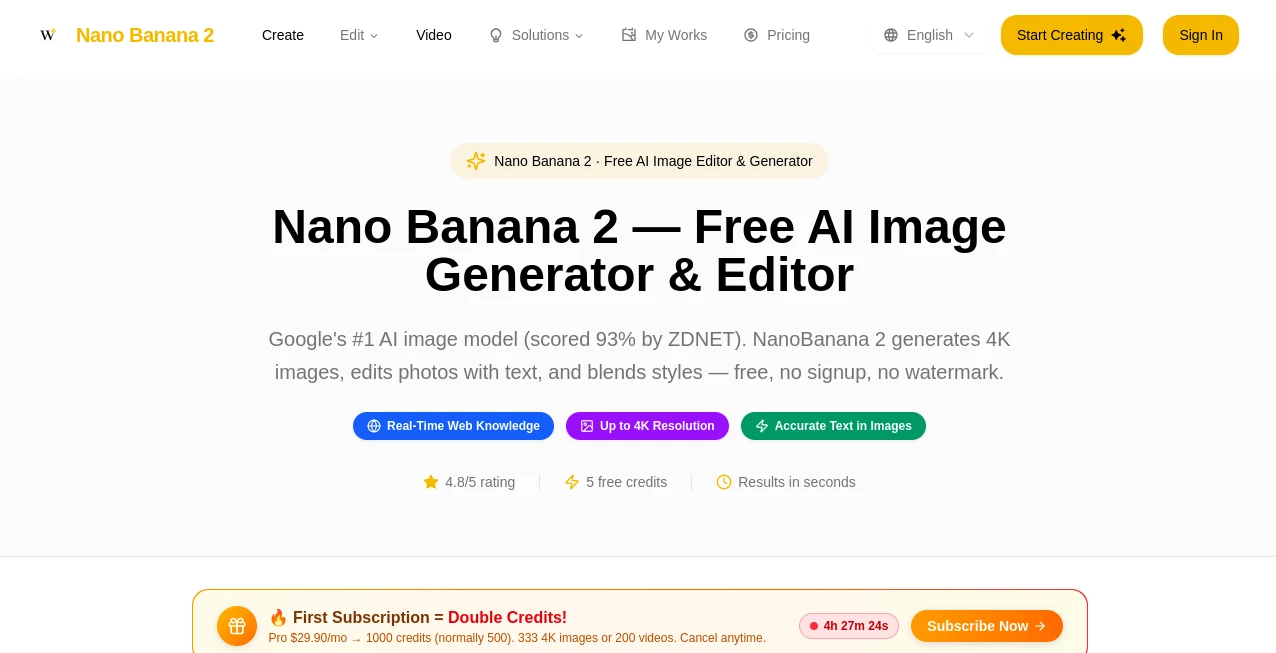
What is NanoBanana2?
I still remember the first time I tried it. I typed a silly prompt about a tiny chef cooking on a giant pizza, hit generate, and a few seconds later there it was — vibrant, detailed, and somehow exactly the chaotic fun I had in my head. No login, no watermark, no waiting around. That kind of instant gratification is rare with AI tools, but this one delivers it consistently. Whether you're making quick social media visuals, editing product shots, or experimenting with wild concepts, it feels like having a creative partner who never gets tired and always understands what you meant.
Introduction
Most AI image generators force you to sign up, deal with watermarks, or wait in long queues. Nano Banana 2 skips all that nonsense. It's fast, free to start, and produces high-fidelity results — up to 4K — with surprisingly accurate text rendering and strong style control. Powered by advanced models, it handles both image generation from text and smart photo editing. People use it for everything from meme creation to professional-looking product visuals, and the fact that you can jump in without any barriers makes it especially appealing for casual creators and busy professionals alike. The quality often feels closer to paid tools, yet it's available right away with no strings attached.
Key Features
User Interface
The interface is delightfully straightforward. A clean prompt box, quick style suggestions, aspect ratio choices, and a prominent generate button — that's basically it. No overwhelming dashboards or hidden settings. You can switch between create and edit modes easily, and results appear fast enough to keep the creative momentum going. I like how it stays out of your way; you focus on the idea, not on learning the tool.
Accuracy & Performance
It consistently delivers sharp, vibrant images with good prompt adherence. Text inside images comes out readable far more often than with many competitors, and details like lighting, textures, and composition hold up well even on complex prompts. Generation is quick — often just seconds — and the model handles both realistic and stylized requests without falling apart. For a free tool, the performance is genuinely impressive; many users note it rivals or beats tools that charge monthly fees.
Capabilities
You can generate fresh images from text prompts, edit existing photos with natural language instructions, blend different artistic styles, and even create short AI videos. It supports high resolutions up to 4K, offers trending templates (Met Gala looks, dreamcore surreal, Y2K nostalgia, cyber-organic, etc.), and includes strong photo editing features like background changes, object removal, and enhancement. The combination of speed, quality, and versatility makes it suitable for quick social content as well as more polished creative work.
Security & Privacy
No login is required to start generating, which keeps things simple and private. Your prompts and images aren't tied to a persistent account unless you choose to create one. The tool processes requests efficiently without unnecessary data retention, giving you peace of mind when experimenting with personal or sensitive ideas.
Use Cases
A small business owner quickly generates professional product visuals with clean backgrounds for their online store. A content creator makes eye-catching thumbnails or memes in minutes instead of hours. A hobbyist turns random ideas into polished illustrations for their portfolio or social feed. Someone editing family photos uses the tools to restore old images or create fun stylized versions as gifts. It's versatile enough for both serious work and playful experimentation, often saving hours compared to traditional editing software.
Pros and Cons
Pros:
- Completely free to start with no login or watermark on basic use.
- Fast generation times that keep your creative flow uninterrupted.
- Strong text rendering and style blending for more accurate results.
- Supports both image generation and editing in one place.
- High-resolution outputs that look professional right out of the gate.
Cons:
- Free daily limits mean heavy users will eventually need paid credits.
- Very complex or highly specific artistic requests can still need refinement.
- Video generation is available but more credit-intensive than images.
Pricing Plans
You get a handful of free credits when you first try it — enough to play around and see the quality for yourself. Additional credits are available through simple top-up options for those who generate more frequently. There are no monthly subscriptions forced on you; you only pay for what you use beyond the free allowance. It's a flexible system that works well for both occasional creators and more active users.
How to Use Nano Banana 2
Head to the main page and start typing your prompt in the box. Choose an aspect ratio if you have a specific format in mind, select a style or mode (create or edit), and hit generate. For photo editing, upload your image and describe the changes you want. Results appear quickly — review them, regenerate with small tweaks if needed, and download the ones you like. The process is intuitive enough that most people get good results on their first or second try.
Comparison with Similar Tools
Many AI image tools require sign-ups, add watermarks, or deliver slower, lower-quality results. This one stands out by letting you jump straight in with no barriers while still producing sharp, detailed outputs with better text handling than most free alternatives. It doesn't try to be everything at once — it focuses on fast, high-fidelity image and light video generation, and it does that part exceptionally well. For creators who value simplicity and quality without the hassle, it often feels like the smarter choice.
Conclusion
In a crowded space full of complicated AI tools, Nano Banana 2 keeps things refreshingly simple and effective. It gives you impressive image and video generation power without forcing accounts, subscriptions, or long waits. Whether you're making something fun for social media, polishing visuals for work, or just exploring creative ideas, it delivers results that look good and feel rewarding to create. Sometimes the best tools are the ones that get out of your way and let your ideas shine — and this one does exactly that.
Frequently Asked Questions (FAQ)
Do I need to create an account?
No — you can start generating immediately without signing up.
Are there watermarks on the images?
Basic free generations usually come without watermarks, keeping the output clean.
How good is the text rendering?
It's one of the stronger points — text inside images comes out clear and readable far more reliably than many other tools.
Can I edit existing photos?
Yes — upload a photo and describe the changes you want in natural language.
What about video generation?
It supports short AI video clips with options for different models and native audio support.
AI Photo & Image Generator , AI Image to Image , AI Art Generator , AI Design Generator .
These classifications represent its core capabilities and areas of application. For related tools, explore the linked categories above.
NanoBanana2 details
Pricing
- Free
Apps
- Web Tools
Categories

NanoBanana2 Alternatives Product

X Grok Imagi…
svgstud.io
Image to Pro…

Consistent C…
Z-Image Free
AI Image Enh…
AniFlow AI

EaseMaker

meta ai image
