🧠 AI Quiz
Think you really understand Artificial Intelligence?
Test yourself and see how well you know the world of AI.
Answer AI-related questions, compete with other users, and prove that
you’re among the best when it comes to AI knowledge.
Reach the top of our leaderboard.

















NanoBananaPro
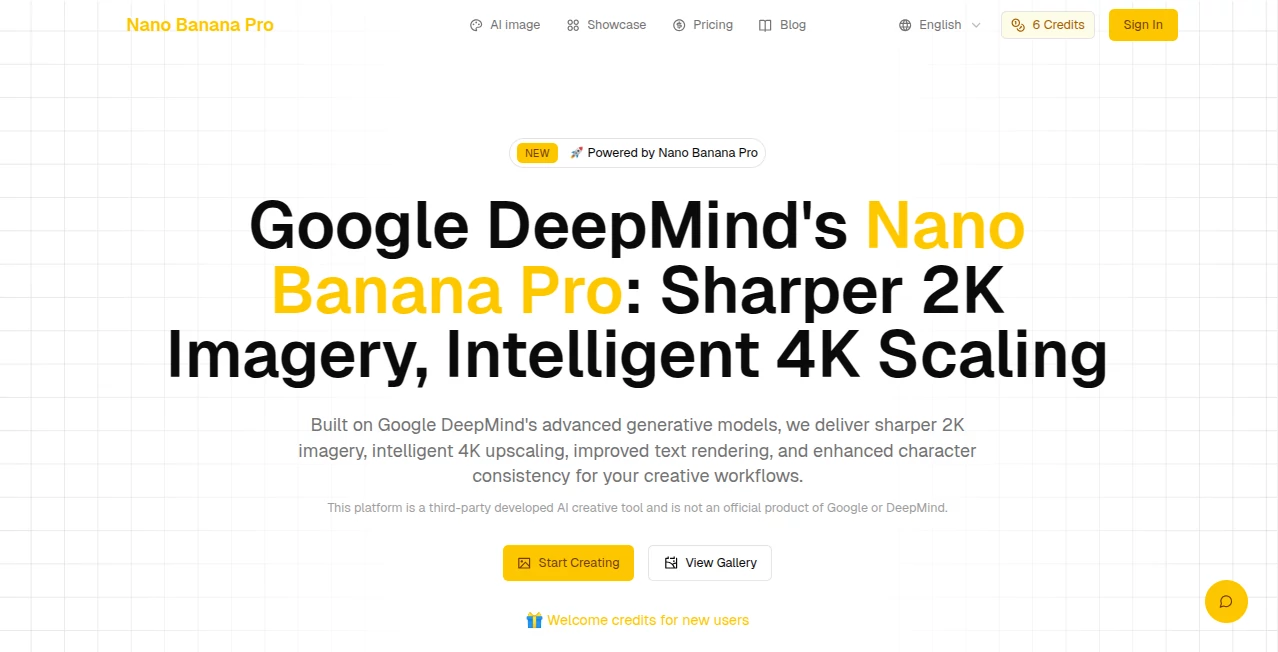
What is NanoBananaPro?
You type a description, maybe throw in a reference photo or two, and seconds later a crisp image appears—text reads perfectly, details hold together, and the whole thing scales beautifully to 4K without falling apart. I've run prompts that would trip up other generators (long sentences in signs, multiple characters in consistent outfits), and this one handles them with a quiet confidence that feels almost unfair. It's the kind of tool that makes you pause and think, "Okay, this actually changes things."
Introduction
Image generation has come a long way, but most models still stumble on the little things: wonky letters, faces that drift between shots, resolutions that blur when you zoom. This one quietly raises the bar. Built on advanced reasoning, it delivers visuals that look thoughtful—sharp at 2K, intelligently upscaled to 4K, text that's actually readable in any language, characters that stay true across edits. Early users share side-by-sides where complex scenes (think a bustling market with signs in three languages) come out coherent and print-ready. It's not about flashy gimmicks; it's about reliability that lets creators focus on ideas instead of fixing flaws.
Key Features
User Interface
The flow is clean and unpretentious. A prominent prompt box, options to upload up to 8 references, quick dropdowns for aspect ratio and resolution, then generate. Previews arrive fast, and editing feels conversational—you can refine with follow-up prompts without starting over. It's the kind of setup where you spend more time creating than configuring.
Accuracy & Performance
Text rendering is flawless—no broken letters, no gibberish even in small fonts or tricky angles. Character consistency holds across multiple references and edits. Physics and lighting feel grounded. Generations are quick (2-8 seconds typical), and 4K scaling keeps sharpness without introducing noise or artifacts. In practice, first attempts often feel final-ready, which saves endless tweaking.
Capabilities
Natural language generation and editing, up to 8 reference images for precise control, 10 aspect ratios, three resolutions (1K/2K/4K), PNG/JPG output, multi-language text support, hyper-realistic physics-aware rendering, and seamless style transfers. It excels at complex compositions—crowded scenes, legible signage, consistent characters—while handling both creative and commercial needs with equal grace.
Security & Privacy
Your prompts and uploads are processed securely with standard protections in place. No unnecessary data retention beyond what's required for the generation itself. For anyone working with client assets or personal projects, that baseline trust is reassuring.
Use Cases
A graphic designer mocks up posters with perfect typography in seconds instead of fighting fonts. A social media creator generates consistent character visuals for a series of posts without reshooting. A marketer builds product lifestyle shots with accurate branding and text overlays. An illustrator experiments with scene variations while keeping the main subject identical across them. It's versatile enough for quick ideation and polished enough for client delivery.
Pros and Cons
Pros:
- Industry-leading text rendering—legible, accurate, multilingual.
- Strong character and style consistency even with multiple references.
- Intelligent 4K upscaling that preserves detail without noise.
- Fast, reliable generations that reward detailed prompts.
Cons:
- Very abstract prompts can occasionally confuse it (like most models).
- Higher resolutions and heavier usage require paid access.
Pricing Plans
New users get welcome credits to explore without commitment. Usage is credit-based, with clear costs per generation depending on resolution and complexity. Plans scale affordably—casual creators stay light, power users get volume discounts. It's structured so the quality justifies the spend rather than forcing you into tiers you don't need.
How to Use Nano Banana Pro
Start with a clear, detailed prompt ("vintage bookstore interior at dusk, warm lamplight, wooden shelves filled with old books, young woman reading in armchair, legible title on book spine"). Upload 1–8 reference images if you want exact style or character matching. Choose aspect ratio and resolution. Generate, review the result, then refine with follow-up prompts or additional references. Download in PNG or JPG. Iterate until it feels right—each loop is quick enough to keep momentum.
Comparison with Similar Tools
Where many models still garble text or lose consistency across edits, this one handles both with confidence. It sits ahead in visual reasoning and upscaling quality, producing outputs that often need minimal post-work. For creators who value readable text, coherent characters, and high-res results without fighting the model, it's a clear step forward.
Conclusion
Image generation is only as good as the details it gets right. This tool quietly masters the hard ones—text, consistency, scaling—so your ideas look as sharp in the final render as they did in your head. It's not about overwhelming with features; it's about delivering reliability that lets creativity flow. When your next visual lands exactly as intended, that's when you realize how much the small things matter.
Frequently Asked Questions (FAQ)
How much detail should I put in the prompt?
The more specific, the better—describe lighting, mood, composition, text content. It rewards clarity.
How many reference images can I use?
Up to 8 for strong style or character guidance.
Does it handle non-English text well?
Yes—legible text in multiple languages is one of its strongest points.
What resolutions are available?
1K, 2K, and intelligent 4K scaling for high-quality output.
Is commercial use allowed?
Yes—review the terms, but it's designed with professional and commercial workflows in mind.
AI Text to Image , AI Photo & Image Generator , AI Image to Image , AI Art Generator .
These classifications represent its core capabilities and areas of application. For related tools, explore the linked categories above.
NanoBananaPro details
Pricing
- Free
Apps
- Web Tools
Categories

NanoBananaPro Alternatives Product
imagen 5

Picsart

HypeClip

gempix2

insMind

Roblox Man F…
Nano AI

Nano Banana …

Flux 2 Klein