
🧠 AI Quiz
Think you really understand Artificial Intelligence?
Test yourself and see how well you know the world of AI.
Answer AI-related questions, compete with other users, and prove that
you’re among the best when it comes to AI knowledge.
Reach the top of our leaderboard.


















Nano Banana Pro AI
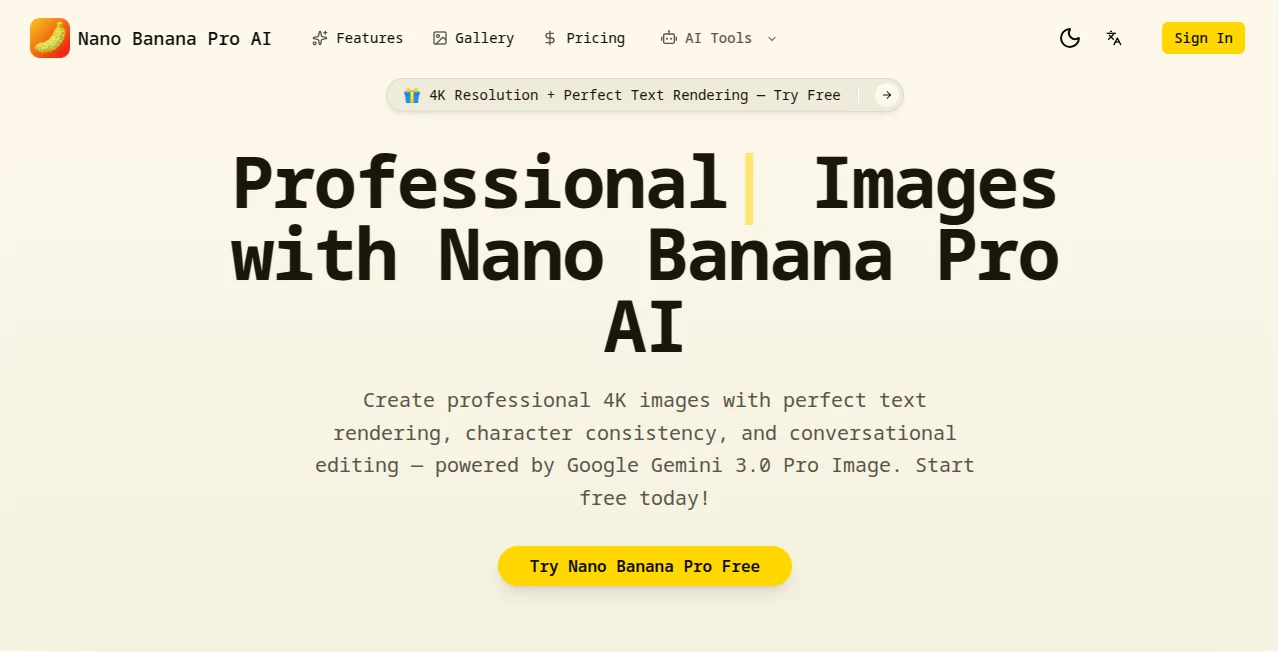
What is Nano Banana Pro AI?
I remember the first time I tried to get an AI to put readable text on a poster mockup—hours of tweaking prompts only to end up with gibberish letters that looked like a toddler's ransom note. Then I landed here and typed "bold white headline saying 'Summer Sale – 50% Off' across the top of a beach scene," hit go, and there it was: crisp, perfectly kerned text that actually looked designed by a human. That moment alone sold me. This isn't just another image generator; it's the one that finally makes text behave, characters stay the same across shots, and edits feel like chatting with a very talented designer who never sleeps.
Introduction
Most AI image tools still struggle with the basics: text turns into squiggles, people change faces between frames, and making small adjustments means regenerating the whole thing from scratch. This platform quietly fixes all of that by leaning on Google's Gemini 3.0 Pro Image under the hood, delivering results that feel production-ready rather than experimental. You can create full ad sets, social graphics, or UI mockups where every headline reads clearly, every face remains consistent, and every tweak happens through plain conversation. For anyone who's ever wasted time fighting bad outputs or paying a freelancer for simple revisions, this feels like a long-overdue relief. The free entry point with monthly credits means there's no excuse not to try it right now.
Key Features
User Interface
The dashboard keeps things blissfully uncluttered. Log in with Google in one click, get your free credits, and you're staring at a big prompt box with room for up to 14 reference images. Sliders for aspect ratio and resolution sit nearby, and a chat-style history lets you refine without starting over. It's the kind of layout that disappears once you're in the flow—my favorite part is how conversational edits just continue in the same thread, no need to re-upload or re-describe the whole scene.
Accuracy & Performance
Text comes out sharp and correctly spelled in over 100 languages, even tiny disclaimers or stylized logos. Character consistency holds across multiple generations using references—upload a few shots of the same person and they stay recognizably them through different poses and lighting. Generation times stay reasonable (10–30 seconds), and the native 2K base with 4K upscaling keeps details crisp without artifacts. In real tests, it handles complex prompts like "infographic showing quarterly sales growth with accurate bar chart numbers" far better than anything I've tried before—no more guessing what the numbers should be.
Capabilities
Beyond generation, the conversational editing is a standout: say "make the lighting warmer like golden hour" or "change the jacket to navy blue" and it adjusts exactly that part without touching the rest. Grounding with real-time Google Search pulls accurate data into visuals—weather maps, stock charts, calendars—all rendered correctly. Multi-image composition blends up to 14 references for intricate scenes, and thinking mode reasoning understands spatial relationships and physics so objects don't float or intersect strangely. It's powerful for marketing assets, comics, UI mockups, product photography, and anything where precision matters.
Security & Privacy
Your prompts and references are processed securely, with SynthID invisible watermarking on outputs for traceability. No data is used to train models without explicit consent, and everything stays tied to your account. For brands or creators handling sensitive mockups, that level of care matters—it lets you experiment boldly without second-guessing where your assets might end up.
Use Cases
A small business owner builds an entire social media campaign—posters, stories, carousels—where the product shots stay consistent and every call-to-action text is legible. A YouTuber creates thumbnail variations with their face in different expressions and backgrounds without reshooting. Marketing teams mock up packaging with accurate nutritional info and branding elements that actually read correctly. Even comic artists use it to rough out panels with speech bubbles that don't look like alien script. The speed and quality turn weeks of iteration into afternoons of refinement.
Pros and Cons
Pros:
- Text rendering that actually works—clear, styled, multilingual, no gibberish.
- Conversational edits feel like talking to a patient designer.
- Character consistency across images is reliable and production-useful.
- 4K-ready outputs with grounded factual elements when needed.
Cons:
- Free monthly credits run out quickly if you're generating a lot.
- Complex multi-subject scenes can still require a couple of tries.
Pricing Plans
You start with 4 free credits every month—no card required—which is enough to test seriously and see the difference. After that, credit packs or monthly subscriptions scale affordably; each image usually costs 2 credits, and you can cancel anytime. The value hits hard when you realize how much freelancer time or stock photo licenses this replaces—it's priced like a utility, not a luxury.
How to Use Nano Banana Pro AI
Sign in with Google, claim your free credits, and jump into the prompt box. Describe your scene in detail, upload reference images for consistency, choose aspect ratio and resolution, then generate. Once you have a base image, keep chatting: "add a price tag saying $29.99 in gold", "shift to sunset lighting", "make the model smile more". Download when you're happy, or keep iterating. It's the most natural back-and-forth I've had with an image tool—almost like sketching with a very talented friend.
Comparison with Similar Tools
Where Midjourney still mangles text and DALL-E caps resolution lower, this one delivers usable typography and higher-res detail out of the gate. The conversational editing beats inpainting tools that force you to mask and guess, and the character consistency rivals dedicated face-swap systems without the uncanny valley. It's not trying to be everything to everyone; it just does the hard parts—text, identity, precise edits—better than most.
Conclusion
For anyone who's ever groaned at distorted letters, shifting faces, or the need to regenerate an entire image for one tiny change, this feels like the tool we've been waiting for. It turns frustrating guesswork into confident creation, letting you focus on the idea instead of fighting the tech. Whether you're building a brand, mocking up products, or just having fun with visuals, the leap in quality and control is hard to ignore. Give it a spin with the free credits—you'll likely find yourself wondering how you managed without it.
Frequently Asked Questions (FAQ)
How much does one image cost?
Typically 2 credits, with free monthly credits to start.
Can it really do accurate text in images?
Yes—legible, styled text in 100+ languages with almost no errors.
How many references for character consistency?
Up to 14 images, giving strong consistency across generations.
Does it understand real-world data?
Grounded in Google Search for accurate charts, maps, and facts.
Is editing really conversational?
Completely—just describe changes naturally and it adjusts.
AI Text to Image , AI Photo & Image Generator , AI Image to Image , AI Design Generator .
These classifications represent its core capabilities and areas of application. For related tools, explore the linked categories above.
Nano Banana Pro AI details
Pricing
- Free
Apps
- Web Tools
Categories

Nano Banana Pro AI Alternatives Product
text to 3d w…

claude image

string art g…

AI Slop Canv…

insMind
Pixfy AI
grok images

Nano Banana …

Z image AI
